Announcements

Announcement: We’re aware of an issue affecting starting a new topic from category pages and creating new blog posts. New topics can still be started directly from the relevant board. Learn more here.

Troubles with Revit File import into Infrawroks 360

Troubles with Revit File import into Infrawroks 360

ilja.prinz
Participant Participant
1,561 Views
6 Replies
Message 1 of 7

Troubles with Revit File import into Infrawroks 360

ilja.prinz
Participant
Participant

Hi, I'm trying to import my Revit Model into Infrawork and I'm getting this result:
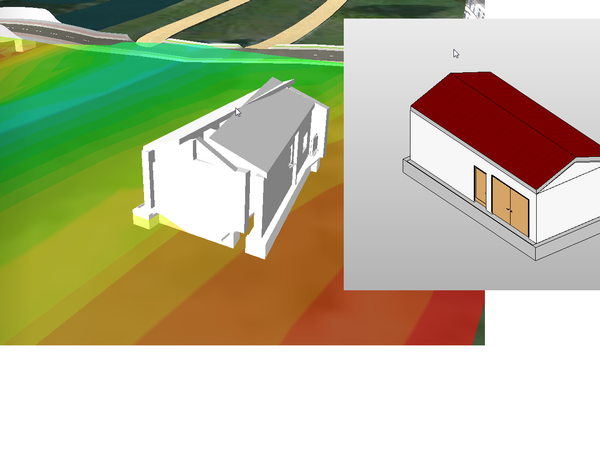
 

Unbenannt.pngUnbenannt.png

I use Civil 3D, Revit and Infraworks 360 in the current version. I used Shared Reference Point for giving my Model the right coordinates.
I have a Civil 3D surface model which I already have imported into Infrawork (without any problems) and now I want my building to get also into Infraworks.
Has anyone an idea what is going wrong during the .rvt File Import?
I already checked the coordinates of the corners, they are the same as in the civil 3D Model

0 Likes
Accepted solutions (1)
1,562 Views
6 Replies
Replies (6)
Message 2 of 7

Karsten.Saenger
Autodesk Support
Autodesk Support

Hi Ilja,


this looks as if the geometry gets corrupted. What coordinates range are you working with?
If you are using large coordinates maybe it works if you move everything closer to X,Y = 0,0


In this knowledge article you will find a document with information about how to import a Revit model into InfraWorks with coordinates.


http://knowledge.autodesk.com/article/Best-Practice-Bring-in-Revit-Models-into-InfraWorks


Regards,

Karsten.


Karsten Saenger
Message 3 of 7

ilja.prinz
Participant
Participant

Hi Karsten, hi Lucy

first of all, thank you for your answer and the hint to the "best practice" document. I worked it through, but still have problems to get my Revit model into Infraworks...

Perhaps you can help me when you have detailed information.


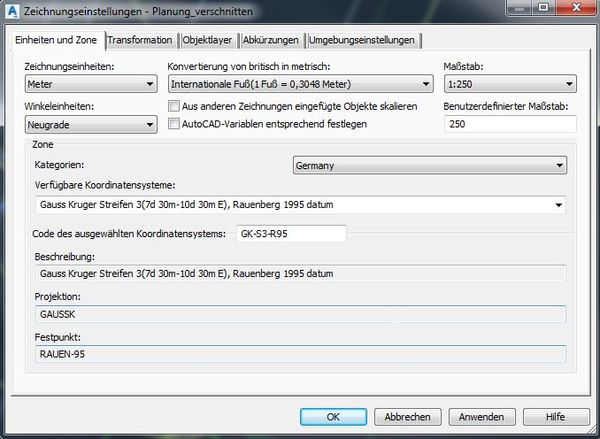
  • I work in the Gaus-Krüger coordinate system. (in Civil 3d as well as in Infraworks)


2016-10-24 09_27_16-Modelleigenschaften.jpg2016-10-24 09_42_59-Zeichnungseinstellungen - Planung_verschnitten.jpg


  • The coordinates of the reference point are:

<OriginX>3454517.0954947639
<OriginY>5447971.75447122
<OriginZ>101.715

2016-10-24 09_38_46-Autodesk AutoCAD Civil 3D 2017 - [Planung_verschnitten.dwg].jpg2016-10-24 09_38_46-Autodesk AutoCAD Civil 3D 2017 - [Planung_verschnitten.dwg].jpg


  • I use this coordinate points to define my Project Base Point.

2016-10-24 09_53_11-Autodesk Revit 2017 - [Grundriss_ Ebene 0 - Dammwachthaus.rvt].jpg

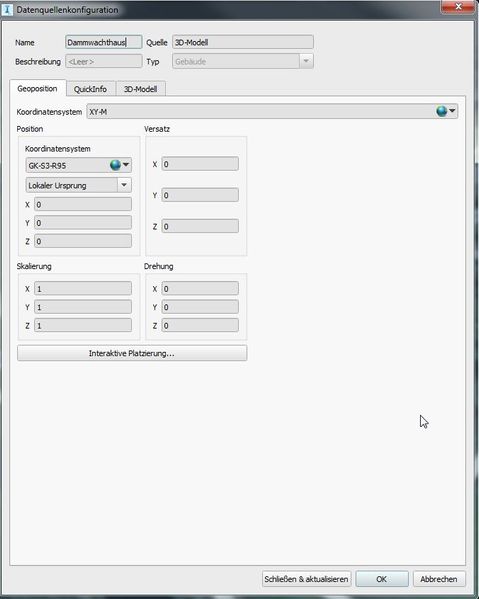
  • So now, when I Import my Revit file into Infraworks the model does not show up...I would expect it to show up on the coordinates of the project base point. 

2016-10-24 09_56_00-Datenquellenkonfiguration.jpg2016-10-24 09_56_00-Datenquellenkonfiguration.jpg


I still don't see my mistake 🙂

0 Likes
Message 4 of 7

ilja.prinz
Participant
Participant

I already tried out to import different Revit Models into Infraworks. No matter what coordinate system, the positioning works out, but the geometry is still corrupted...

Has anyone an idea how to get a grip on the geometry?

0 Likes
Message 5 of 7

John_de_Leeuw-NTI
Advisor
Advisor
Accepted solution

@ilja.prinz, if you are getting really crappy imported geometry due to large coordinates, you have 2 options:


  1. Move your Revit file back to the Origin, setting the PBP back to default. Then in InfraWorks use an Offset to move your Revit project back to the correct coordinates
  2. Move your Revit file back to the Origin, setting the PBP back to default. Then use a GIS point as reference from your project site, bring that in InfraWorks 360 as POI and Style using a custom 3D Model Style containing your Revit Model. Read this post and watch this screencast.

Let me know if this helps you?

John de Leeuw
Senior Consultant

Community Ambassador - Twitter - LinkedIn

Message 6 of 7

ilja.prinz
Participant
Participant

Thank you John,


this works. 

But somehow Infraworks come with an error message when I want to import the sdf-file. Independently, I managed to get my Revit model into Infraworks...Thank you for the support!

0 Likes
Message 7 of 7

mori
Enthusiast
Enthusiast

Hi everybody


If we import the Revit file over the cloud or Navisworks-FBX it works perfectly but why it doesn't work when we import the revit file directly into Infraworks?

Is it not possible that Infraworks uses the coordinates which are used in Revit?

May be Autodesk can improve this import fuctionality for the next version.


Thanks.


0 Likes