3D Map for presentations

3D Map for presentations

VCivil3D
Contributor Contributor
1,302 Views
3 Replies
Message 1 of 4

3D Map for presentations

VCivil3D
Contributor
Contributor

Hello everyone!


I was wondering if you guys can help me with something I’m trying to achieve with InfraWorks 360, but didn’t get a satisfactory result.


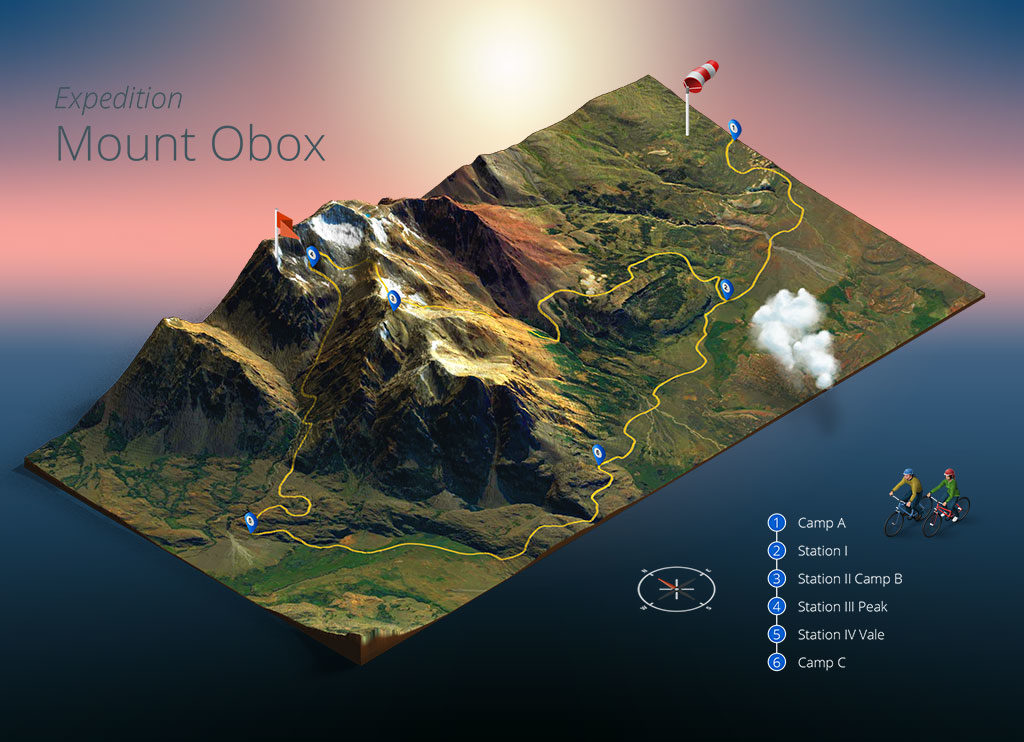
You may know the Photoshop plugin “3D Map Generator – Atlas“ (https://www.3d-map-generator.com/) that generates really nice 3D isometric views of aerial images, with that “box cut” detail of the terrain and the "aerial clouds".


I’ve tried to reproduce that effect within my InfraWorks 360 models, by exporting the EG surface to Civil 3D, getting the surface boundary, using “loft” to extrude it until an elevation bellow and making a solid of it. When I export it as FBX and import again with InfraWorks 360, it happens to not to fit properly in the model, giving a weird overlapping effect on it.


I was thinking about the lighting of the model too, it has a better result if the sky turned off, giving a blank background so we can change it color later.


Thanks!

0 Likes
Accepted solutions (1)
1,303 Views
3 Replies
Replies (3)
Message 2 of 4

Karsten.Saenger
Autodesk Support
Autodesk Support
Accepted solution

Hi @VCivil3D,


the FBX format probably does not contain the geolocation info and - depending on your model extent - it can happen that there is an offset on the other end of your insertion point.

See following article for details:

http://knowledge.autodesk.com/article/When-importing-a-FBX-file-the-geometry-is-degraded-and-has-bad...


Try following:

- In Civil 3D use EXPORTSURFACETOSOLID

- Once you have a solid, remove the surface from the DWG

- Then - EXPORTCIVIL3DDWG to AutoCAD

- In InfraWorks load the AutoCAD DWG (3D Objects)


Regards,

Karsten.


Karsten Saenger
Message 3 of 4

VCivil3D
Contributor
Contributor

Hello @Karsten.Saenger ,


Thanks a lot for the feedback.


It worked! Now I only need to find a 3D cloud model to make it complete.

0 Likes
Message 4 of 4

Karsten.Saenger
Autodesk Support
Autodesk Support

Hi @VCivil3D ,


good to hear that the workflow worked for you.

What do you mean with "find cloud model"?
You can load the 3D solid (your block surface) into an existing InfraWorks model at any time.


Regards,

Karsten.


Karsten Saenger
0 Likes