Message 1 of 5
Fusion 360 tool path preview

- Mark as New
- Bookmark
- Subscribe
- Mute
- Subscribe to RSS Feed
- Permalink
- Report
I'm seeing a discrepancy between the tool path preview you see when you click on an operation vs. what you run a simulation on the tool path in Fusion 360.
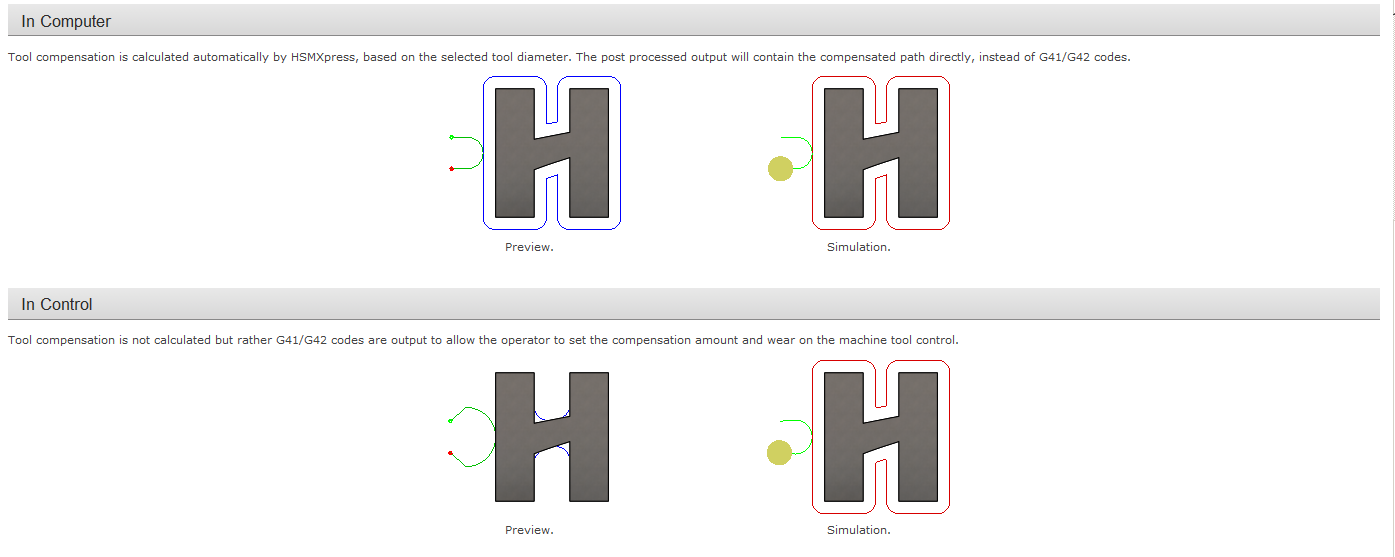
This is the tool path preview I see when I click on the 2D contour OP. I'm using cutter comp set to in control and I have the lead in angle set to 0. The tool path looks pretty odd. I have a pretty large "tangential fragment extension distance" of around .5"
Here is what the tool path looks like when I run a simulation on it. This is more of what I expect the tool path to look like. I'm not sure why it isn't completely parallel to the entry point, but it is closer.
An iso shot of the simulated tool path.
This is the tool path preview I see when I click on the 2D contour OP. I'm using cutter comp set to in control and I have the lead in angle set to 0. The tool path looks pretty odd. I have a pretty large "tangential fragment extension distance" of around .5"
Here is what the tool path looks like when I run a simulation on it. This is more of what I expect the tool path to look like. I'm not sure why it isn't completely parallel to the entry point, but it is closer.
An iso shot of the simulated tool path.
Kevin Ellingson
Technical Specialist
If my post resolves your issue, please click the Accept Solution button.
Technical Specialist
If my post resolves your issue, please click the Accept Solution button.