Non uniform scale missing

Non uniform scale missing

Anonymous
Not applicable
3,502 Views
11 Replies
Message 1 of 12

Non uniform scale missing

Anonymous
Not applicable

I am trying to scale a component but the non-uniform scale is unavailable.

0 Likes
Accepted solutions (1)
3,503 Views
11 Replies
Replies (11)
Message 2 of 12

jhackney1972
Consultant
Consultant
Accepted solution

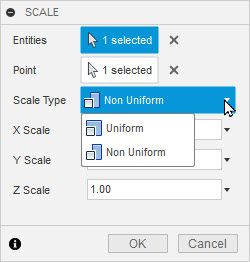
Make sure you are looking under the Modify drop-down menu, Scale.  Then the Scale Type drop-down to find Non Uniform.  I do not see any issues finding it.


Scale Dialog.jpg

John Hackney, Retired
Did you find this post helpful? Feel free to Like this post.
Did your question get successfully answered? Then click on the ACCEPT SOLUTION button.

EESignature

Message 3 of 12

Anonymous
Not applicable

I resolved the problem myself and here's how. The part I was trying  to scale had just been imported into my design and I was trying to resize it. The part was not orientated with the x, y and z planes when I imported it. Initially, I was able to select the menu you have shown but that menu did not contain a non-uniform option. Once I aligned the part with a face on my existing model the non-uniform option became available in the scale menu

Message 4 of 12

Mehrab.Nasrabadi
Participant
Participant

I have the problem that when I select the component or the body, non-uniform scaling doesn't work. As seen in the first picture. Scale_Fail.jpg

But when I select a surface, suddenly the option for non-uniform scaling appears. ( Picture 2)Scale_works.jpg


I can imagine a certain logic, but it would still be better for me if this would also work on the component. It is misleading that sometimes it works for some components and not for others. Do you perhaps know why?


Thanks in advance!

0 Likes
Message 5 of 12

TheCADWhisperer
Consultant
Consultant

Seems to work for me.

Can you File>Export your *.f3d file to your local drive and then Attach it here to a Reply?


Expand the Component and select the Body in the browser.  What do you observe?

TheCADWhisperer_0-1666700683004.png


Message 6 of 12

HughesTooling
Consultant
Consultant

Just testing and found you can only select a component for scale in direct mode and as you've found there's no non uniform scale option. Should work fine if you select a body though.

HughesTooling_0-1666700960014.png


Mark Hughes
Owner, Hughes Tooling
Did you find this post helpful? Feel free to Like this post.
Did your question get successfully answered? Then click on the ACCEPT SOLUTION button.

EESignature


Message 7 of 12

HughesTooling
Consultant
Consultant

When you click a face rather than a component in the tree, in direct mode it selects the body not the component, that's the difference. Better question might be why can you select a component in direct mode, is that a bug @jeff_strater ?

HughesTooling_0-1666701277648.png


Mark Hughes
Owner, Hughes Tooling
Did you find this post helpful? Feel free to Like this post.
Did your question get successfully answered? Then click on the ACCEPT SOLUTION button.

EESignature


Message 8 of 12

Mehrab.Nasrabadi
Participant
Participant

ok thank you all! it works with the selection of the body! that was my mistake to assume that the body is selected when there is only one body in the component!

0 Likes
Message 9 of 12

Mehrab.Nasrabadi
Participant
Participant


..."Better question might be why can you select a component in direct mode... ?"


I think it's because I've been playing around with the select settings.

0 Likes
Message 10 of 12

sandaeson
Participant
Participant

Even in the latest version its missing but only in the sketch mode... where it actually is more useful than anywhere else...lol one day software engineers will get things right....

0 Likes
Message 11 of 12

sandaeson
Participant
Participant

yep another crazy thing in Fusion... non uniform scaling is an important feature in reverse engineerging. As Fusion is heavily based on a sketch/extrude workflow, I find it absoulutely mind boggling how software engineers have not made non uniform scaling an option in sketch mode.... where it is actually more useful than anywhere else... In fusion non uniform is only when working with solid bodies.... stupid

0 Likes
Message 12 of 12

g-andresen
Consultant
Consultant

Hi,

I can't imagine any application for the sketch area.
Can you please show an example where you scale x and y lengths differently.


günther

0 Likes