File corrupted after Fusion update 2.0.10440

File corrupted after Fusion update 2.0.10440

Anonymous
Not applicable
3,702 Views
16 Replies
Message 1 of 17

File corrupted after Fusion update 2.0.10440

Anonymous
Not applicable

Good morning,

After Fusion update I receive noftification about file corruption with many files in my cloud.

Please fix it soon

Thank you.
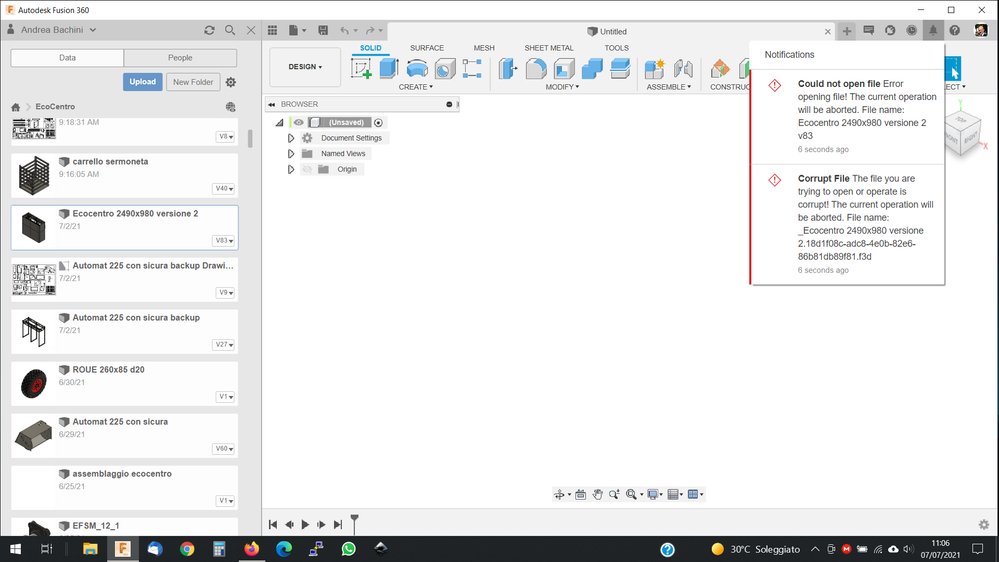
Screenshot (511).png

Accepted solutions (1)
3,703 Views
16 Replies
Replies (16)
Message 2 of 17

RajkumarIlanchelian
Autodesk
Autodesk

@Anonymous Would it be possible to invite me into the project (rajDOTkumarDOTilanchelianATautodeskDOTcom)? If that is not possible would it be possible to export one of the designs that you have this issue and send it to the same email ID? 

Rajkumar Ilanchelian
Autodesk Fusion

Join Fusion Insider

0 Likes
Message 3 of 17

PatrickPowers-Renk-America
Advocate
Advocate

I am having the same problem!!! 😥  I've got months of work invested in at least one file that opened this morning before the update but now says is corrupted.  Can't open pervious versions either.


This is not cool.

0 Likes
Message 4 of 17

@PatrickPowers-Renk-America @Can you please invite me to the project or export the design with the issue and send it (if it cannot be publicly shared here). 

Rajkumar Ilanchelian
Autodesk Fusion

Join Fusion Insider

0 Likes
Message 5 of 17

Anonymous
Not applicable

I send you an email. Thank You

0 Likes
Message 6 of 17

I'll have our Admin invite you to the Cincinnati Gearing Systems project. The first file I have found to have this issue so far is titled 8000-0357. 

0 Likes
Message 7 of 17

@PatrickPowers-Renk-America @Anonymous @@I have received the project invite and the email. We will take a look at the issue as priority and will update here. 

Rajkumar Ilanchelian
Autodesk Fusion

Join Fusion Insider

0 Likes
Message 8 of 17

Anonymous
Not applicable

Hi, while you look around the files, is there a way to downgrade Fusion to previous version? Two working days are gone and we need to use the project.

0 Likes
Message 9 of 17

g-andresen
Consultant
Consultant

Hi


@Anonymous  schrieb:

… is there a way to downgrade Fusion to previous version? 


NO


günther

0 Likes
Message 10 of 17

Anonymous
Not applicable

thank you for your reply


0 Likes
Message 11 of 17

RajkumarIlanchelian
Autodesk
Autodesk

@Anonymous @PatrickPowers-Renk-America We believe we know what could be happening here and are working on a possible fix as the highest priority. I will keep you informed in this thread. 

Rajkumar Ilanchelian
Autodesk Fusion

Join Fusion Insider

Message 12 of 17

dmkirov
Participant
Participant

I am having the same problem!!! After install July 2021 update i can't open one project. Clearing cache data doesn't help. 

dmkirov_0-1625943854597.png


0 Likes
Message 13 of 17

bkent.kenrett
Explorer
Explorer

I am having the same issue, costing me precious time and money

0 Likes
Message 14 of 17

RajkumarIlanchelian
Autodesk
Autodesk

For anyone that shared the design, we have validated that the design does open internally with our fix. We are working to get an update out as soon as possible. I will update this thread as soon as the fix is out. 

Rajkumar Ilanchelian
Autodesk Fusion

Join Fusion Insider

Message 15 of 17

RajkumarIlanchelian
Autodesk
Autodesk
Accepted solution

We have deployed 2.0.10446 that should address this issue. Please update to the new version. 

Rajkumar Ilanchelian
Autodesk Fusion

Join Fusion Insider

Message 16 of 17

That fixed it! Thanks!

0 Likes
Message 17 of 17

Anonymous
Not applicable

works fine!

Thank you all

Andrea

0 Likes