Cannot export as STEP

Cannot export as STEP

citrusbobiel
Contributor Contributor
1,671 Views
11 Replies
Message 1 of 12

Cannot export as STEP

citrusbobiel
Contributor
Contributor

When trying to export as a STEP I get this message.


Translator failed to export the asset as file: "/Users/.../Desktop/Wont export step v1.step



0 Likes
1,672 Views
11 Replies
Replies (11)
Message 2 of 12

karina.harper
Autodesk Support
Autodesk Support

Hi @citrusbobiel 


It looks like you're having the issue described in this article.

Did you export an SMT first? This might be connected to a development ticket we have open.


Restarting Fusion should allow you to export. Let me know how it goes.

0 Likes
Message 3 of 12

citrusbobiel
Contributor
Contributor

Hello,


I did not export an SMT.  I restarted Fusion and I still receive the same error message.


0 Likes
Message 4 of 12

karina.harper
Autodesk Support
Autodesk Support

Hey @citrusbobiel 


Hmm...


Can you share the file with me?  I'd like to try it on my computer.


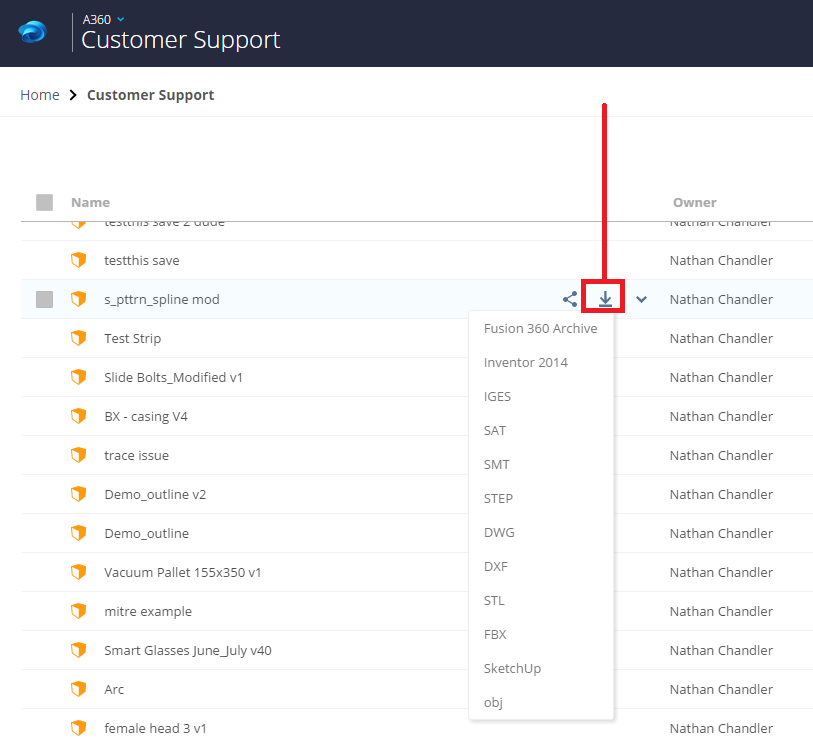
You can also export a .step from your online hub as well.


User-added image


0 Likes
Message 5 of 12

citrusbobiel
Contributor
Contributor

How do I share the file with you?


Also, how long does it take to download the file when using the online hub?

0 Likes
Message 6 of 12

karina.harper
Autodesk Support
Autodesk Support

@citrusbobiel 


Here are directions to share a fusion 360 design:


https://knowledge.autodesk.com/support/fusion-360/troubleshooting/caas/sfdcarticles/sfdcarticles/How...


And the download shouldn't take very long at all.

0 Likes
Message 7 of 12

citrusbobiel
Contributor
Contributor

Here is the file link.


https://a360.co/2FX3FMB


I was able to download the STEP from the hub and it took a few minutes to receive the email with the download.


Message 8 of 12

karina.harper
Autodesk Support
Autodesk Support

Hey @citrusbobiel 


I'm glad that worked.


Could you send that file again and allow downloading? I'd like to try it on my end.

0 Likes
Message 9 of 12

citrusbobiel
Contributor
Contributor

Sure thing.


https://a360.co/2FX3FMB

Message 10 of 12

karina.harper
Autodesk Support
Autodesk Support

Hi @citrusbobiel 


I tried this on my PC and my Mac and I wasn't able to recreate the failed export with the file. I'd like to log this with the development team - can you try exporting it from fusion again and then send me your log files as a .zip? It might be recording in the logs why it fails.

0 Likes
Message 11 of 12

citrusbobiel
Contributor
Contributor

@karina.harper 


As of now the file will export without error.  Nothing on my computer was updated in the past 24hrs so I have no idea why it works today.


If I receive the error again I will be sure to post in this thread again.


Thanks

0 Likes
Message 12 of 12

karina.harper
Autodesk Support
Autodesk Support

@citrusbobiel 


Hmm.. Strange. Yes, please let me know if it occurs again and send along your logs as well.

0 Likes