2D-contour smoothing error

2D-contour smoothing error

jorgenBRPTH
Explorer Explorer
628 Views
4 Replies
Message 1 of 5

2D-contour smoothing error

jorgenBRPTH
Explorer
Explorer

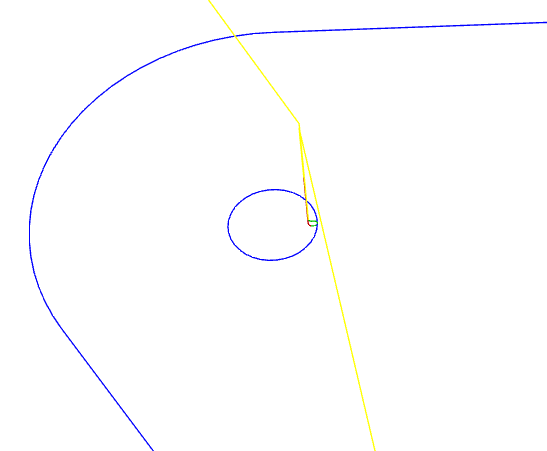
After the last update I've got an error in some 2D-contour CAM operations. The error is present on the contours that are circular. When smoothing is applied the tool-path will close 50% of the circle and then do some lead-operations on the wrong side of the contour. When I turn off smoothing it generates the tool-path as it should do. Smoothing setting was 0.01mm. To toggle the error the tool-path has to be regenerated upon exiting the settings dialog box.

0 Likes
Accepted solutions (1)
629 Views
4 Replies
Replies (4)
Message 2 of 5

julia.paganucci
Autodesk Support
Autodesk Support

Hi @jorgenBRPTH , 


Thanks for posting!


This seems strange. I could not yet reproduce this, is it happening just in this one tool path or every tool path where smoothing is used? Is it just in this one file? Do you mind uploading your file here so I can take a close look at the tool path?


Thanks, 

Julia Paganucci

Technical Support Specialist


| Autodesk Knowledge Network | My Screencasts | Fusion 360 Webinars | Tips and Best Practices

0 Likes
Message 3 of 5

jorgenBRPTH
Explorer
Explorer
Can you access it from this link?
https://a360.co/2DGvWo9

It is the T5 3mm operations for chamfering the two holes of each part.
0 Likes
Message 4 of 5

julia.paganucci
Autodesk Support
Autodesk Support
Accepted solution

Hi @jorgenBRPTH , 


Yes the design link worked, thank you!


I am not seeing any unusual paths on your file for the T5 3mm tool path (with or without smoothing) like your screenshot in your original post. Can you confirm that you are on the most recent version of Fusion? There was recently some smoothing improvements. You can check this by clicking the question mark in the upper right hand corner of the screen, click about, and then check the version number (should say 2.0.5350).


Thanks, 

Julia Paganucci

Technical Support Specialist


| Autodesk Knowledge Network | My Screencasts | Fusion 360 Webinars | Tips and Best Practices

0 Likes
Message 5 of 5

jorgenBRPTH
Explorer
Explorer
I was on the previous version is looks like. Now I closed and opened
Fusion, and the newest version is was installed, and it works again. Thanks.