Making a copy of a component misplaces holes

Making a copy of a component misplaces holes

s.gavin.torok
Observer Observer
579 Views
3 Replies
Message 1 of 4

Making a copy of a component misplaces holes

s.gavin.torok
Observer
Observer

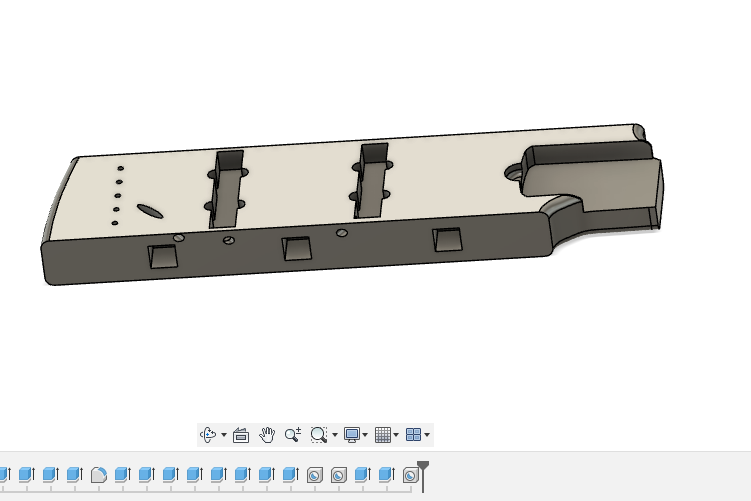
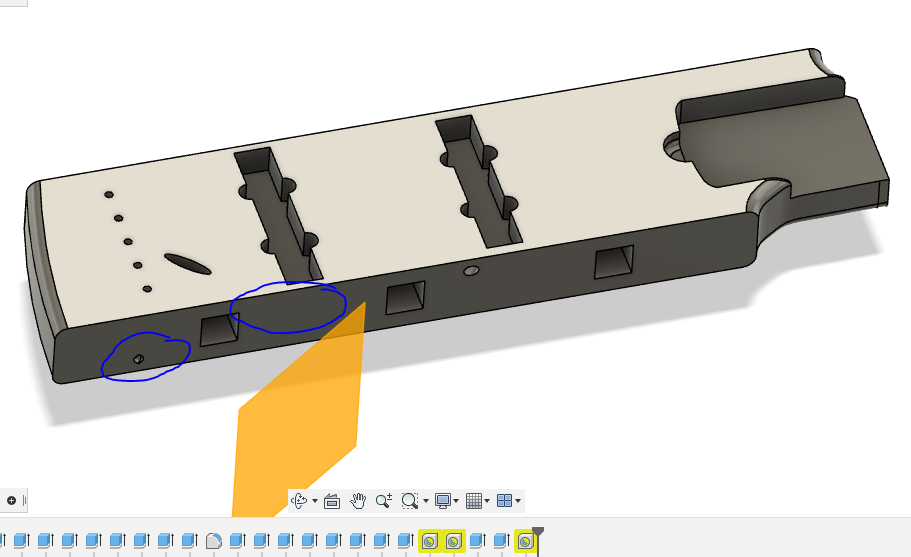
Creating a copy of a component I misplaced its holes because there's no face to reference for the start of the holes.

The first image is the correct model, while the second is the model with misplaced holes. Is there a way to have a valid copy of the original? I'm essentially trying to 3D print a large piece in 3 separate parts.

The first image is correct second has misplaced holes.

0 Likes
Accepted solutions (1)
580 Views
3 Replies
Replies (3)
Message 2 of 4

g-andresen
Consultant
Consultant

Hi,

please share the file

File > export > save as f3d on local device > attach to next post


günther

0 Likes
Message 3 of 4

s.gavin.torok
Observer
Observer

The piece that is having issues is the Middle section of the Body

Also, I realize that I could make a copy of the entire body and sort out the 3D print layout without separating the pieces... I may end up doing that if I can't find a way to separate the holes.

0 Likes
Message 4 of 4

g-andresen
Consultant
Consultant
Accepted solution

Hi,

works as expected


günther

0 Likes