Components move around within configurations

Components move around within configurations

LiorDW4TG
Explorer Explorer
1,180 Views
11 Replies
Message 1 of 12

Components move around within configurations

LiorDW4TG
Explorer
Explorer

Hi all,

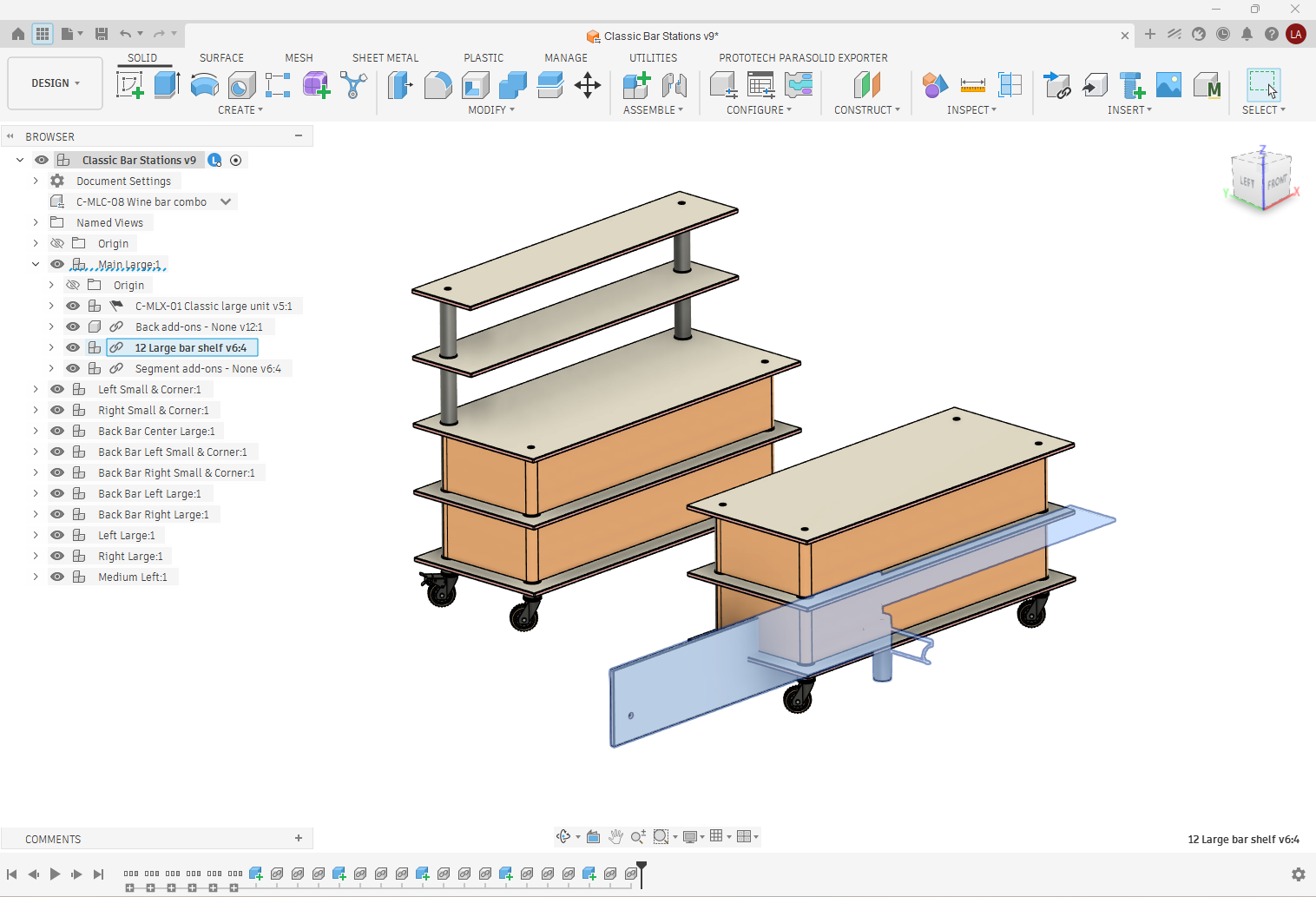
So I have been working with configurations for years now, never had this problem before. It seems that in new configured designs I create component locations and joints break when switching between configurations. I tried adding joins, creating rigid groups, saving as, re-inserting components, event clearing cache - nothing works. Ctrl+B works, until I change between configurations again. I am at my wits end. Does anyone have any experience with this scenario?

Additional information: The problematic components are all within linked configured components. The inserted configurations, when opened separately, are not affected. Seems that only "second level" components are affected. See the attached screenshots.

Thank you

0 Likes
Accepted solutions (1)
1,181 Views
11 Replies
Replies (11)
Message 2 of 12

TrippyLighting
Consultant
Consultant

Please share your design in .f3d or .f3z format.


EESignature

0 Likes
Message 3 of 12

gautham_kattethota
Autodesk
Autodesk

@LiorDW4TG 

This issue appears similar to an issue we have seen.  Can you try this step and check if it helps - when you switch between configurations and the components seem to be located in the wrong place, click and drag on the offending component, and see if it jumps to its correct position and stays there.  If this works for you, then its the same issue which we are working on.

Did this issue start recently with the latest update of Fusion?


Regards

Gautham


Gautham Kattethota
Software Development
Message 4 of 12

LiorDW4TG
Explorer
Explorer

Hi @TrippyLighting 

Its too big to attach so this is the download link:
https://we.tl/t-W4n01VsZn3R0VzBO

I hope this represents the same problem because there are a lot of linked sub components.
Also, not all configured components have relations - some have joints, some are rigid groups and some are just captured locations.

0 Likes
Message 5 of 12

LiorDW4TG
Explorer
Explorer

Hi @gautham_kattethota 

So some interesting results: when dragged around the inserted component doesn't snap back to place, but the sub-components do rearrange to their relative positions (in other words, the shelf comes back together but does not snap back to the table). If I click Compute it goes to the correct position, and if I click Revert Position it goes back to the weird dismantled position.

And yes, this happens only in new configurations opened in the last few days.


Thank you,
Lior

0 Likes
Message 6 of 12

TrippyLighting
Consultant
Consultant

Your assembly isn't assembled properly, at any level. Most of it can be dragged around freely in the viewport with the mouse, which should not be the case.

Using the capture position feature to position otherwise unconstrained/un-joined components is not a pest practice and generally should be avoided at all costs!

Also, some of the position capture features are highlighted in yellow, which means something went wrong.


EESignature

0 Likes
Message 7 of 12

LiorDW4TG
Explorer
Explorer

Thank you for taking the time to look at the design. I know its mostly not assembled with constraints, as most of the components were imported as-is from another program. I am aware that this is not good practice generally. That being said, event parts with rigid joints suffer from this problem, which they shouldnt. Furthermore, this was never a problem with older configurations I made up until recent weeks (cant say exactly when). regarding the yellow features - i dont have any on my end. Might this be because of lost links in the .f3z?

0 Likes
Message 8 of 12

TrippyLighting
Consultant
Consultant

@LiorDW4TG wrote:

...  mostly not assembled with constraints, as most of the components were imported as-is from another program.


Whether or not component were imported is mostly irrelevant. Somehow you have to "lock them in place".


There are multiple ways to do so.  I'll have to create a screencast as typing all of this out takes too long 😉 

For a lot of the stuff in your design the GTP (ground-to-parent) attribute and the Rigid Group Joint would take care of business and you would not encounter these problems.

However, even when properly assembled I have encountered "component jumping" in my assemblies. I've reported that as a bug multiple times. the effects appear to have become worse when using configurations.


EESignature

0 Likes
Message 9 of 12

TrippyLighting
Consultant
Consultant

As I am working through your design, I am encountering exactly what you are seeing as well.

I GTP all components in this design:

TrippyLighting_0-1779976789730.png


When I GAL the design this is assembly part of , the End Plate Disjoints from the Cylinder. Compute all fixes this in this particular case, But I have come across situations in my own work where even that did not help! Clicking and dragging as @gautham_kattethota has suggested works most of the time, but not all of the time.


TrippyLighting_1-1779976990229.png


EESignature

0 Likes
Message 10 of 12

LiorDW4TG
Explorer
Explorer

I will try to GTP everything in all levels of the design, hopefully this helps. I will come back here if I have any relevant new finidings. Thanks a lot for your help!

0 Likes
Message 11 of 12

TrippyLighting
Consultant
Consultant

It will definitely improve, but not completely fix the situation!


EESignature

0 Likes
Message 12 of 12

LiorDW4TG
Explorer
Explorer
Accepted solution

@TrippyLighting @gautham_kattethota 

I think I found the culprit - Inserting the external configurations into sub components (acting as folders) in the main configuration.

When I opened a new main configuration with all of the inserted externals in the main tree - no more jumping around!

This makes the file less intuitive to navigate - given all the suppressed components. I make do with selection sets for now. But this seems to be entirely solvable - hopefully in the near future?


Again thank you all for the help,
Lior

0 Likes