Setup WCS with different Tool Orientation WCS

Setup WCS with different Tool Orientation WCS

Anonymous
Not applicable
6,134 Views
24 Replies
Message 1 of 25

Setup WCS with different Tool Orientation WCS

Anonymous
Not applicable

Hello! I'm trying to machine the side of a part that has already been machined on the top. A little info about what i'm using... I have a 3+2 axis CNC, but have to manually change the angle of the tool. 

My first image is my tool setup, with the appropriate WCS orientation that matches my machine's coordinate orientations. 
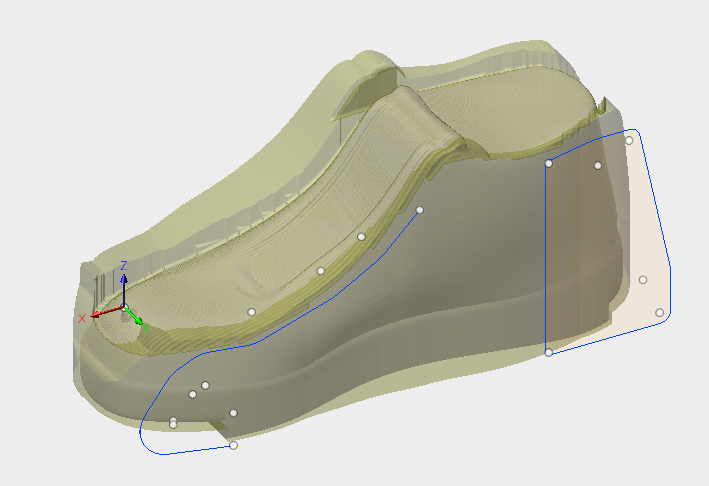
Screen Shot 2018-02-23 at 1.57.32 PM.png

My second image is my adaptive clearing operation with a different tool orientation. 
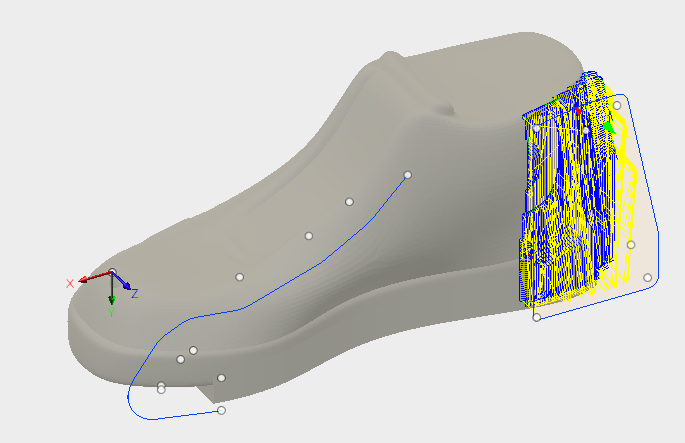
Screen Shot 2018-02-23 at 2.04.20 PM.png

I have read about Fusion allowing you to have different WCS orientations for the setup and tool orientations in the individual operations. Since I have to manually change the tool orientation on my machine, I need the setup WCS to mimic the orientations of my machine. I have tried to have my setup WCS and tool orientation WCS to be the same (as in my image #2) but when I load the g.code into my machine, it machines it as if I was machining the top of the part and not the side of the part. I would like to avoid having to reorient my part in my machine as that would cause a lot of clamping challenges due to the organic shape of my part.

Once I try to post using the setup and tool orientations in my 2 images, the post fails. Is there something I'm missing or am I going down the wrong path? I have also attached the .f3d file that my post is failing. Thanks! 


0 Likes
Accepted solutions (1)
6,135 Views
24 Replies
Replies (24)
Message 21 of 25

RandyKopf
Collaborator
Collaborator

@Anonymous I think Seth makes some great points as well. I would suspect your machine has some default orientation that is starts out in. That is does it have a homing routine at start up?


If it does not follow standard output for Right Hand Coordinate system you may have to do axis swapping. This is very standard for older machines or custom machines.

But you have to know your machine. You must be able to command X Y Z and any other axis and know what makes it move +/- directions.

If it turns out that you need axis swapping or mirror of output of an axis that can be done in the post.

But it may be part of your setup on Mach3 of your machine. If so someone on the Mach3 forums should be able to help.


So further investigation is merited on your part. 


Can you control the machine manually.

Since there are so many machines it also helps to have some baseline to think by.

The best way on a mill is to always consider the direction the spindle is moving with respect to a part.

Some machines have a fixed spindle and the XY Table moves. Other machines the spindle moves on a column and the table is fixed.


Looking down on your part as if you had a camera facing the down from the spindle consider

If the spindle is directly over the part and you move the spindle to the right on most machines that is the X+ direction.

Same if you moved directly up that would be the Y+ direction.

If you move away from the part with the camera that is the Z+ direction.


Make sure you know these things...


If it turns out your Axis directions are not normal you will have to customize the post or machine configuration as Seth points out.

Randy Kopf 

http://desktopartisan.blogspot.com/


If my post is helpful, press the LIKE Button If it resolves your issue, press Accept as Solution! Have a great day!
0 Likes
Message 22 of 25

Anonymous
Not applicable

dezery, I did not see your request come into us at Silverhawk, I am not sure what happened.  Please contact us again and we would be glad to assist if you wish.  [email protected]

Message 23 of 25

Anonymous
Not applicable

@Anonymous Thank you for the reply. I have emailed [email protected] with my original question. I hope Silverhawk can help!

0 Likes
Message 24 of 25

Anonymous
Not applicable

@RandyKopf I have posted specific pictures of my machine in previous posts. Thanks for the suggestion for the tutorials but I have been successfully cutting simple, 3axis (on the XY plane) toolpaths for awhile now. What I'm trying to do is not complicated, I just don't have much coding experience. I am going forward with getting a 3rd party to modify my post to make it work for my machine.

Message 25 of 25

LibertyMachine
Mentor
Mentor

@Anonymous if you don't mind revisiting this thread when your post processor is complete, I'd be curious to see what the solution ends up being. I imagine you are going to have to specify your head orientation in your post processor dialog. I hope there is a better way though, as that could lead to some expensive mistakes if that step is skipped.


Seth Madore
Owner, Liberty Machine, Inc.
Good. Fast. Cheap. Pick two.
0 Likes