Post Processors 101

Post Processors 101

al.whatmough
Alumni Alumni
41,886 Views
46 Replies
Message 1 of 47

Post Processors 101

al.whatmough
Alumni
Alumni

What is a Post Processor?


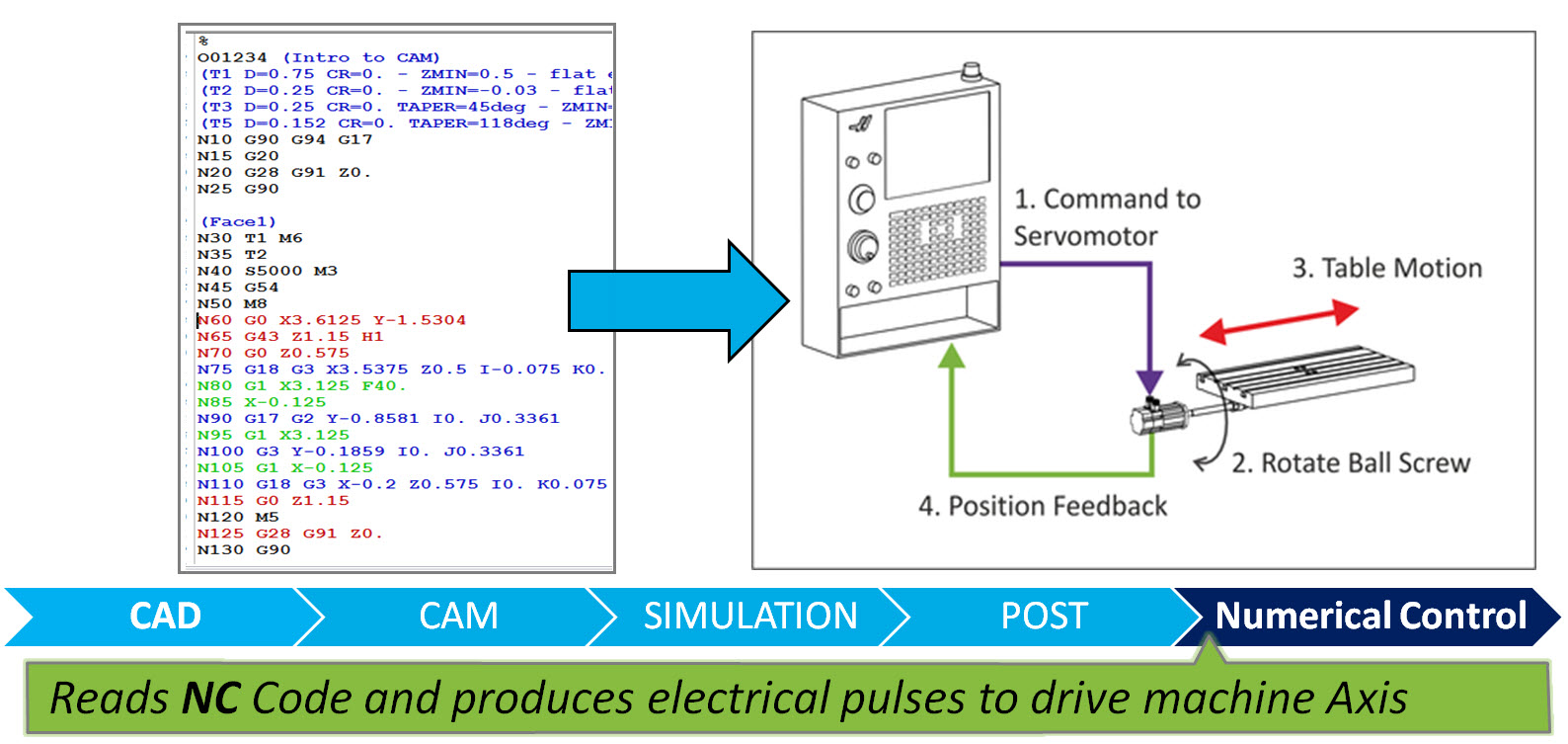
CAM requires post processors to format toolpaths into CNC programs, a.k.a. G-Code. These CNC programs are executed by the CNC control to drive the machine as it removes material from stock to produce a finished part.


Let's start by reviewing the basic steps of going from a CAD model to machined a part:


CAD.jpg


CAM.jpg


Simulate.jpg


POST.jpg


Numberical Control.jpg


 post button.jpg

How do I post a NC Program?


Fusion allows you to post a specific Operation or Operations, Post a complete Setup or Post Multiple Setups into one program.  Simply, select the Operation(s), Setup or Setups and Click post.


When posting multiple Setups you can even optimize the program to remove un-need tool changes!  Don't worry; it will never break the order of operations for a single setup.  But, before putting a face mill away, it does makes sense to see if that tool is the next one needed for one of the setups doesn't it?  If it is, the machine will retract to home in Z, move the other Setup and perform the facing operation!


What if the NC program isn't correct?post properties.png


Fusion 360 includes a variety of standard library post processors or "posts". If your machine is not listed in the post processor library then you may need to request a special post to be created. If the post for your machine is listed, you may need to have some modifications done to get the exact output you are looking for. Depending on your experience in machining and machine tool knowledge this may or may not be important to you. For others, such as professional CNC programmers - this is essential.


BEFORE, you request a post edit start by confirming that you can't make your required changes my modifying the POST parameters.


Basic parameters include:


AllowHelical moves - If your machine does not support helical moves it may machine an Arc and the plunge in Z.  Setting "Allow Helical moves" to false will convert all helical moves to small linear moves at the specified (Built-in) Tolerance


Show Sequence numbers - Specifies is Sequence numbers are output on each line


Some examples Advanced Parameters are:


Use G0 - Specifies if rapids that change in multiple Axis at are allowed.  If this is set to no, these moves will be output as a linear move (G01) at the Specified (Built-in) highFeedrate.  Machines that do not move in a linear fashion between to rapid points will produce what we "Dogleg rapid" that can potentially gouge parts.


UseG28 - While G28 should be a SAFE home position, some machines have G28 set at the top of the table.  So, when the machine homes at the begging or end of a program it plunges into part.  Setting UseG28 to false will not send the machine home at the beginning or end of the program.


What do I need to have a Post modified?


When having post customizations done, the best thing to do is to create simple part for each machine type in their CAD. This part should utilize all the processes you would normally use. Then post process the program with the closest generic post that is shipped with the system. When this is complete you should edit the NC output in an editor, and markup the output with comments showing what they want to change (don’t delete anything).


Here is an example of the best way to indicate the changes you require:


#1           HAVE THE COOLANT M8 BE ON THE LINE AFTER THE G43 LINE

#2           AT THE BEGINNING OF EACH TOOL HAVE THE WCS OUTPUT ON THE FIRST POSITIONING LINE

#3           PUT M9 AT END OF EACH TOOL BEFORE RETRACT TO Z HOME ?

#4           REMOVE X0. SO IT DOESN'T HOME IN X, JUST IN Y AT THE END OF THE CODE

#5           RECALL 1RST TOOL AT THE END OF THE FILE

#6           A N20 G28 G91 Z0. AT THE BEGINNING OF EACH TOOL JUST AFTER THE M1


%

O03091 (AVP 7)

(T1  D=0.25 CR=0. TAPER=90deg - ZMIN=-0.08 - spot drill)

(T2  D=0.257 CR=0. TAPER=118deg - ZMIN=-1.1272 - drill)

(T8  D=0.3125 CR=0. - ZMIN=-0.5 - right hand tap)

N10 G90 G94 G17

N15 G20

N20 G28 G91 Z0.

N25 G90

(Drill1)

N30 T1 M6

N35 T2

N40 S2500 M3

N45 G55

N50 M8

N60 G0 X4.5 Y-0.25

N65 G43 Z0.6 H1

N75 G0 Z0.2 (#1   PUT M8 HERE, JUST AFTER G43 LINE?)

N80 G98 G81 X4.5 Y-0.25 Z-0.08 R0.2 F20.

N85 X6.125

N90 X7.75

N95 G80 (#3       PUT M9 AT END OF EACH TOOL BEFORE RETRACT TO Z HOME ? )

N100 Z0.6

N105 M5

N110 G28 G91 Z0.

N115 G90

(Drill2)

N120 M9

N125 M1

N130 T2 M6

N135 T8

N140 S1000 M3

N145 M8

N155 G0 ( PUT WCS HERE ON EACH TOOL SECTION) X4.5 Y-0.25

N160 G43 Z0.6 H2

N170 G0 Z0.2 (#1    PUT M8 HERE, JUST AFTER G43 LINE?)

N175 G83 X4.5 Y-0.25 Z-1.1272 R0.2 Q0.1 P0 F3.

N180 X6.125

N185 X7.75

N190 G80 (#3     PUT M9 AT END OF EACH TOOL BEFORE RETRACT TO Z HOME ? )

N195 Z0.6

N200 M5

N205 G28 G91 Z0.

N210 G90

(Drill3)

N215 M9

N220 M1

N225 T8 M6

N230 T1

N235 S100 M3

N240 M8

N250 G0 X4.5 Y-0.25

N255 G43 Z0.6 H8

N265 G0 Z0.2

N270 G84 X4.5 Y-0.25 Z-0.5 R0.2 F5.5556

N275 X6.125

N280 X7.75

N285 G80

N290 Z0.6

N295 M9

N300 G28 G91 Z0.

N305 G28 X0. Y0. (#4       REMOVE X0. SO IT DOESN'T HOME IN X, JUST IN Y)

(#5         RECALL 1RST TOOL AT THE END OF THE FILE)

N310 M30

%


To obtain more information or request a post or post modifications please visit: http://camforum.autodesk.com/index.php?board=3.0.


Because all Autodesk CAM tools utilize the same post processor system and CAM kernel we have a dedicated forum to discuss all things CAM.


I hope this was a help.  


Feel free to add comments if you feel I missed something!


---------
AL Whatmough
Director Product Management - Manufacturing

Note, I love to engage on the forums. However, I spend a lot of time in meetings trying to help clear the path for our amazing team of Developers working on Manufacturing at Autodesk. So, if I don't respond immediately, it's not that I don't care.
Reply
Reply
41,887 Views
46 Replies
Replies (46)
Message 21 of 47

Steinwerks
Mentor
Mentor

@Rob_Lockwood wrote:

I don't think you uploaded the right post, the one attached doesn't have a rotary property, or contain the word rotary anywhere in it.. ?


Yeah that's just a "working" A axis post. No user property at all until I can get that working, so it'll always post an A position.


Your other thread reminds me of the Nakamura-Tome STW40's at an old job.


Except you probably get more then eight lines running on three subdivisions of the screen (three programs - one per turret). I had no idea at the time how much attention I should have been paying to those little screens.

Neal Stein

New to Fusion 360 CAM? Click here for an introduction to 2D Milling, here for 2D Turning.

Find me on:
Instagram and YouTube
Reply
Reply
Message 22 of 47

zodiaceng
Advocate
Advocate

Uploaded Rob's configuration and all is working well! Thanks again guys! I really appreciate all the help with this.

www.zodiaceng.com
Reply
Reply
0 Likes
Message 23 of 47

Steinwerks
Mentor
Mentor

I do believe I have the User Property A-axis working. Someone else please verify.

Neal Stein

New to Fusion 360 CAM? Click here for an introduction to 2D Milling, here for 2D Turning.

Find me on:
Instagram and YouTube
Reply
Reply
0 Likes
Message 24 of 47

Anonymous
Not applicable

This post is not accurate - on the mac version there are no advanced params for changing the G0 or G28, I'm having some serious issues with this right now. Using the Torchmate Routermate, and the z/home settings are destroying me. I can't even load the gcode because of too many errors - related to G28. Robot Mad

Reply
Reply
0 Likes
Message 25 of 47

JosefVo
Participant
Participant

I´ve got a question regarding starting working on a new post processor for a control that is not covered by the standard posts.


We just retrofitted a 3 Axis VMC (Cincinnati Dart 500) with a new Bosch Rexroth IndraMotion MTX Micro control.

Through there is no Bosch post listed I wondered if any of the available posts might be quite similar to what we need and which we could use to start testing/editing.


MTX Control

Documentation


The machine is 3 Axis milling with a C-Axis Spindle and toolchanger.

Thanks!

Josef

Reply
Reply
0 Likes
Message 26 of 47

autocad
Explorer
Explorer

Can anyone please help me with a post processor for a new Southwestern industries ProtoTRAK SMC bed mill. I keep getting G18 errors. It can't read the G18 code. I have tried the Prototrak ,eztrak, all the fanuc, wincnc, and about 15 others. If I get rid of the G18 code error, then I get a G53 error or a G70 error. I can't even get a good enough working processor so I can post it to ask to get it tweaked. I'm trying it with a simple facing program. Nothing to complicated. Any help or suggestions would be greatly appreciated, 

Reply
Reply
0 Likes
Message 27 of 47

LibertyMachine
Mentor
Mentor

@autocad Do you have ANY documentation on your machine? What about accepted formats, G and M codes? Do you have any samples of programs that have been run? Adding and removing bits of code isn't often a huge deal, but it can be if it's an unknown what is needed.

Once you have the above info, I'd suggest making a thread HERE and trying to see if anyone has a working post that you can at least start with. Be prepared to give feedback as necessary and have some patience.

You could also start a fresh thread on this forum, but more "Post People" would see your thread on the other forum


Biggest thing: Samples of code.


Seth Madore
Owner, Liberty Machine, Inc.
Good. Fast. Cheap. Pick two.
Reply
Reply
0 Likes
Message 28 of 47

Steinwerks
Mentor
Mentor
As @LibertyMachine suggested, please start a post in the HSM Post Processors subforum that he linked. If you can, include which control your machine has (the current lineup of Prototrak bed mills all seem to use the SMX control), and if you have the machine in 2- or 3-axis mode.

A few jobs ago I programmed and ran a DPM5 although only in conversational mode, so hopefully we can get you up and running.
Neal Stein

New to Fusion 360 CAM? Click here for an introduction to 2D Milling, here for 2D Turning.

Find me on:
Instagram and YouTube
Reply
Reply
0 Likes
Message 29 of 47

autocad
Explorer
Explorer

Thank you for your help and suggestions. You are correct, it is SMX not Smc. That was a typo sorry, I was using my phone at that time. I a have a 30 year old EzMill program that works fine with the machine. I'll do the same thing in both and compare the GCode.

Reply
Reply
0 Likes
Message 30 of 47

LibertyMachine
Mentor
Mentor

Don't be afraid to start a new post detailing what you are trying to accomplish. The trouble with "stickied" posts is that they often become a catch-all for various discussions and it makes it slightly cumbersome to find the answer you are looking for. If you start your own thread, next time someone is looking for a ProtTrak post, there is a greater chance they will find your thread and the following responses!


Seth Madore
Owner, Liberty Machine, Inc.
Good. Fast. Cheap. Pick two.
Reply
Reply
0 Likes
Message 31 of 47

AmishSolanki
Advocate
Advocate

I need to get the post for the Seimens 840D modified ever so slightly for my DMU. I have the AE here this week and he's commented as per the first post here. He was able to make some changes but not all. Should I start a few post here, or just post it in this thread? TIA!

SS CADCAM - www.sscadcam.com
@sscadcam
Reply
Reply
0 Likes
Message 32 of 47

LibertyMachine
Mentor
Mentor

For a DMU, I'd think your fastest answer would be over on the Post Forum. There are a few people ever there that have that same machine, so I'd think help would be quick to obtain.

It's even possible that a post already exists with the changes you need


Seth Madore
Owner, Liberty Machine, Inc.
Good. Fast. Cheap. Pick two.
Reply
Reply
0 Likes
Message 33 of 47

matth
Advocate
Advocate

What is the function to get the tool type description field? Is there a list of functions for parsing the tools? I would love to get a more descriptive and refined nc output with regards to what tools I am using.


@Steinwerks wrote:
Oh and the tools output with a Z MIN and use the Tool Description instead of the awful info garble that comes stock with HSM.


Thanks,

Matt

MSH | Matt
Reply
Reply
0 Likes
Message 34 of 47

Steinwerks
Mentor
Mentor
@Anonymous

Use the dump.cps post processor to see ask the values that are output by the CAM ( look for "tool." values). If you look at the post processor I attached in that post you quoted you can see how I created the output. Not at a computer right now but can add more later if needed.
Neal Stein

New to Fusion 360 CAM? Click here for an introduction to 2D Milling, here for 2D Turning.

Find me on:
Instagram and YouTube
Reply
Reply
0 Likes
Message 35 of 47

matth
Advocate
Advocate

Thanks, I just did that right before your answer! "tool.description" and others work like a charm.

Thanks again!


Matt

MSH | Matt
Reply
Reply
0 Likes
Message 36 of 47

LibertyMachine
Mentor
Mentor

What I did for my file was find this line:

writeBlock("T" + toolFormat.format(tool.number), mFormat.format(6));

And change it to read this: 

    writeBlock("T" + toolFormat.format(tool.number), mFormat.format(6), conditional(tool.description, formatComment(tool.description)));

The one downside is that it does depend on you manually entering a description. However, if you have your own library, than it's not an issue, as the data gets stays with the tool


Seth Madore
Owner, Liberty Machine, Inc.
Good. Fast. Cheap. Pick two.
Reply
Reply
0 Likes
Message 37 of 47

Steinwerks
Mentor
Mentor

I have thought about this but I tend to keep tool descriptions at the top of the program so the operator can set them up there. That's just me though. Here's what my Haas post looks like for the tool list:


    var tools = getToolTable();
    if (tools.getNumberOfTools() > 0) {
      for (var i = 0; i < tools.getNumberOfTools(); ++i) {
        var tool = tools.getTool(i);
        var comment = "T" + toolFormat.format(tool.number) + " - " + (tool.description);
        /*   "D=" + xyzFormat.format(tool.diameter) + " " +
          localize("CR") + "=" + xyzFormat.format(tool.cornerRadius);
        if ((tool.taperAngle > 0) && (tool.taperAngle < Math.PI)) {
          comment += " " + localize("TAPER") + "=" + taperFormat.format(tool.taperAngle) + localize("deg");
        } */
        if (zRanges[tool.number]) {
          comment += " - " + localize("ZMIN") + "=" + xyzFormat.format(zRanges[tool.number].getMinimum());
        }
        //comment += " - " + getToolTypeName(tool.type);
        writeComment(comment);
      }
    }


I kept the ZMIN so anyone can look right at the tool list and (hopefully) know how far out the tool needs to be from the holder. Other info is just commented out for reasons that I doubt I need to explain (I'm of the same opinion as Matt Nichols: better to comment and retain than delete and need later).


My current project is to change the tool change sequence number to every operation so the operator can search each operation by N line instead of looking for them (which can take time if the same tool finishes a floor depth after roughing, which we do a lot since having separate roughing and finishing tools usually isn't necessary when you're making four parts).


YMMV of course! Smiley Happy

Neal Stein

New to Fusion 360 CAM? Click here for an introduction to 2D Milling, here for 2D Turning.

Find me on:
Instagram and YouTube
Reply
Reply
0 Likes
Message 38 of 47

Anonymous
Not applicable

hi after the rescent update when i try post process for plasma cutting it putts 0 for the feedrate no matter what i put in during the cam process 

Reply
Reply
0 Likes
Message 39 of 47

Anonymous
Not applicable

Hi all,


I'd like to change my post to output tapping feed as pitch, mm/rev instead of mm/min. (Post is Generic Mitsubishi)

Did a few attempts following a tweaked Haas post I found in an earlier thread, but with little success.

There's no need for changing from G94 to G95 for threading, my control takes care of that.


Example:


This is what I get now:


Tap M16x2


N35 T19 M06
(TAPP M16)
N40 S298 M03
N45 G54
N50 M08
N60 G00 X22. Y-45.
N65 G43 Z15. H19
N75 Z5.
N80 G98 G84 X22. Y-45. Z-38. R4. P0 F596.
N85 X352.
N90 G80
N95 Z15.
N105 M09
N110 G28 G91 Z0.
N115 G28 Y0.
N120 M30


...and this is what i'd like:


N35 T19 M06
(TAPP M16)
N40 S298 M03
N45 G54
N50 M08
N60 G00 X22. Y-45.
N65 G43 Z15. H19
N75 Z5.
N80 G98 G84 X22. Y-45. Z-38. R4. P0 F2.0
N85 X352.
N90 G80
N95 Z15.
N105 M09
N110 G28 G91 Z0.
N115 G28 Y0.
N120 M30


Thanx in advance, I'm sure you'll fix this.


/ David

Reply
Reply
0 Likes
Message 40 of 47

LibertyMachine
Mentor
Mentor

David,


Here you go, use with caution.

I had to add quite a few lines of code, but it's functioning as I'd expect

DO NOT add this to the generic post folder. It will be overwritten at the next Fusion update. Either create a folder removed from anything Autodesk on your computer or stick it in the cloud folder.

You will then need to direct the post dialog to search for the location of the .cps file.


It now has a user variable you can toggle to go between mm/rev and mm/min


Seth Madore
Owner, Liberty Machine, Inc.
Good. Fast. Cheap. Pick two.
Reply
Reply