DIFFERENT SET UP SHEET

DIFFERENT SET UP SHEET

Anonymous
Not applicable
6,807 Views
14 Replies
Message 1 of 15

DIFFERENT SET UP SHEET

Anonymous
Not applicable

Hello,


I want to try and use a different set up sheet and I am not sure how to change to the Excel set up sheet.  Can some one explain how to select a different set up sheet?


Thanks

0 Likes
Accepted solutions (1)
6,808 Views
14 Replies
Replies (14)
Message 2 of 15

LibertyMachine
Mentor
Mentor


Seth Madore
Owner, Liberty Machine, Inc.
Good. Fast. Cheap. Pick two.
Message 3 of 15

balsmen
Alumni
Alumni

Hi @Anonymous,


Like @LibertyMachine showed, this can be done by selecting a setup sheet via the Post Processing dialog.


Another alternative: If you hold down the Shift key before you click the "Select Folder" button to select your output folder, this will automatically generate a setup sheet using the setup-sheet-excel-2007.cps post processor.


Hope this helps!


Noah


Noah Balsmeyer

Fusion Mfg Software Engineer
Message 4 of 15

Anonymous
Not applicable

Thanks Guys!  The short cut works great.  The Excel tool sheet is missing one import column for me and that is the tool description which I input to the description field.  Is there a way to add or replace one of the other columns?


Thanks

0 Likes
Message 5 of 15

LibertyMachine
Mentor
Mentor

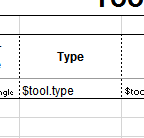
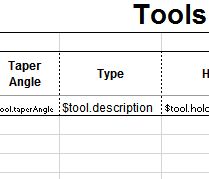
Yes. You will need to go into the excel template (I showed the location in my screencast) and change the $tool.type to $tool.description (or another field you don't want)

Do yourself a favor; copy, NOT OVERWRITE the files into another location. Everything gets overwritten at an update. You would need to move both the .cps as well as the corresponding excel template.


Seth Madore
Owner, Liberty Machine, Inc.
Good. Fast. Cheap. Pick two.
Message 6 of 15

Anonymous
Not applicable
OH COOL!! I will work on this soon. Thanks Dude
0 Likes
Message 7 of 15

Anonymous
Not applicable

I received an error after making the change.  Do I have to change anything in the .cps file or only the excel template file?

0 Likes
Message 8 of 15

LibertyMachine
Mentor
Mentor
Accepted solution

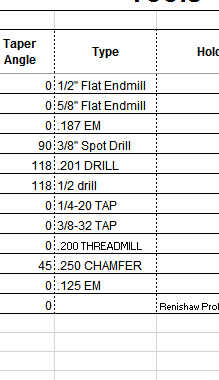
I just made the change myself to make sure I was giving you solid info. The change worked fine, and it pulled the info from my tool description:

screenshot_63.png


All I did was this:

screenshot_65.png


Became this:

screenshot_64.png


 Change is only made to the .xlsx file


Seth Madore
Owner, Liberty Machine, Inc.
Good. Fast. Cheap. Pick two.
Message 9 of 15

Anonymous
Not applicable

Thanks Seth!!!  Got what I was looking for

0 Likes
Message 10 of 15

Anonymous
Not applicable

Ok I am back at this!  i just changed computers but don't have Microsoft Excel now.  Is there a way to make this work with Open Office Sheets?  The "shift Select Folder" trick works and opens Open Office sheets but it is empty on the Operations and Tools pages.


Is there a away to modify the template to work with Open Office?


Thanks

0 Likes
Message 11 of 15

Anonymous
Not applicable

@LibertyMachine

Hello Seth, Happy Friday!


I have been working on modifying the Excel 2007 format for my tool list the way I would like to see it and I am wondering if you know how to change the "L" in the length offset to "H"?  I examined the excel 2007.cps for quite awhile and didn't see anything that stuck out.  I was able to add shank diameter successfully to the list but would like to see the length offset  have H instead of L.


Thanks


0 Likes
Message 12 of 15

Steinwerks
Mentor
Mentor
@Anonymous Have you looked at the template? It might be in there.
Neal Stein

New to Fusion 360 CAM? Click here for an introduction to 2D Milling, here for 2D Turning.

Find me on:
Instagram and YouTube
0 Likes
Message 13 of 15

LibertyMachine
Mentor
Mentor

It took someone else showing me for me to understand it. My Excel expertise is.........basic, at best. I can fill out sheets, but anything more....ugh

It's actually being forced by the cell format. Right click on that cell in the template (the $tool.length) and select "Format Cells":

2017-03-04_04h35_00.png


I suspect you will have to add a new format designation.


With a little miscommunication from a reseller, I've ended up with a rather compact setup sheet template:


I don't think it's there yet, but it gives you an idea of what is possible:
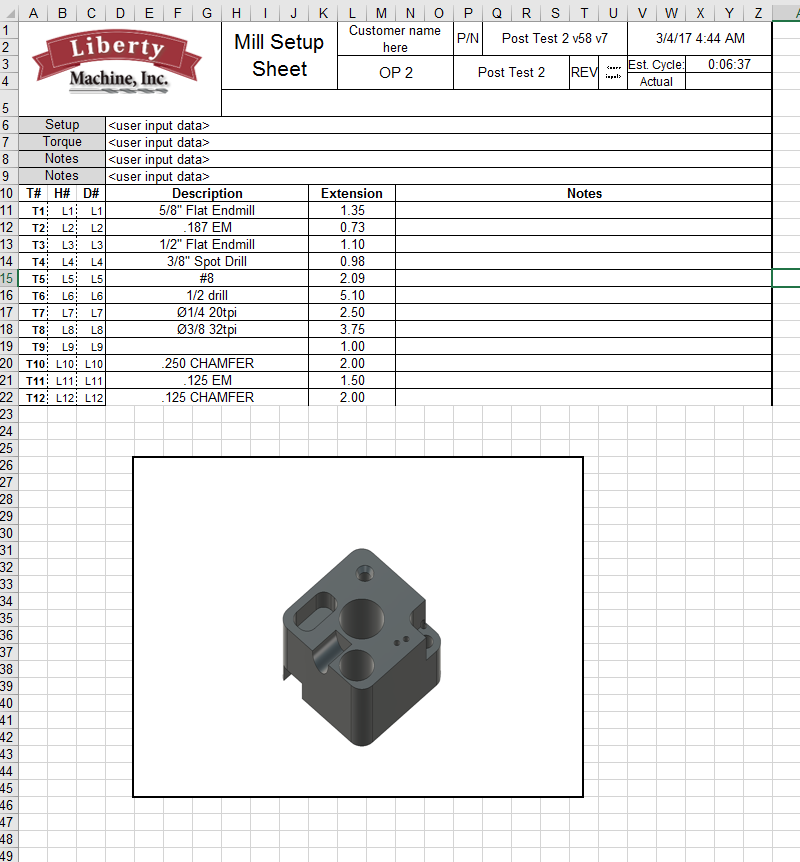
2017-03-04_04h45_19.png


Lastly, I'm also working privately with an individual I hired off of Craigslist. He is making a VBA/Macro that will grab all the relevant fields from the OEM sheet and produce a format VERY CLOSE to what is shown above. On top of that, it will also be able to consolidate multiple setup sheets into one workbook, so you can have OP1, OP2 and OP3 all part of one file. If it reaches the level of completeness I need/want, I'll be more than happy to selectively distribute this.


Seth Madore
Owner, Liberty Machine, Inc.
Good. Fast. Cheap. Pick two.
Message 14 of 15

Anonymous
Not applicable
Thanks Seth! I will look at my sheet on Monday. I like your tool list, looks good. I did think about placing my logo on it or giving it a change up. Another thing to look into. I still need to try and make a drawing template so when I make drawings it is more to my flavor and less generic.
0 Likes
Message 15 of 15

U.Uhl
Enthusiast
Enthusiast

Hi,


I Know the Topic is Old, but i have the Question: How you get all at One Page ? Do you have also change the CPS File or only the Excel File ??


I keep puzzling myself trying to get the tools and the overview data on One Page.