Additive - Removing Rapids Significantly Affects Print Quality for Personal Licenses

Additive - Removing Rapids Significantly Affects Print Quality for Personal Licenses

EricSchubert-Symetri
Advocate Advocate
3,326 Views
10 Replies
Message 1 of 11

Additive - Removing Rapids Significantly Affects Print Quality for Personal Licenses

EricSchubert-Symetri
Advocate
Advocate

I posted this into the thread on the update for personal license changes, but wanted to ensure this got separate attention, as I think it warrants some discussion and evaluation and may not have been an intended consequence of changes to the personal licensing.  Therefore, I'm copying my reply there into this post.


For context, I work at a VAR/ATC.  I have also been using Fusion 360 for my own 3D printing needs since May 2020, and I've enjoyed seeing the feature list grow and improve the experience in the Additive workspace.  But while I understand many of the changes described in the blog post, I think there may be an unintended consequence of removing rapid moves in the personal license when it comes to additive/FFF/3D printing.


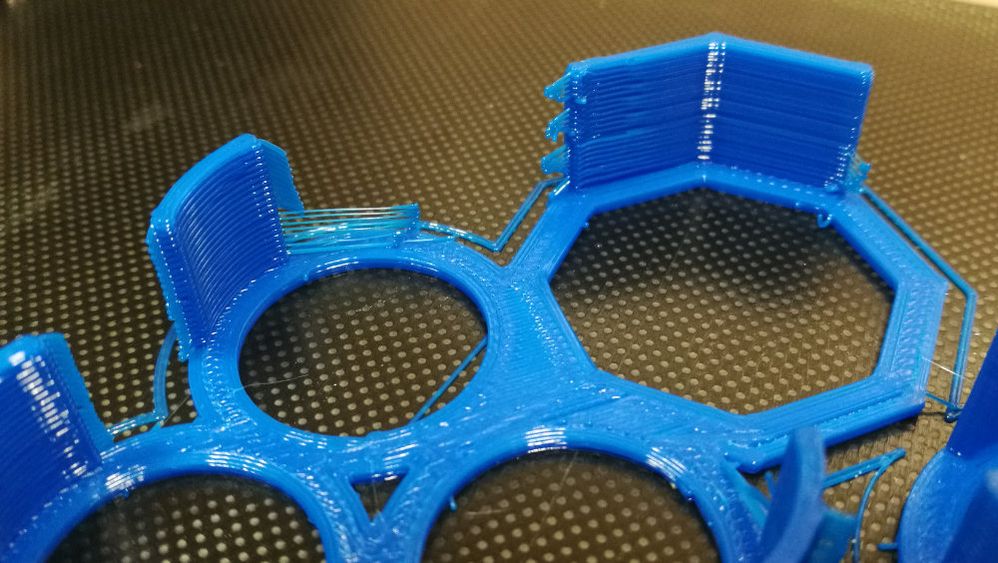
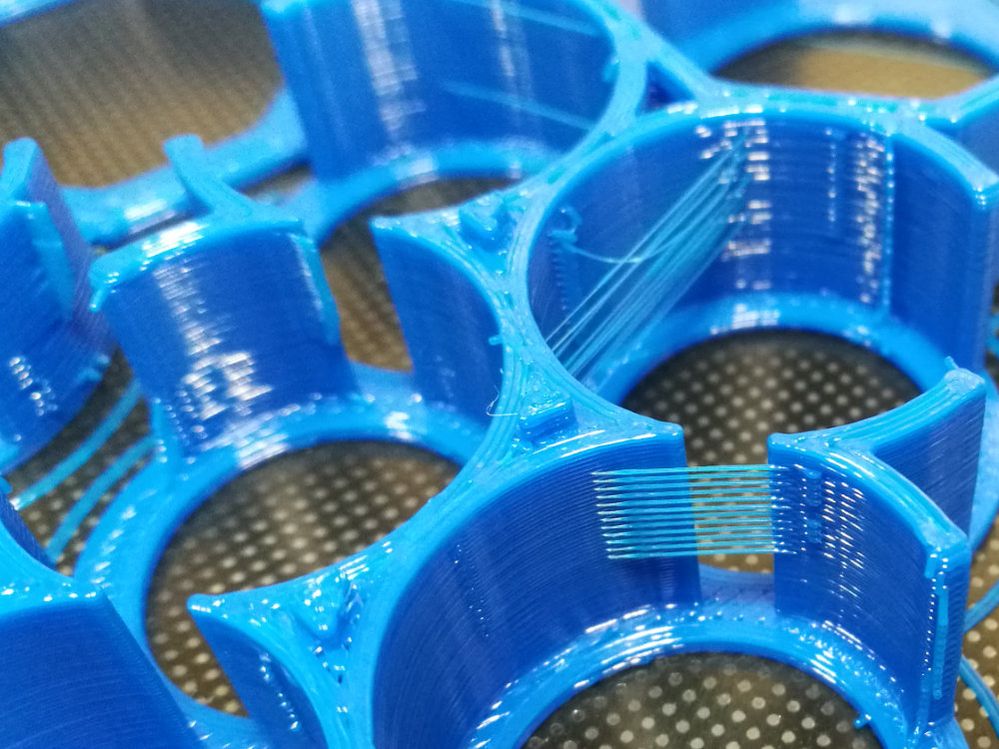
While removing rapids really doesn't affect the overall quality of a subtractive job (aside from making things take longer), this can have detrimental effects for additive jobs.  In 3D printing, rapid moves are highly-beneficial to avoid oozing and blobbing as the nozzle moves from one spot to another.  It also reduces stringing, as the faster movement is able to break the flow of the material as it moves from point A to point B.  If the head moves too slowly, you'll get these issues.  It's not just making things take longer, it's actually degrading print quality.  And doing so quite noticeably, based on my own testing.  (I'll post a photo or two momentarily.)


Most of the items removed are either advanced features or conveniences that I can understand.  But rapids in additive are pretty necessary to avoid problems with print quality.  I would love to see rapids included at least under Additive, as I imagine this wasn't the intent of the change.

Accepted solutions (1)
3,327 Views
10 Replies
Replies (10)
Message 2 of 11

EricSchubert-Symetri
Advocate
Advocate

Example photos of blobbing, stringing, "zits", etc. using the exact same print profile I've used without any of these issues in numerous previous prints.


F360 PUL No Rapids 1.jpg

F360 PUL No Rapids 2.jpg

F360 PUL No Rapids 3.jpg

Message 3 of 11

KrupalVala
Autodesk
Autodesk

Hi @EricSchubert-Symetri ,


We can remove material deposition while there is a rapid/connection move. It will give a better output.
Could you share the post-processor file with me?


Thanks,


Krupal Vala
Senior Technology Consultant - Post Processor & Machine Simulation
0 Likes
Message 4 of 11

mattdlr89
Advisor
Advisor

I hope Autodesk change course on the rapid feedrate removal. 

I am a paying user. I understand the need for tiers and why limiting features is one way to support a broad base of users. I don't follow the logic of removing a feature that has been a part of CNC machines for decades. For the sake of the wider community I hope this is reconsidered. 

0 Likes
Message 5 of 11

KrupalVala
Autodesk
Autodesk

Hi @mattdlr89 & @EricSchubert-Symetri 


I would advice going into the “Extruder” tab in the print-settings and changing the following:


Extrude Retraction Length > 5

Extrude Retraction Speed > 35

print.jpg


Hope that helps – let me know the results!


Thanks,


Krupal Vala
Senior Technology Consultant - Post Processor & Machine Simulation
0 Likes
Message 6 of 11

franky.the.pierre
Contributor
Contributor

@KrupalVala wrote:

Hi @EricSchubert-Symetri ,


We can remove material deposition while there is a rapid/connection move. It will give a better output.
Could you share the post-processor file with me?


Thanks,


Exactly, there is no rapids, you have removed all G0 output, so everything is a feed move now, cannot give good printing results anymore.

0 Likes
Message 7 of 11

EricSchubert-Symetri
Advocate
Advocate

I'm using the stock Creality post-processor that Autodesk supplies.


I don't see this helping much, if at all.  It's not that material is being extruded as it moves.  It's that melting plastic is leaking from the nozzle as it moves.  If you move too slowly, it just drips and oozes out.  Rapids really are needed to get good prints.

Message 8 of 11

EricSchubert-Symetri
Advocate
Advocate

Upping retraction is not a solution, nor is it a good workaround.  For Bowden tube extruders, this might work fine, as increased retraction compensates for the latent response of pulling on a flexible filament through a long tube.  For direct-drive extruders, such as my Bondtech BMG, the distance is much too short for high retractions and too much retraction distance can cause nozzle clogs and other issues.  (I typically set my retraction arount 0.4mm.)  Another example of how this isn't effective:  certain materials are VERY stringy.  TPU is a good example.  If you retract, you actually make stringing worse than if you just set it to 0 retraction distance.

Message 9 of 11

Sualp.Ozel
Community Manager
Community Manager

Hi Eric


Thanks for bringing this to our attention

We will investigate this and get back to you.


Sualp Ozel

Senior Product Manager

Fusion 360 - Additive MFG


Sualp Ozel, PE
Principal Product Manager
Message 10 of 11

kadah.coba
Enthusiast
Enthusiast

I can echo that increasing reaction to such an extreme is the wrong way to try fixing this issue.


I don't use F360 for slicing, but this issue would be a non starter if I had wanted to use it.

0 Likes
Message 11 of 11

mattdlr89
Advisor
Advisor
Accepted solution

From the release notes of the latest patch looks like rapids has been added back for additive manufacturing.


"Additive 

  • Rapid moves are now available again for additive strategies and 3D prints to ensure that the print quality is optimized.  "