Schematics/PCB display windows problem

Schematics/PCB display windows problem

marek.nowakTAR9M
Explorer Explorer
1,119 Views
3 Replies
Message 1 of 4

Schematics/PCB display windows problem

marek.nowakTAR9M
Explorer
Explorer

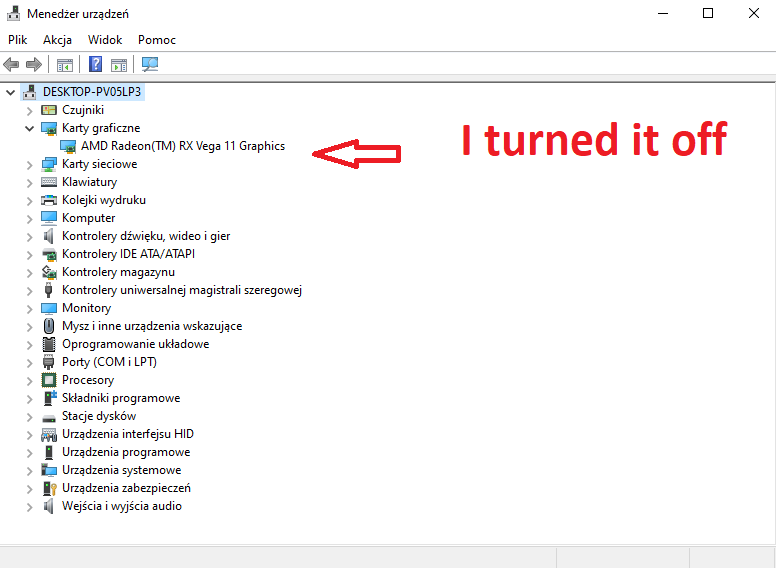
In one day something was changed in the Fusion 360 Electronic. It cause the problem in display schematics and PCB window in Fusion. When I open schematics or PCB I only see black screen.  The problem is with my display card Radeon RX Vega 11. When I turn it off in devices manager I can see schematics and PCB window. Yesterday I was able to work with schematics/PCB.

0 Likes
Accepted solutions (1)
1,120 Views
3 Replies
Replies (3)
Message 2 of 4

marek.nowakTAR9M
Explorer
Explorer
Accepted solution

Uncheck "Enable GPU rendering" fix the problem.

Message 3 of 4

HelenChen-AutodeskQA
Autodesk
Autodesk

Hi @marek.nowakTAR9M ,


Thank you very much for the update.

So sorry for any inconvenient.


Best regards,

Helen


Helen Chen
Principle QA for AutoCAD Windows
0 Likes
Message 4 of 4

HelenChen-AutodeskQA
Autodesk
Autodesk

Dear @marek.nowakTAR9M,


Good news that today we released new Fusion version 2.0.15995 which has fixes about below issues you reported about GPU rendering, including:


  • Black Canvas in some Windows OS with integrated AMD graphic card
  • Canvas refresh issue in Windows OS with Intel Iris Xe
  • Customer Font not showing well
  • Slow performance in some Mac Intel OS which ONLY has integrated graphic card
  • Overlapping polygon and rotated device issue

Could you please update Fusion to new version and go to preferences dialog and check the checkbox to enable the GPU rendering and relaunch Fusion to take effective?

HelenChenElectronicsQA_0-1681467365731.png


Please feel free to let us know if you have any problem about the new version.

Much appreciated for all your feedback and patient. 


Hope you have a great day.


Best regards,

Helen


Helen Chen
Principle QA for AutoCAD Windows
0 Likes