Turn off "Reconstructed Planes"?

Turn off "Reconstructed Planes"?

pete.dubler
Participant Participant
1,054 Views
2 Replies
Message 1 of 3

Turn off "Reconstructed Planes"?

pete.dubler
Participant
Participant

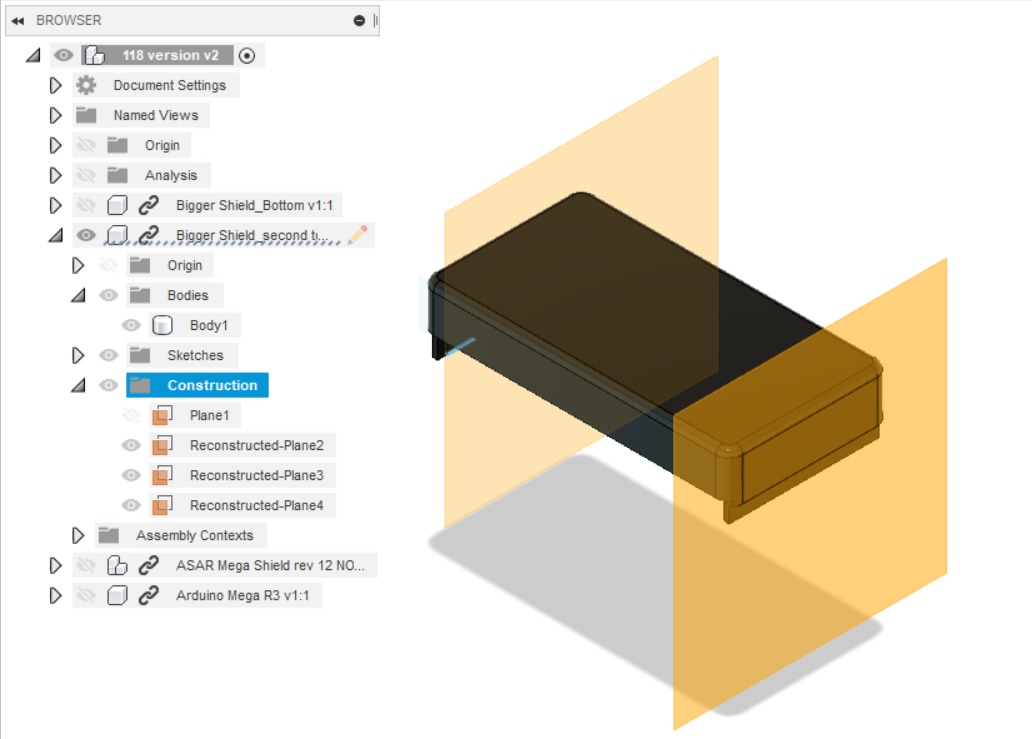
I am building up a new design in which I am bringing in a number of saved components.   When I bring some of them in, by drag and drop of the files, I get some new "reconstructed planes".  I can't seem to turn these off.  What's the deal?  How can I hide these or avoid having them generated in the first place?


See picture attached.


Thanks!

0 Likes
Accepted solutions (1)
1,055 Views
2 Replies
Replies (2)
Message 2 of 3

laughingcreek
Mentor
Mentor

select the pencil icon next to the joint name so you can "edit in place" and toggle visability of the planes off.

0 Likes
Message 3 of 3

jhackney1972
Consultant
Consultant
Accepted solution

If you want to turn off a work plane or construction plane in a "Linked" component, you will either have to open of the component itself or Edit the Component in Place to turn off the feature.  The reason if shows up is that you probably left it visible when you save the linked component.  If you want to open the component quickly, simply right click on it and choose Open, fix what you want, save and then update in the top level assembly.

John Hackney, Retired
Did you find this post helpful? Feel free to Like this post.
Did your question get successfully answered? Then click on the ACCEPT SOLUTION button.

EESignature