join a round surface to a flat surface

join a round surface to a flat surface

crchisholm
Advocate Advocate
3,015 Views
7 Replies
Message 1 of 8

join a round surface to a flat surface

crchisholm
Advocate
Advocate

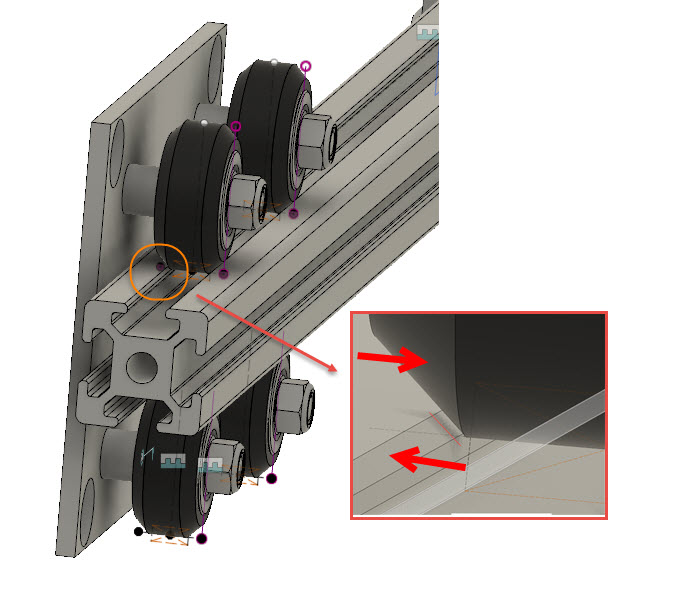
I think I am reaching for the sky here, but need to ask.  Trying to learn how to errectively use joins.  I have a "trolley" that moves along a v-slot rail using four wheels.  In an effort to restrict movement, I wanted to create a join between the v-slot and the week. (see attached).  I suspect this is not possible, but I wonder if anyone else has an idea how I can limit motion along the rail?


Thanks for any suggestion.


0 Likes
Accepted solutions (1)
3,016 Views
7 Replies
Replies (7)
Message 2 of 8

TheCADWhisperer
Consultant
Consultant

Midplanes.

File>Export and then Attach your *.f3d file here if you can't figure it out.

0 Likes
Message 3 of 8

crchisholm
Advocate
Advocate

I tried to export the project to a f3d file and it would not do it because almost everything in the file is linked from external drawings, so I had to recreate the two components (wheel and v-slot rail) that I am trying to join.  To include the other parts it appears that I would have to redesign them in a single file to be able to export, and as new as I am to 360, that would take me a long time.  


I did look at midplane but couldn't figure out how that would help me in this particular circumstance.  Were you thinking I would join the v-slot rail with some other part of the trolley besides the wheel?


0 Likes
Message 4 of 8

davebYYPCU
Consultant
Consultant
Accepted solution

Couple of things, 


your file has no components, so joints will not work with out them.

Fusion does not have a rolling motion joint, so we do it with slider joint/s.

Your original picture had the assembled trolley and you would create the slider joint as built, selecting any edge of the rail, then setting the distance limit.


Your file, returned with these suggestions incorporated....

0 Likes
Message 5 of 8

crchisholm
Advocate
Advocate

Thank you so much for your help!


Ok, in my version, I made both bodies components.  I looked at your join and I see one component box that shows two selections and a position box.  How did you get there.  I see two component selection boxes and no position box.  I am missing something here.  I really need to learn now to do that as this is something I see myself doing a lot since I work with v-slot a lot.  What you did is exactly what I need if I can figure this out.


0 Likes
Message 6 of 8

crchisholm
Advocate
Advocate

Missed the part about "as built".  I got it to work on the drawing I sent, not not yet on the actual project drawing.  Getting closer though.  I will try and take it from here.  


Thank you very much for getting me started!


0 Likes
Message 7 of 8

davebYYPCU
Consultant
Consultant

When going back to the full trolley, there are sooo many ways, 


With the wheels, axles, spacers, and the plate, assembled 

should be a rigid group, then 

select the trolley, Rail, and position, for as built, 


Normal Joint, a little thinking, about where to place the Component selection points, but you will need a position on each that remain offset to each other, and include that offset in the dialogue box.


Might help.....


Message 8 of 8

crchisholm
Advocate
Advocate
Actually I got it too work perfectly. I found that I had to do an as built join on two wheels (diagonal) on each trolley to get it to work as I intended. Also, on the frame I couldn’t get grounding to work, so I had to rebuild the frame grounding the top rail first. After that grounding worked. This has been a fun learning experience. Thank you all very much.
0 Likes