Insert Derive is not importing favorite parameters

Insert Derive is not importing favorite parameters

mvondrak596HY
Explorer Explorer
842 Views
5 Replies
Message 1 of 6

Insert Derive is not importing favorite parameters

mvondrak596HY
Explorer
Explorer

I have 2 documents, the main and a simple joint. I want to use several instances of the joint inside the main, and be able to reference User Parameters defined in the joint file.


From what I understood, you need to Insert Derive instead of just Insert Component in order to see the Parameters, but no matter how I do the Insert Derive I can't seem to get the Parameters to show up (I've inserted just the bodies, bodies and sketch, and the entire component).


mvondrak596HY_1-1745934958512.png


0 Likes
Accepted solutions (1)
843 Views
5 Replies
Replies (5)
Message 2 of 6

jhackney1972
Consultant
Consultant
Accepted solution

In the video I show you where it helps to add a name to your model parameters that you wish to derive into the assembly model.  I then point out the check I think you are missing.


If this video helps out, please select the "Accept Solution" on my post.  If you need further help, please ask.


(view in My Videos)

John Hackney, Retired
Did you find this post helpful? Feel free to Like this post.
Did your question get successfully answered? Then click on the ACCEPT SOLUTION button.

EESignature

Message 3 of 6

mvondrak596HY
Explorer
Explorer

PLEASE SEE UPDATE TO THIS COMMENT BELOW!


For anyone having similar issues, the video from John (thank you John!) is exactly what I was trying to do.


I had actually performed the same steps, and the only thing I can figure is my original Fusion file for the main body must be corrupt or something. I cannot get the original to cooperate no matter what I've tried.


What did finally work was to download the main body file and then re-upload it, then just use the new one instead. The derive then worked as expected.


Thanks again @jhackney1972for the super clear video demo!

0 Likes
Message 4 of 6

mvondrak596HY
Explorer
Explorer

UPDATE

It was not a corrupt file, I had actually performed the same steps as shown in the video, but I was doing one key thing differently:

I was selecting the Seat sub-component inside the main file when doing the Insert Derive.

Insert_Derive_SubComponent.png

There is a "limitation" of Insert Derive function that the main document will not "recursively" pick up the Parameters from the derived component when inserted into a sub-component. However, I think this is a mistake of composition on my part in working with Fusion.


Ultimately the concept that worked for my scenario was:

  1. Create the Seat as a new design (instead of a sub-component of the main file)
    1. Create / import the Parameters desired and mark as Favorites
  2. Insert Derive the Joint into the Seat component
    1. Select the top level Joint component from the Browser
    2. Make sure to click the Parameters dropdown and select Favorites
    3. mvondrak596HY_3-1746094126051.png
  3. Insert Derive the Seat component into the main document
    1. Derive is necessary if you want the Parameters in the main doc, otherwise you can just Insert Component

NOTE: I actually had to get a little more complicated for the real project, deriving the shared Reference Sketch and Parameters into each Design, then Insert Derive Joint -> Seat ->Main as described above.
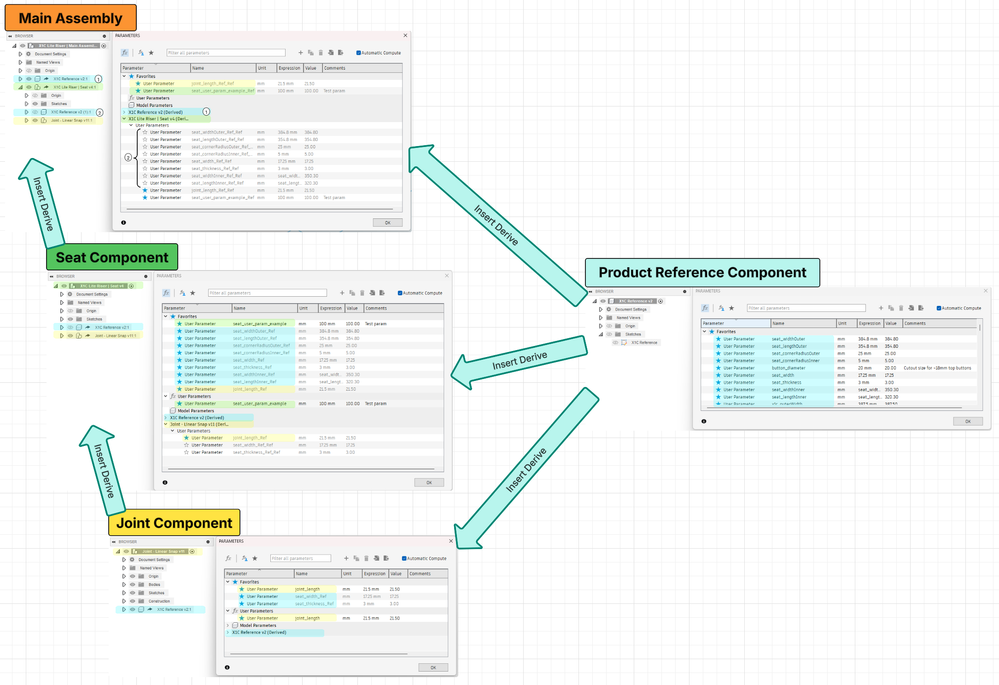
mvondrak596HY_9-1746102853667.png


Details

Here is a before / after comparison of the Browser


Insert Derive into Sub-Component created in the main f3z doc (incorrect)

Notice no Parameters are brought in and Joint - Linear Snap does not appear in the tree.

mvondrak596HY_1-1746091016683.png


Insert Derive in a separate Design, then Insert Derive into the main f3z doc (correct)

New Design for Seat Component

Note the "_Ref" suffix added to Parameter names

mvondrak596HY_4-1746098644271.png

Main Doc

Note the "_Ref" suffix has doubled on the Parameter name

mvondrak596HY_7-1746099723558.png

Concept

mvondrak596HY_10-1746103620363.png


Ultimately this allows access to any variable from the Reference in every Design, and "bubbles up" child component parameters, but it does cause some duplication and redundancy.

I am curious if there is any way to organize / structure this better if anyone has thoughts!


0 Likes
Message 5 of 6

chris_heath01
Advocate
Advocate

Hi John- 

I'm having problems with the Derive function.  I have created a Master file with just parameters in it that I want to use over a number of Parts (using the latest FREE version of Fusion). I have tried Insert Derive to an existing part, the Flags are set for both Favourites and From Components,  the Parameters are imported with the _Ref added but they are not available to use, they are grey'ed out.  I have also tried Derive into a new Part with the same result.  Any idea why this is happening please?

Many thanks

Chris.

0 Likes
Message 6 of 6

jhackney1972
Consultant
Consultant

Please take a look at the attached video.  I hope it shows you that there is no issue using Derived Parameters from a Master model.  Let me know if you have further issues.  If you do, please attach your Master model and a part file you are deriving it into so I can take a look at the problem.


(view in My Videos)

John Hackney, Retired
Did you find this post helpful? Feel free to Like this post.
Did your question get successfully answered? Then click on the ACCEPT SOLUTION button.

EESignature

0 Likes

