Hi Charles,
Thank you so much for your prompt reply and suggestion. As far as my workflow, I just created separate sections of tubes or pipes and eye balled them together, pretty much how someone would try to cut pipes and weld them together in real life. This is probably naive in my part! I am an electrical engineer by trade but with a strong interest in the cool modeling tools available today. This is especially more so since the past two years I have been a mentor and sponsor for the First Robotics Competition where 3D modeling of the robot prototypes can be of great benefit which has peaked my interest and determination in learning and sharing these powerful tools with our youth.
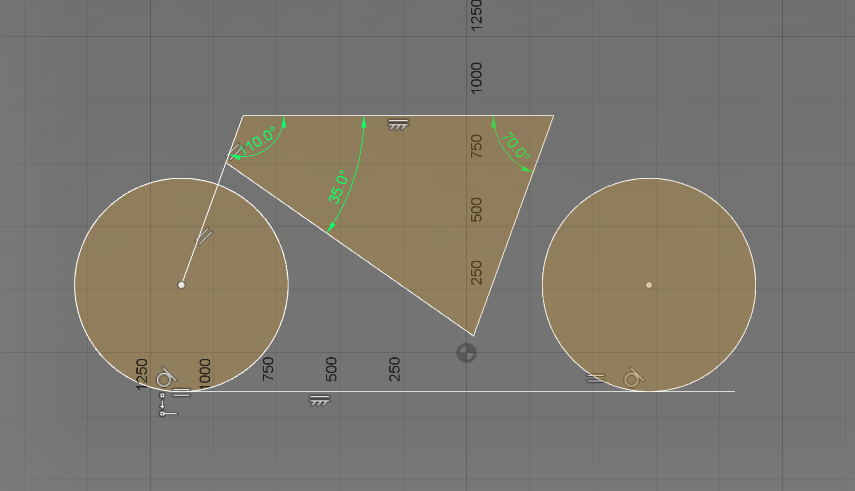
All this being said, I am not from the CAD/CAM or mechanical engineering or drafter side of things. I am not sure how I would be able to extrude these pipes out of the flat sketch layout you have shared with me. I was hoping that I could stretch or change the tubes at will, change the angles between them but yet have them aligned within a flat plane like a bicycle frame would be. Sort of like one would cut pipes to different lengths and affix them to a frame or jig to fix the relation between them and then weld them together. Would I be able to use the tube sections and superimpose them on your sketch and use the sketch as a jig to change the relation between the tubes. Is there a way to achieve this with constraints?
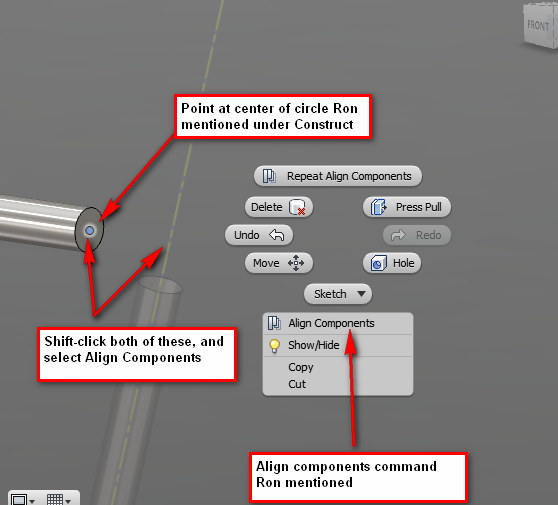
I have noticed as a novice that when one uses tube sections in 3D modeling things can get rather challenging because there are no edges to snap or align. In this case I would intuitively think than then centerlines would do this function, but apparently they don't. I am confused with the "construct category" which seem to work referentially but I cannot actually use them to "construct" the frame sections.
Sorry for my lack of experience in this field of yours, I hope what I lack in industry experience maybe I can make it up to your team with my passion and interest in your empowering tools
If there is a way I could openly share the bicycle model with you or the group please let me know. This would be a nice way to collaborate and learn the ropes. That is one contribution I could suggest your team could add to Fusion 360
"share the helm mode"
for passing the 3D modeling expertise between users and noticing modeling faux pas by novices like myself, since you would be able to see my model structure etc. This would be like a shared white board on steroids where your Fusion 360 live environment is the white board. This would be much more empowering than watching YouTube, pausing and replaying over and over...
I think a bicycle would be the most basic essence of a ubiquitous invention that makes an ideal and fun tutorial for newbies but yet has plenty of challenges with centering, tubing, spokes, chain, differing angles and potential for moving components and mechanisms. At the end it gives one a good sense of accomplishment.
I'd like to thank Autodesk and your team for making this powerful tool available for Beta testing.
Regards,
-Emil