下層のアクティブコンポーネントのTransform Matrixを得たい - I want to get the Transform Matrix of the underlying active component

下層のアクティブコンポーネントのTransform Matrixを得たい - I want to get the Transform Matrix of the underlying active component

obatake5TC3R
Advocate Advocate
1,651 Views
10 Replies
Message 1 of 11

下層のアクティブコンポーネントのTransform Matrixを得たい - I want to get the Transform Matrix of the underlying active component

obatake5TC3R
Advocate
Advocate

@Anonymous managers,

This post is in Japanese but please leave it in this forum and help them to collect ideas and replies from other community members globally. Thanks.


アクティブコンポーネントが下層にある場合、ルートコンポーネントからのTransform Matrixを得たいのですが、どうすればいいでしょうか?

Occurrenceから求めると

Ptr<OccurrenceList> occs = rootComp->allOccurrencesByComponent(activeComp);

とやってもOccurrenceListにがOccurrence1つしか返ってきません。

Traverseして探さなければいけない?

簡単にTransform Matrixを得る方法はありませんか?

0 Likes
Accepted solutions (2)
1,652 Views
10 Replies
Replies (10)
Message 2 of 11

kandennti
Mentor
Mentor

@obatake5TC3R さん こんにちは。


深い位置のOccurrence(孫以上の深さ)のRootComponentから見た時のMatrixを取得したい

と解釈しました。

恐らく、Matrixを取得する目的はエンティティの正しい3D座標(例えばBodyの重心位置等)

なのだろうと思いますが、Matrixでゴリゴリ計算するのではなく ”createForAssemblyContext

メソッドを利用し、エンティティを正しい位置にしたもの(Proxy)を利用する事が

Fusion360的には正攻法の様です。

https://help.autodesk.com/view/fusion360/ENU/?guid=GUID-0cd1172c-ba06-4607-93c4-6547a8d42d76 


この辺りの理解がかなり難しく、サンプルコードはpythonとなっていますが

過去にダラダラとBlogに説明を書きました。(1~5まであります)

https://kantoku.hatenablog.com/entry/2020/11/26/113540 


どうしてもMatrixを取得したい場合は、fullPathNameプロパティを利用し

Occurrence名を取得しゴリゴリ計算させています。

https://forums.autodesk.com/t5/fusion-360-api-and-scripts/incorrect-transformation-from-occurrence-t... 


一応、allOccurrencesByComponentメソッドついてご説明ですが、指定したComponentを

参照しているOccurrenceを返してくるので、あの動作で正しいです。

RootComponentから目的のOccurrenceまでのOccurrenceを返すわけではありませんよ。

Message 3 of 11

obatake5TC3R
Advocate
Advocate

Matrixの取得の方法はわかりました。できれば、アクティブコンポーネントでの座標値、ワールド座標での値を得られるようにしてもらえば助かります。

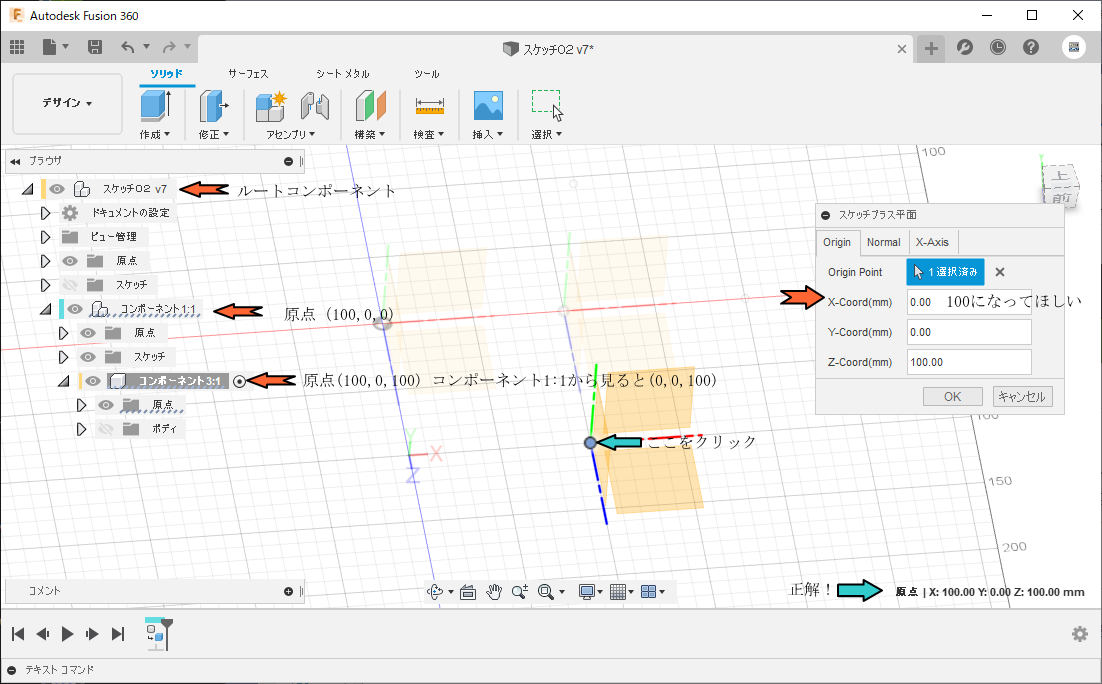
ところで、新たに問題が生じました。2階層の原点をコンポーネント1:1(100,0,0)さらにコンポーネント1:1の下にコンポーネント3:1(100,0,100)-コンポーネント1:1から(0,0,100)移動したコンポーネントを作成し、コンポーネント3:1の原点のコンストラクションポイントの座表を得ると(0,0,100)となって期待する値(100,0,100)とはなりません。

ちなみに立体モデルの頂点を選択するとルートコンポーネント上の座標値が返ってきます。さっぱりわからなくなりました。

Ptr<Base> entity = selection->entity();
if ( !entity )
return nullptr;
// 頂点をセレクト
Ptr<BRepVertex> selectVtx = entity;
if (selectVtx)
{
Ptr<Point3D> coord = selectVtx->geometry();
return coord;←頂点(BrepVertex)はワールド座標で返される
}
// コンストラクションポイントをセレクト
Ptr<ConstructionPoint> selectCPoint = entity;
if (selectCPoint)
{
Ptr<Point3D> coord = selectCPoint->geometry();
return coord;←原点コンストラクションポイントをセレクトするとコンポーネント1:1からの相対位置座標が返される
}

よろしくお願いたします。

0 Likes
Message 4 of 11

kandennti
Mentor
Mentor

@obatake5TC3R さん


pythonで確認しました。確かにConstructionPointではおかしいです。

恐らくバグだと思います。selectEntityやSelectionCommandInputで選択された

エンティティはプロキシのはずです。


Can someone please confirm that for me?
I have a feeling that the createForAssemblyContext method of the ConstructionPoint object is not working.

The Vertex of a ConstructionPoint at the same position has different coordinate values that can be obtained.

#Fusion360API Python script
import adsk.core, adsk.fusion, traceback

_app = adsk.core.Application.cast(None)
_ui = adsk.core.UserInterface.cast(None)

def run(context):
    ui = None
    try:
        app :adsk.core.Application = adsk.core.Application.get()
        ui :adsk.core.UserInterface = app.userInterface
        des :adsk.fusion.Design = app.activeDocument.design

        # select point
        msg :str = 'Select ConstructionPoint or Vertex'
        selFiltter :str = 'ConstructionPoints, Vertices'
        sel :adsk.core.Selection = selectEnt(msg ,selFiltter)
        if not sel: return

        # unit conv
        unitsMgr :adsk.core.UnitsManager = des.unitsManager
        defLenUnit :str = unitsMgr.defaultLengthUnits
        covunit :float = unitsMgr.convert(1, unitsMgr.internalUnits, defLenUnit)

        # --get info--
        entity = sel.entity
        geo :adsk.core.Point3D = entity.geometry

        infos = []

        # coordinate
        infos.append(isNativeMsg(entity))
        infos.append('coordinate value(use select entity):{}\n'.format(
            'X: {1}{0} Y: {2}{0} Z: {3}{0}'.format(
            defLenUnit, geo.x * covunit, geo.y * covunit, geo.z * covunit)))

        # Use proxy
        occ :adsk.fusion.Occurrence = entity.assemblyContext
        try:
            nativeObject = entity.nativeObject
            proxy = nativeObject.createForAssemblyContext(occ)
            proxyGeo = proxy.geometry
            infos.append('coordinate value(use proxy):{}\n'.format(
                'X: {1}{0} Y: {2}{0} Z: {3}{0}'.format(
                defLenUnit, proxyGeo.x * covunit, proxyGeo.y * covunit, proxyGeo.z * covunit)))
        except:
            pass

        # Affiliation Occurrence
        infos.append(isNativeMsg(occ))
        infos.append('Affiliation Occurrence Name:{}'.format(occ.name))
        infos.append('Path: root+{}'.format(occ.fullPathName))

        # show info
        ui.messageBox('\n'.join(infos))

    except:
        if ui:
            ui.messageBox('Failed:\n{}'.format(traceback.format_exc()))

# select
def selectEnt(
    msg :str, 
    filtterStr :str
    ) -> adsk.core.Selection :

    app :adsk.core.Application = adsk.core.Application.get()
    ui :adsk.core.UserInterface = app.userInterface
    try:
        sel = ui.selectEntity(msg, filtterStr)
        return sel
    except:
        return None

# isNativeObject
def isNativeMsg(obj) -> str:

    if hasattr(obj, 'name'):
        name = obj.name
    else:
        name = 'Selection entity'

    if not hasattr(obj, 'nativeObject'):
        return "[{}]  can't determine NativeObjects.".format(name)

    if obj.nativeObject:
        return '[{}] is not a NativeObject.'.format(name)
    else:
        return '[{}] is a NativeObject.'.format(name)

1.png


0 Likes
Message 5 of 11

obatake5TC3R
Advocate
Advocate
Accepted solution

どうにか直してもらえると助かりますけど。。。いまのところコンストラクションポイントはセレクションから除外するしかないようですね!

0 Likes
Message 6 of 11

kandennti
Mentor
Mentor

>いまのところコンストラクションポイントはセレクションから除外するしかないようですね!

直るのが一番ですが、直るまでは選択されたエンティティがコンストラクションポイントの場合は、

occurrence.fullPathNameを取得して、rootまでの全てのoccurrence.transform (matrix3D) を

ゴリゴリ計算してはどうでしょう?
・・・面倒ですけど。

0 Likes
Message 7 of 11

obatake5TC3R
Advocate
Advocate

コンストラクションポイントの場合は1つ上のコンポーネント階層の相対位置座標を返すみたいです。なのでルートからのMatrix3D(逆行列)を掛けても正解は得られないのです。2階層ではなく3階層のコンポーネントの原点でテストしてみるとわかります。

0 Likes
Message 8 of 11

kandennti
Mentor
Mentor
Accepted solution

>なのでルートからのMatrix3D(逆行列)を掛けても正解は得られないのです。

その部分を説明しているのが、最初のレスのリンク先に記載しています。
(但し当時は理解がまだ浅く、一部不足している処理があります)


C++で書こうとしたのですが、リストの操作等がわからない為断念。
文字でだけ説明します。

1)オカレンスを取得し、fullPathNameを取得します。

 Ptr<Occurrence> occ = constructionPoint_var->assemblyContext();
 string fullpath = occ->fullPathName();


ここで、root以降のオカレンス名の文字列が取得出来ます。

Component1:1+Component2:1

こんな感じです。


2)"1"の文字列を "+" を区切り文字として分割しリスト(配列?)にします。


3)"2"のリストを利用し、ルートコンポーネントのallOccurrencesの
 itemByNameメソッドで各オカレンスをリストとして取得。


4)constructionPointのnativeObjectをチェックする。
 nullだった場合はそのままでOK.
 null以外の場合(恐らくこれになります)"3"のリストの最後を捨てる。


5)"3" 又は "4" のオカレンスリストから各transformプロパティ(Matrix3D)を
 リストとして取得。


6)"5"のリストの順番を逆にする。(重要です)


7)新たなMatrix3Dを作成する。


8)"7"のMatrix3DのtransformByメソッドを試用し、"6"のリストを適応させる。


9)constructionPointのgeometryプロパティ(Point3D)を複製。


10)"9"のPoint3DのtransformByメソッドを利用し、"8"のMatrix3Dを適応させる。


これで正しい座標値が得られます。但し、ルートコンポーネントの場合は
エラーとなるはずの為、選択されたconstructionPointから判断して
処理を分ける必要があるはずです。

pythonであればサンプルが書けるのですが、これ以上の説明が出来ません。

(恐らくバグとは言え、代替え処理で手に届く範囲の問題だと思っています)

0 Likes
Message 9 of 11

kandennti
Mentor
Mentor

日本人同士のやり取りとは言え、このトピを日本語フォーラムに移動されると

こちらのテストコードを試してもらえる可能性が激減するのですが・・・。

https://forums.autodesk.com/t5/fusion-360-ri-ben-yu/xia-cengnoakutibukonponentonotransform-matrixwo-... 


恐らくこれはバグですよ。

NativeObjectとProxyについては、スクリプト/アドイン開発中級者にとっては

非常にわかりにくく一つの大きな壁です。そこにバグが潜んでいる為、さらに理解が

困難な状態になっています。

Mr@goyals を指定した方が良かったでしょうか?

0 Likes
Message 10 of 11

akina.yokoyama
Alumni
Alumni

@kandennti さん、こんにちは。


投稿を移動させてしまい失礼いたしました。元に戻させていただきました。

ご指摘ありがとうございます☺


@Community managers,

This post is Japanese but please leave it in this forum and help them to collect ideas and replies from other community members globally. Thanks.


Akina Yokoyama
Community Coordinator
Message 11 of 11

obatake5TC3R
Advocate
Advocate

おかげさま、うまく座標をゲットすることができました。ありがとうございました。