Announcements
Visit Fusion 360 Feedback Hub, the great way to connect to our Product, UX, and Research teams. See you there!
cancel
Showing results for 
Show  only  | Search instead for 
Did you mean: 

Enable mating for assembling

Enable mating for assembling

Hi Community, hi Autodesk,


coming from Inventor i really like Fusion and most of its concepts and i wish Inventor had some of them implemented.


Having said that, there is one key element that i am missing in Fusion. Mates. While Jointing is ok-ish most of the time, some times faster some times slower, it is unbearable for more complex parts to joint them properly without measuring beforehand or creating support sketches to even be able to somehow joint them.


Take this file for example 1.PNG
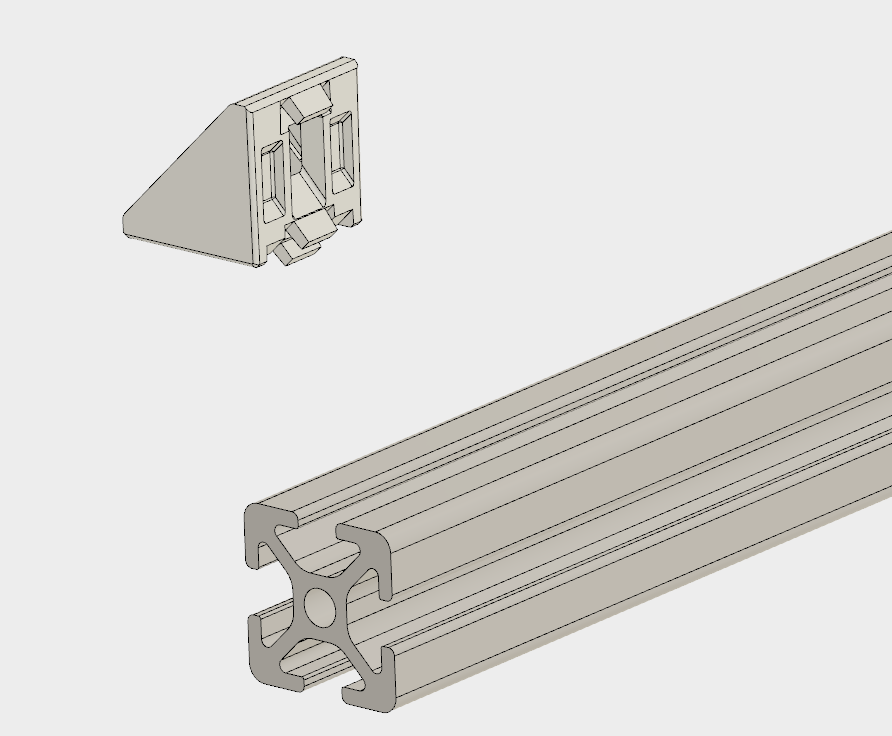
 

Assemble those very simple and often used components is no fun at all using Joints.

Basically you have to create support sketches on the corner bracket (better on both to eliminate the measuring) to assemble this correctly.

Using Mates, this job is precisely done in a blink of an eye. Sure, it needs three clicks and constraints but this is alone is so much faster than using those snap points cause you can hit the surfaces much quicker and with less hassle than hitting those snap points(with ctrl held down).


Im not saying that the concept of Joints is bad or anything, both mating and jointing have their advantages and disadvantages and certainly their place and fanboys, but not being able to choose surely isnt a smart move.


Long story short/TLDR


Please give us mating in Fusion so we can decide when to use which tool to do the work more effectivly and faster. 


Thank you for your time


Sorry for the subpar english, not my native language.


22 Comments
Scoox
Collaborator

I've not used Inventor (only ever used Fusion) but in Fusion we have "Joint Origins", would that do what you want?

t3dris
Contributor

To be completely honest, i dont really get the benefit of Joint Origins in this case.

It doesnt offer anything more than a normal joint to assemble those two parts.


In my opinion, i could be wrong, i see the benefit of a joint origin in joining multiple parts to the same base. While this is for sure extremely powerful for skeleton modeling techniques it doesnt offer a simple solution in this case since you have to move the joint origin from a snap point and then joining the parts. The same is achieved by simply doing the same with a rigid joint, chose a snap point and then offset the joint by the same values.


Just wondering how difficult it would be to add classic mating for assemblies in Fusion, maybe a developer could answer this?


As stated in my initial post, i really like fusion, its concepts and approaches. But it is the least capable and most unfun CAD-Software i used to this day (been using Inventor, Solidworks and CATIA V5 professionally) regarding assemblies. Most of this weak point comes down to mating and replacing components with similiar geometry. 


Thanks for your comment though, all help and critique is welcome!

Scoox
Collaborator

I don't know anything about other CAD packages, but I recently modelled an aluminium extrusion frame and the brackets were narrower than the extrusion, and I relied on joint origins to get my brackets to line up properly with minimal mambo jumbo.

t3dris
Contributor

I still dont see the benefit of a joint origin in your case, you can do the same with a rigid joint, define offsets and done.


Maybe think of it that way. You import a Model with irregular geometry with no snap points really practical at all (like the file i attached...). A joint origin is a lot of hassle here. First you have to measure the relevant geometry of both shapes to get an idea on how to define your offsets to join them properly. Then you joint them typing in all measured offsets and your done. So far so good(or not). Now imagine that you can´t measure the geometry to precise values. This can have several reasons: a) the model isnt modelled in to precise values b) the model is to complex to measure it c) the model is modelled in another unit system which can lead to rounded values or unelegant values at least.


Sure you can join the models using odd values or even wrong ones, no big deal right? There are cases where this is ok to some sort, but dont think about CAM-ing or FEA.


The solution for this is to use sketches to define more workable geometry for your joints. This is time consuming and clusters the model with sketches and geometry that are not nice to handle. A simple mate assembly is clicks. No measuring, no guessing, no hassle, ultimately precise and takes less time than typing the offsets on a much more simple model.

Scoox
Collaborator

Anyway you got my vote because you obviously know what you are talking about. It would be nice if you could post a link to an Youtube video showing how mating works in Inventor, specifically one addressing the situation you are trying to deal with.

Anonymous
Not applicable

Having worked with several different CAD-Systems this is one of the key-features that is missing to make assemblys less of a pain in Fusion360 😉

PinRudolf
Advocate

Hi t3dis,


Fair to say; if I would be using Inventor I would probably use Mates in this situation as well. (Except that Mates is the SolidWorks terminology, Inventor calls them Constraints) But probably mostly because I am so used to that method. 


Don't get me wrong, i'm not saying this is not a good idea. I am just curious if you might be right, that maybe this 'old' system is still the best way and I want to share my findings.


If you use the Align command (Modify > Align) you can orientate the object in the same way you would orientate it using Mates. (Face to face) This is obviously just an alternative for the move command, there is no connection between the Aligned components just yet. Though as a final step you could use As Built Joint to create a connection between the components. 
Welll... this works but it is without all the fancy extra options you get with Inventor or SolidWorks. 


I do agree with Scoox that a Joint Origin would work well here though! You could place the joint origin exactly on a point where the two connecting faces of the bracket meet. (In this specific situation;  the 0-point) Once that point is there you can use that to place a joint between the bracket and the correct point on the frame (Using the between to faces option). 


Orrrr....use multiple joints (as you would use multiple mates) of the planar type. That basically functions as a Mate/Constraint.


t3dris
Contributor

Hi PinRudolf,


i agree with you. There are workarounds that help in this case. Still, they seem like more work to get this done than neccessary. Lets face it, it all comes down to do simple tasks fast and without having to think out of the box (at least in most cases). As an engineer/designer i want to focus my time on things that contribute to the function or form of the final product, not on how can i get the software to do a simple task.


Autodesk made a statement that they ultimatively thought that joints are more powerful and easier to use. While i can say that i dont agree with it, i also can say that they have a point in stating that.


The concept of joints is great, inventor has them too, but the concept on beeing restricted on the snap points isnt something i dig.


The solution could be to enable classic constraints/mates or a checkbox in the joint command.


"Use boundary"


By default it stays like it is at the moment. If "Use boundary" is checked within the command, only the primitive shape of the object is beeing looked at, giving you less snap points but more discreet ones.

Exactly like the stock operates in cam and the origin point of it.


With that method, joints could be even easier to use and achieve the same (in most cases) as mating, without the need to do workarounds for special geometry.


And while you´re at it, PLEASE implement an "apply" button to joints, so i can stay in the command and join multiple objects without having to press the button or "j" all the time 🙂


I hope that made sense 🙂


Best regards

PinRudolf
Advocate

 I'll vote for your Use Bounday idea! Simplicity is key with Fusion. Maybe just the option to select a surface without the need of selecting a point afterward would be good enough!


And ooo yes, the missing Apply-button is a pain! (with many commands!)

ArjanDijk
Advisor

I'm very happy that Autodesk decides to let go of that old mating method. I agree that there are situation that were easier with mates. I think they have to look at the situation and find a solution in joints. Have two methods aside of each other will get messy.


But the case you mention can be made easier with a bettter workflow. The same goes for a tangent constrain. That is not easy to replicate with joints in Inventor and impossible in Fusion

John369
Explorer

I do believe that the joint origin  would work for what you are trying to do.  I find that when I design components I already know where it will join to the next member/part of the assembly. The inclusion of the joint origin in the design of the component is easy. I have incorporated that placement of the joint origin into my workflow, then when I have assemblies to make all of the connection are easy to select and placement proceeds quickly. Perhaps the issues is learning a method that works for you and letting go of what other software does and focusing on how Fusion 360 is a great product.

ArjanDijk
Advisor

There is no joint origin in Inventor

t3dris
Contributor

Hi John369,

as i stated in my first post i too think that fusion is a great product. I also stated that unfortunately it lacks in terms of capability when it comes to assemblies.


A part of it is mates/constraints (i still think that they are a extremely powerful, there is a reason that all big CAD softwares are using them as the main feature to assemble parts and still have joints for other stuff that is harder to do with classic mates/constraints).


There are a lot more features that i miss in fusion that enable a faster more fun workflow, that are standard in other software packages. Some things are a smaller issue, while others like mating and replacing components is a must have for a good workflow. Especially replacing components is extremely needed if you ask me.


I know that Fusion isnt Inventor, Solidworks, Catia and so on, but there is no need cut down on well known, well functioning features just to be "different" and "new". I appreciate new stuff in software, dont get me wrong but when it comes down to essential stuff there is no need to be different just to be different. 


I am not saying that joints are bad or that they should be removed, i just think ( 12 years of professional experience with both methods) that mates/constraints are in a lot of ways faster and easier to use. Maybe a quick solution could be to add the "boundary" function i mentioned in an earlier post. 


Please do upload my example file jointed, all could benefit from your expertise in joints!

John369
Explorer
Joint origins placed on components during the design work for me. When
going to assemble I just choose that origin and join it to another origin
and select type of joint desired. I don't know what could be easier. Just
my work flow, I have no problems and have complex assemblies with over 100
joints.
t3dris
Contributor

In this and many other cases constraints are easier. Sorry but in my book 100 joints are not much. Join 25 screws with washers and nuts in a hole and you got that number.  

Please share my example file with your easy and efficient jointing method.

John369
Explorer
I was just offering some advice on what worked for me.I am really confused
in what you are trying to do.I haven't seen your problem file. With as much
previous CAD experience as you have I would think that the joint function
would be easier to use. I was attempting to state that joints are used in
Fusion and my method of using a joint origin to pre-select where I want the
connection to be made. This is my work flow for this CAD program. I would
never include multiple instances of screws, washers, or nuts as this eats
memory. Now for joining (of components to each other or sub assemblies to
each other) the Joint Origin works great for me. In the Fusion nomenclature
if you want to make sure that a sketch won't move when adjusted then it is
fully constrained, this is where I use the term constraint, as in
co-linear, perpendicular, equal, ect... If I want to connect two components
then I use the term joint. To suggest that 100 joints is trivial is
disingenuous. I work with complex models which are artistic and organic
with many odd angles and surface orientations and with Fusion I am able to
place joints where I want.
John369
Explorer

After seeing the file placing a joint origin in the middle slot of the extruded bar, placing a joint origin on one of the flat sides of the corner bracket.  Ground the extruded bar and select the bracket first and join the two. Set desired location by sliding or entering the offset and rotate the part in the correct orientation and finished. Took less than 2 minutes to join and copy and paste for second entityt bar.png at other end of extruded bar.

mads.bjornenak
Participant

All other CAD programs that I know of uses mates or constraints (SW, Inventor, ProE, Onshape), even Onshape uses mates/constraints. Inventor has the option of using both joints and constrain in assemblies. Implementing mates/constraints for assemblies would make Fusion 360 much better.

ArjanDijk
Advisor

@mads.bjornenak, or more confusing

John369
Explorer

I hope that you understand how Fusion 360 is trying to deal with the degrees of freedom in a Joint. If you can understand how the program wants to implement the attachment of the components then I believe that things will become easier in making an assembly.  

Can't find what you're looking for? Ask the community or share your knowledge.

Submit Idea