Announcements
Visit Fusion 360 Feedback Hub, the great way to connect to our Product, UX, and Research teams. See you there!
cancel
Showing results for 
Show  only  | Search instead for 
Did you mean: 

ray tracing bug

ray tracing bug

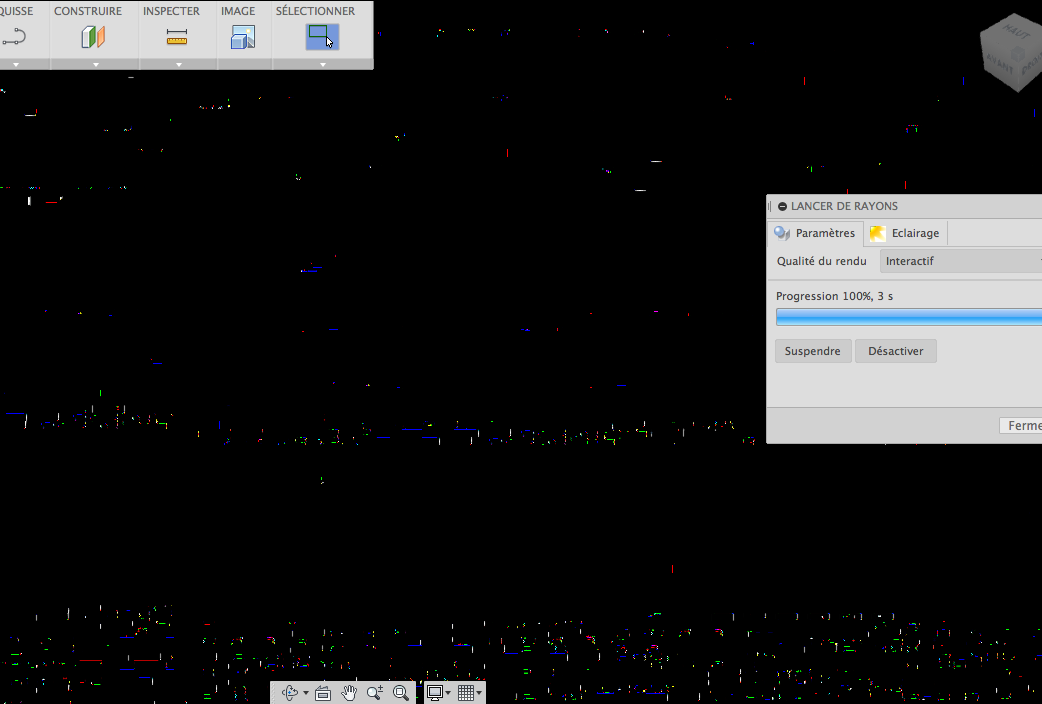
Some annoyances aside, ray tracing was working well enough for me in the previous Fusion 360, but in the beta preview I'm just getting image corruption [see enclosed].


Late 2010 MacBook Air (1.8GHz i7 w/ 4GB 1333 MHz DDR3 RAM Intel HD Graphics 3000 w/ 384 MB)

OS X 10.9.2 13C39 (though also present at least as early as the GM release of 10.9.1)

13 Comments

This is driving me insane and took ray tracing in the app from good enough for lots of applications to utterly unusable 😞


Capture d’écran 2014-02-01 à 12.35.58.png

Am I really the only person who is running into this ?


I think it may be an OpenGL / GPU issue but whatever the cause, it kinda sucks.

evan
Explorer

Confirming it here.


Screen Shot 2014-05-21 at 1.16.45 PM.png

Still no luck 😞
Anonymous
Not applicable

I am having the same problem. I have a similar machine as yours.

Have you found a solution yet?


Here's a video of it in action on my machine:

https://www.youtube.com/watch?v=nvOaNEtZBV0


Yeah (ish / in the sense of tiptoing through a minefield).


You're running out of video memory and F360 (apparently still) has a bug where that wrecks havoc on rendered scenes.


The (annoyingly unsatisfying) work-around is to reduce your window size (or, perhaps in the hopes of shutting you up, Autodesk will get you a loaded MacBook Pro as a partial work-around.. not that I'm unappreciative but it'd be nice if problems were actually fixed)


Editorial aside: I can't say I'm surprised but I'm still disheartened and disappointed to see that this hasn't been fixed given that the issue is both severe and well over a year old.. I'm starting to worry that I just expect and hope too much of people 😞

Anonymous
Not applicable

I've actually already uninstalled it; there are other products on the market which render in the way that I expect. Although I must say that I like the workflow in F360, particularly for patterning, etc. In some ways the creation workflow is similar to SolidWorks+PhotoView360 which I am very used to (from an old job I had with a windows-based machine). 


The resizing sounds like a weird solution... I guess I would expect that the implementation would render without actually drawing to the screen, then only draw to the screen when a full frame (or subframe) is rendered and available to be drawn.


If Autodesk wants to send me a new MacBook Pro, I'd be more than happy about it and would get a license... but I'm not holding my breath.


Thanks for the response!

Any time!


..and for Carl / any other Autodeskers please read, re-read, and re-read again the above!


It's so nearly an insanely great program and for everyone like acohe1 who goes out of their way to come here, I guarantee you're losing many more potential customers because of things like this that should just work.

Anonymous
Not applicable

I reinstalled it to see, and sure enough, you are right! If I reduce the window size to about 3/4 of the screen, it suddenly renders. 


What a strange implementation they must have chosen. I would expect it would just take longer (or at minimum give an error message), not just output nonsense. I guess I will continue with the trial until the end, because the workflow seems to be the best for OSX-compatible products.


Yeah even with all the issues, there is nothing better on OS X today. About the only alternative that comes close is to run Solid Works in Windows in a virtual machine and that's just awful. I'd be much happier with everything if they were still calling it a «Beta» and not charging anyone for it until it's rock solid and all of these little things are fixed.
prabakarm
Alumni

The problem seems to be with the Intel HD 3000 cards.  We are working on a fix for it.  It will not be in the release this Saturday but we will get it out as soon as possible.

chengyun.yang
Alumni

Hi All,


This problem is specific to Intel HD 3000 graphics cards on Mac. According to our investigation, this should be an Intel graphics card driver problem where it has some problem with 32 bit float format texture. The team has fixed this problem using a different format texture. We will deploy the fix either in the hotfix for Fusion 2015 March release or in Fusion next major release(mostly likely in May).


Thanks

Chengyun

keqingsong
Community Manager
Status changed to: RUG-jp審査通過
 

Can't find what you're looking for? Ask the community or share your knowledge.

Submit Idea