Announcements
Visit Fusion 360 Feedback Hub, the great way to connect to our Product, UX, and Research teams. See you there!
cancel
Showing results for 
Show  only  | Search instead for 
Did you mean: 

combine the move and scale functions into one gizmo

combine the move and scale functions into one gizmo

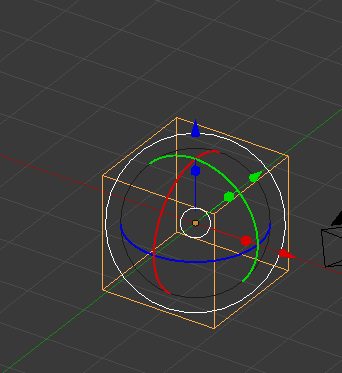
I'm not sure why the move and rotate tool is in a different place than the scale tool. below are 3 different gizmos from different programs, rhino, blender and c4d. I think rhino's is the clearest when looking at it, it's easy to tell which handle does what and Blender's has a lot of versatility by allowing local, global, normal (a surprizingly useful one), view, and gimble. 


this is my first post so let me know if the attachments do anything funny

7 Comments
cekuhnen
Mentor

also throw in the ability from Blender to save custom orientations. For a poly modeler I am somewhat surprised no other CAD app has that type of a CAD function ?!?!


This is the number one reason why for polygonal modeling I only use Blender and none of the competition + the modifiers since that is like features in Fusion.

HughesTooling
Consultant

How are you seeing this working with the timeline? If you scale would a scale feature be added to the timeline or a new Move and Scale feature and what happens when you edit the timeline feature, does it bring up the move\scale gismo?


Mark

Seems obvious - the move-and-scale feature should replace both move and scale in the timeline

Anonymous
Not applicable

"How are you seeing this working with the timeline? If you scale would a scale feature be added to the timeline or a new Move and Scale feature and what happens when you edit the timeline feature, does it bring up the move\scale gizmo?" 


fair point, I Haven't used parametric modelers too much before using fusion 360 but what robotics Scott said is along the lines of what I'm thinking. I'm thinking if you want to parametrically edit only scale that there would be three options in the dialog box right below the xyz angle options along with the uniform /non uniform toggle.


here's the timeline after I've moved, rotated and scaled a cube, as it stands it looks like I've moved the cube twice and then scaled it

Capture.PNG


here's how i imagine it looking albeit with a less crappy looking ui picture, even tho it's more ambiguous then having scale as a separate picture in the timeline  it's also more consistent 

ideal UI.jpg


I also mocked up a quick dirty ui of how I think the dialog box might look when editing a feature, problably would point and entities option at the top tho

Untitled-1.jpg

HughesTooling
Consultant

The more I think about it the more I think although you can have one gizmo do it all it should create a separate feature for move\rotate and scale or it's going to get confusing.


Example. You have a 100mm cube at the origin you set it to move 100mm along the X axis and scale by 2%, does the move scale to 102 as well as the cube and you might want different base points, add a rotation as well and even more scope for confusion. Or is a feature saved to the timeline each time you pick a different transform type. So you'd drag 100mm then when you drag\change the scale the move feature would save and so on, and like your mock up all the transforms would have the same icon in the time line.


Mark

Anonymous
Not applicable


"Example. You have a 100mm cube at the origin you set it to move 100mm along the X axis and scale by 2%, does the move scale to 102 as well as the cube and you might want different base points, add a rotation as well and even more scope for confusion.


Or is a feature saved to the timeline each time you pick a different transform type. So you'd drag 100mm then when you drag\change the scale the move feature would save and so on, and like your mock up all the transforms would have the same icon in the time line."


the italic part of the example is what I'm thinking for how it would work, but thinking about it a little more. The icon showing up as move, rotate and scale really would make more sense.

Capture.jpg


cekuhnen
Mentor

@HughesTooling


I can see an issue with creating a feature that also includes the gizmo data.


It would need to memorize the gizmo data (position rotation ...) then also the from to translation.

So we are talking about 2 features actually I think.

Can't find what you're looking for? Ask the community or share your knowledge.

Submit Idea