- Home
- /
- Community Archive - Read Only
- /
- IdeaStation
- /
- CAM Tool Library - table style bulk edit or csv import/export
Announcements
Visit Fusion 360 Feedback Hub, the great way to connect to our Product, UX, and Research teams. See you there!
Turn on suggestions
Auto-suggest helps you quickly narrow down your search results by suggesting possible matches as you type.
 This page has been translated for your convenience with an automatic translation service. This is not an official translation and may contain errors and inaccurate translations. Autodesk does not warrant, either expressly or implied, the accuracy, reliability or completeness of the information translated by the machine translation service and will not be liable for damages or losses caused by the trust placed in the translation service.
Translate
This page has been translated for your convenience with an automatic translation service. This is not an official translation and may contain errors and inaccurate translations. Autodesk does not warrant, either expressly or implied, the accuracy, reliability or completeness of the information translated by the machine translation service and will not be liable for damages or losses caused by the trust placed in the translation service.
Translate
Options
- Subscribe to RSS Feed
- Mark as New
- Mark as Read
- Bookmark
- Subscribe
- Printer Friendly Page
- Report
CAM Tool Library - table style bulk edit or csv import/export


CAM Tool Library - table style bulk edit or csv import/export
i switched to Fusion from Rhino/Rhinocam a little while ago and now that the evaluation period has been great and i'm ready to move all my cam workflow to Fusion i stand before the daunting task of creating a tool library for all my router bits. i have about25 different styles of mills in various sizes and around 85 tools in total.
creating a tool library through the gui in Fusion will take day, just one example of how tedious and unnecessary this is: i have only 6mm shafts on my tools so i always have to change from the default 10mm to , i also only have one holder but for every tool i create i have to reselect this through the gu, for most of my tools i have the same feeds/speed set, again i have to change every field from the defaults to 'my' defaults. it goes on and on and after creating only a dozen of tools i decided to create this thread in the hope i'm not alone banging my head against the wall about this 
and i already have most of my tools dimensions in an excel table which i used to import export my tools for Rhinocam.
so there are two ways this could be really easy to do:
1 - CSV import export .. i tried this by converting the json of the .tool export to csv but there are too many fields to make this workable, it should be implemented so that only the relevant fields are imported/exported. i tried using this: http://konklone.io/json/ to do the conversion but it's complicated.
2 - a table editor similar to the attribute spreadsheet in Maya: https://knowledge.autodesk.com/support/maya/learn-explore/caas/CloudHelp/cloudhelp/2015/ENU/Maya/fil... like this: 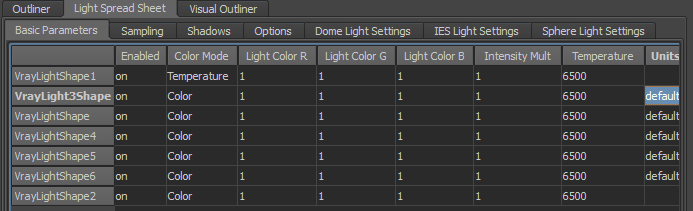
both features shouldn't be too hard to implement but my personal preference would go to option 2, just take the Maya attribute spreadsheet and apply it to the Fusion Tool Library and tool management would be so easy and elegant in Fusion.
7 Comments
Forums Links
Can't find what you're looking for? Ask the community or share your knowledge.