Synthesize Workflow (Fusion 360 > Dynamo > Revit)

- Mark as New
- Bookmark
- Subscribe
- Mute
- Subscribe to RSS Feed
- Permalink
- Report
Hello Community, Here's Synthesize Workflow,
Workflow Software: Fusion 360, Dynamo, Revit
University: Al-Albayt University, Jordan
The students who are directly involved in the case study project are:
And indirectly:
- Saeed Al-Hamza, also, an Autodesk Expert Elite and an Autodesk Student Ambassador, specialized in Fusion 360, for teaching the students Fusion 360 in a professional way.
- Thomas Spiegelhalter, a professor at University of Florida, for his and his students’ help in testing the workflow in 2018 and providing continues feedback.
External Dynamo Nodes Needed From:
- Springs Package
- Clockwork Package
The Workflow Summary:
Using Dynamo to read the exported SAT file from Fusion,
Then import it into a nested Family within a Conceptual Massing Family,
Finally Placing an instance of it
You can now tab into the surfaces and divide them,
Whenever a change happens in Fusion 360, just re-export another SAT,
Run Dynamo again, and It will replace the geometry inside the nested Family with the new one, while trying the to keep any divided surfaces or adaptive components placed on it.
The Goals of the workflow are:
- Ability to freely model organic forms, by using Fusion 360 T-Splines.
- Understanding What works best with Revit panelling and surface UV Dividing.
- Achieving a Synchronizable Connection between Fusion 360 and Revit.
Considering the Following Rules:
- Using Utilities and the Convert tool in Fusion to control what edges to keep and what others to delete, this controls the dividable surfaces in Revit
- Trying to have two adjacent surfaces at most, for the belt measurement configuration to work in Revit as expected.
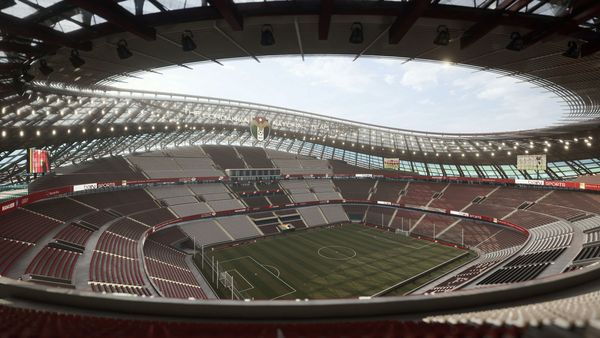
After understanding the above rules, the guys could design a breath-taking stadium without big effort.

Some More Detailed Images:






Background / History
The story starts 3 years ago when I asked Bjørn Wittenberg a question,
"Hey Bjørn, Fusion is good, and Dynamo is good, which one to spend an effort on?"
He answered: "Both"
So, the first breakthrough was in that same year, where we were able to create the ReFusion IT workflow, and named later into Synthesize Workflow
Which targeted an integration between Fusion 360 and Revit with a mini help of Dynamo, via linking the SAT file exported from Fusion, inside an in-place mass of a Revit project
It was good one, but still with so many limitations,
And according to Zach Kron, the head of Dynamo team, when I met him in Slovenia some months ago, said: "We make it look good, but it is not actually"
One of the major problems were:
- Dynamo has a limitation of accessing the Inplace mass, so no more Dynamo to manipulate the patterns or the form.
- Revit died, as it is a heavy Inplace mass with a heavy. SAT file, especially Fusion when using T-Spline in Fusion to create the form.
Now even with all the above problems, the Autodesk Expert Elite team promoted it as a potential workflow, and the workflow won in a competition held by the community called DynAwards, which pushed me to improve it.
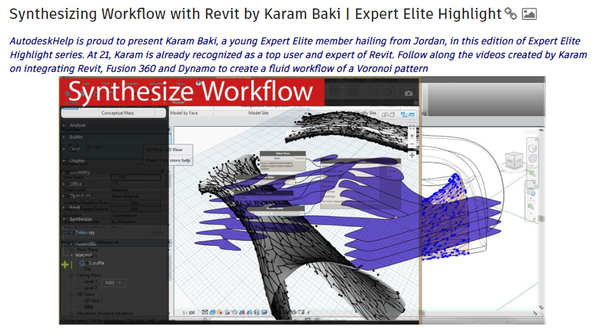
Now in 2019, the workflow has heavily improved, and is now only a 1 graph out of 340 ones of a package called Synthesize Toolkit,
The Dynamo graph is Fusion 360 SAT Sync.

As the name says, it can Sync the content of a Fusion project to a conceptual Mass Family (Listen up, it a family!)
That means we can use Dynamo freely within it!
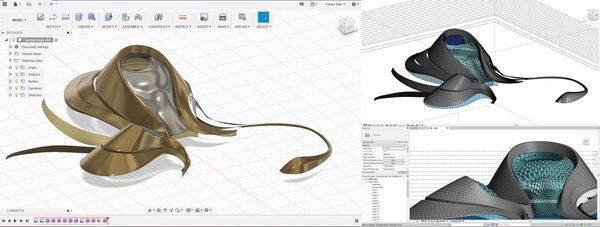
Here's an example of syncing after running another script called K-Attractor to Automate the openings according to points or curves.
Whenever you need to refresh, you could do it with a click from Dynamo Player!, while keeping all the panelling and the divided surfaces updated !

Also, another student, Omar Otoom, is re-creating another project called Harbin Opera House,
A very well-known project in China, it being created using the same workflow and panelled in Revit with ease, still in progress.
Some Images:
We wish this article would encourage Students and Architects around the world to use this workflow for using the full potential of Autodesk Software, and change from "Drafting in Revit”, into "Designing in Revit"
Finally, the compatibility and the smoothness of a workflow, is what makes it a successful one, so many workflows to be discovered and created, it just need passion and determination!
-Karam Baki