Creating a 'Scalloped' Area between Two Boundaries

Creating a 'Scalloped' Area between Two Boundaries

Anonymous
Not applicable
2,415 Views
8 Replies
Message 1 of 9

Creating a 'Scalloped' Area between Two Boundaries

Anonymous
Not applicable

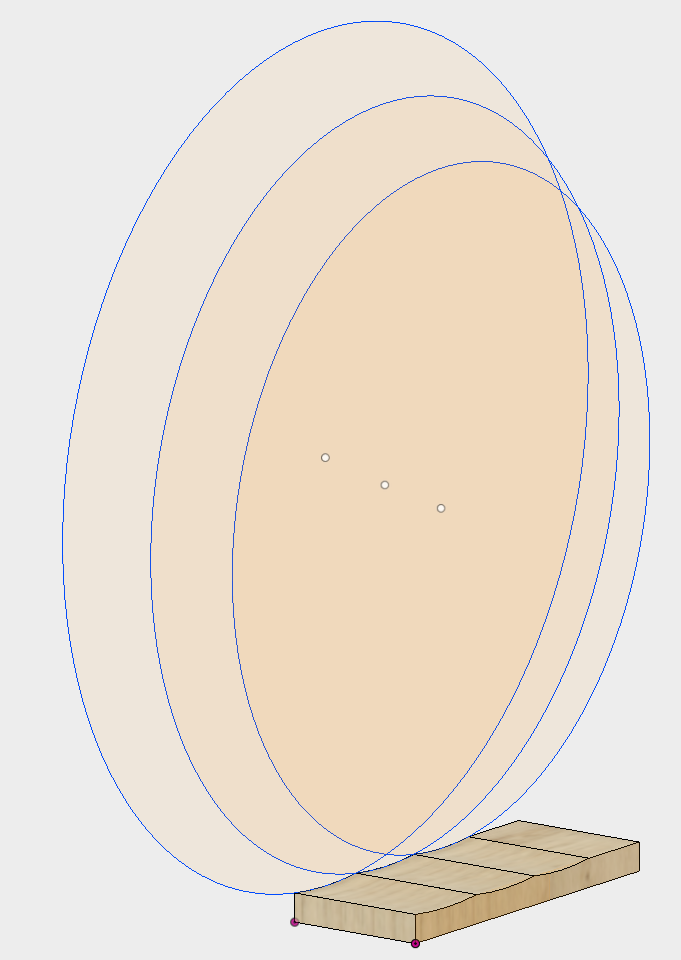
In my attached image you will see three scalloped areas. I achieved this by creating the circles and pulling them into cylinders and then cutting the overlapped 'segment' from the rectangular board.


That's fine, albeit a little bit of a chore.


But what if the boundaries were not parallel, then you would need a cone not a cylinder to produce the scallop...


What it the top of the board was convex? The mind boggles...


My question is:


Is there an easier way to produce a scallop on a surface between ant two boundaries (lines for example)?

0 Likes
Accepted solutions (3)
2,416 Views
8 Replies
Replies (8)
Message 2 of 9

etfrench
Mentor
Mentor
Accepted solution

Try the loft command for non-parallel scallops.  What could be easier than 3 point arcs or circles for parallel scallops?

ETFrench

EESignature

Message 3 of 9

Anonymous
Not applicable

Thanks, I'll try Loft. It looks fairly complex to use, so, I'll have to find a tutorial on its use.


The parallel scallops are easy enough my way, I was thinking ahead to non-parallel scallops and even scallops across a curved surface...

0 Likes
Message 4 of 9

TrippyLighting
Consultant
Consultant

@Anonymous wrote:

... and even scallops across a curved surface...


Still can be done with the loft command.


EESignature

0 Likes
Message 5 of 9

Anonymous
Not applicable

I'm almost there...


But just cannot get it to work...


I have the two non-parallel lines and the two segments at each end but I just cannot get that 'segment' to extend from one side to the other.


I have attached two images that show where I am.


Any chance of another nudge in the right direction, please?

0 Likes
Message 6 of 9

etfrench
Mentor
Mentor
Accepted solution

You only need to select the end face segments for this to work.

ETFrench

EESignature

0 Likes
Message 7 of 9

Anonymous
Not applicable

Sorry to be a pain...


That works nicely for a flat scallop (thanks) but if I have a convex top surface (radius 600mm) I cannot get the scallop to follow that radius. I thought rails would allow me to pick the top convex surface but it does not.


Can I ask for one more nudge, please?

0 Likes
Message 8 of 9

etfrench
Mentor
Mentor
Accepted solution

This little video should give you the results you're looking for:


ETFrench

EESignature

0 Likes
Message 9 of 9

Anonymous
Not applicable

Wow! Thanks very much for that...


I'm going to have to study that several times to see the exact technique but that is exactly what I was looking for.


I really appreciate your help.

0 Likes