Flow design for revit

Flow design for revit

Anonymous
Not applicable
3,194 Views
1 Reply
Message 1 of 2

Flow design for revit

Anonymous
Not applicable

Hello,

I'm trying to render the flow design results with revit, but the problem is that I cannot open flow design in revit.


When I launch Autodesk Revit LT 2015, the tab (called Flow Design) that I can see in the picture below doesn't appear in my computer.
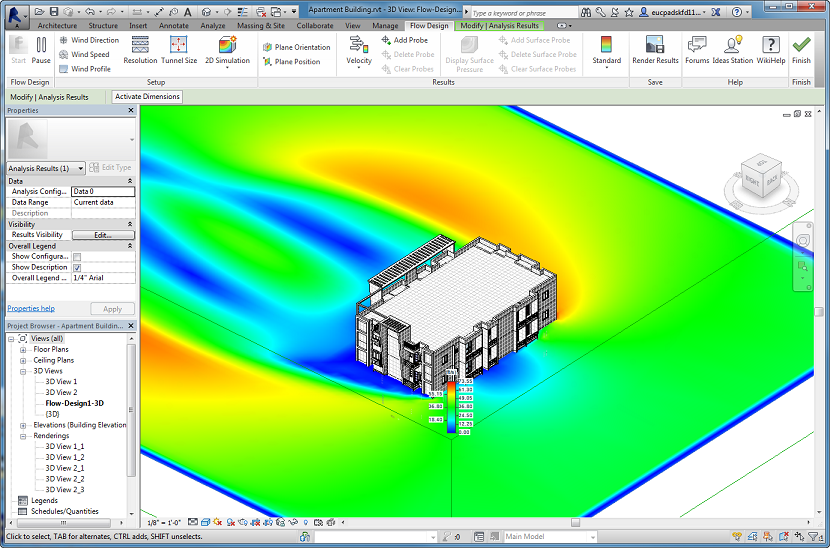
 

I have downloaded and installed Autodesk Revit LT 2015 and Autodesk Flow Design. Did I do something wrong? How can I open Flow Design inside Revit?

Thanks

Reply
Reply
0 Likes
Accepted solutions (1)
3,195 Views
1 Reply
Reply (1)
Message 2 of 2

hartogj
Community Manager
Community Manager
Accepted solution

Right now Flow Design Revit support includes Revit 2014 (x64) and Revit Architecture 2014 (x64) 


The current release has not been tested on or developed for Revit LT 2015.


For now, you have a few options:


1) Output a neutral file and use Flow Design Standalone that installs as its own application outside of Revit, or

2) If you can, move to Revit 2014 (x64) or Revit Architecture 2014 (x64)


The development team is working on updated support for the 2015 versions of Revit, Revit Architecture, and Inventor Professional x64. These should be available soon.


Jon


Jon den Hartog

Product Manager
Reply
Reply
0 Likes