UI Bug

UI Bug

patrick_c3
Not applicable
433 Views
2 Replies
Message 1 of 3

UI Bug

patrick_c3
Not applicable

[ FlexSim 17.1.3 ]

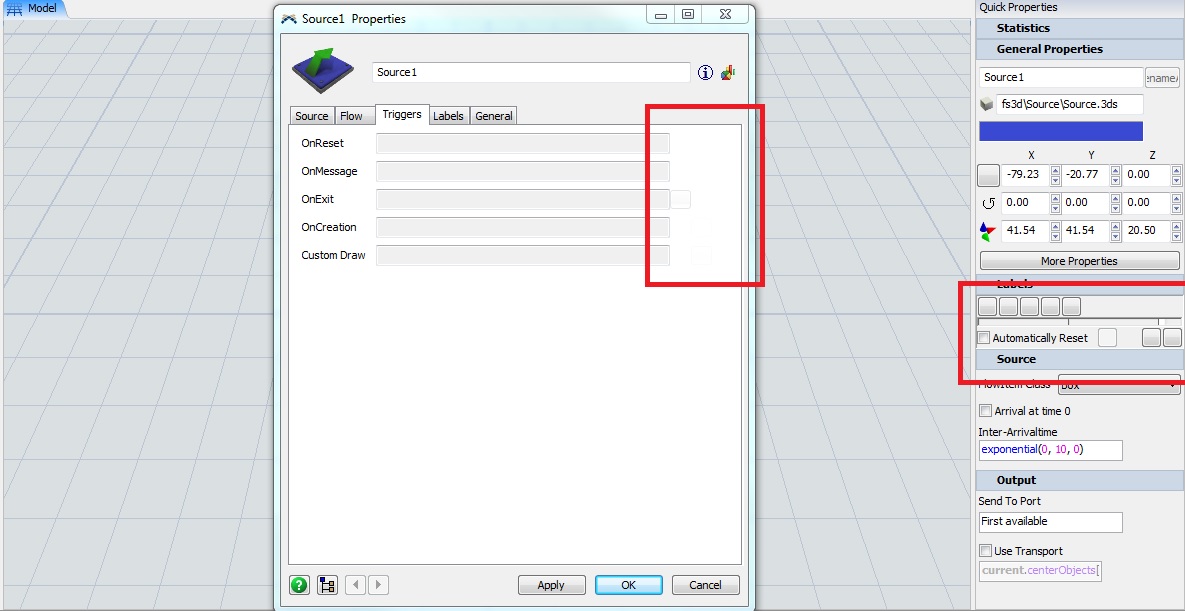
Just updated from 17.1.2 to 17.1.3, and I have noticed what seems to be a bug in the user interface. Trigger buttons and a few other things seem to have disappeared. They can still be selected and the hint text still appears when you hover the cursor, but the actual button icon is gone.

I have restarted my system and flexsim several times, so I don't think it is an issue with my machine. If anyone else is experiencing it or has a fix, it would be appreciated.

17-1-3-ui-bug.jpg

0 Likes
Accepted solutions (1)
434 Views
2 Replies
Replies (2)
Message 2 of 3

philboboADSK
Autodesk
Autodesk
Accepted solution

Are the files missing from the install directory?

  • C:\Program Files\FlexSim 2017 Update 1\buttons\_rename.bmp
  • C:\Program Files\FlexSim 2017 Update 1\buttons\add.png
  • C:\Program Files\FlexSim 2017 Update 1\buttons\remove.png
  • C:\Program Files\FlexSim 2017 Update 1\buttons\editcode.png
  • C:\Program Files\FlexSim 2017 Update 1\buttons\bitmaps\CoordinateSystems
  • C:\Program Files\FlexSim 2017 Update 1\buttons\uparrow_blue.png
  • C:\Program Files\FlexSim 2017 Update 1\buttons\pushpin.png
  • etc.

Try uninstalling FlexSim, deleting the C:\Program Files\FlexSim 2017 Update 1 directory, and reinstalling.


Phil BoBo
Sr. Manager, Software Development
Message 3 of 3

patrick_c3
Not applicable

@phil.bobo

Looks like that's what it was, thanks for the help.

0 Likes