procesador por tipo

procesador por tipo

josymar_alejandro_tr
Not applicable
682 Views
4 Replies
Message 1 of 5

procesador por tipo

josymar_alejandro_tr
Not applicable

[ FlexSim 22.2.0 ]

hola, espero me puedan ayudar , quiero que al salir de una fuente 5 tipos de caja pero cuando llegen

al procesador solo acepta un tipo asi con los 4 tipos de cajas restantes

0 Likes
Accepted solutions (1)
683 Views
4 Replies
Replies (4)
Message 2 of 5

kavika_faleumu
Autodesk
Autodesk

Hey @Josymar_alejandro Tr, when posting a question, please be as specific as you can about your problem. It helps if you post screenshots or your model so we can better understand what your problem is. Could you please provide more details and post a model to this link above?

Message 3 of 5

patricia_brenny_r
Not applicable

Hi there! From what I understood you want your processor to accept only one type of item, correct?

There are many ways to do this, but what I believe will match your intentions better is using an intermediate queue.

You can place your flowitems on an intermediate queue and on said qeue's properties panel, in the output section, use the picklist to choose "port by case".

Configure it to send the items with the type desired to the correct output port of your processor (according to the order it was connected using the "a" key) , this way only the items you configured will be sent to the processor.

This method is of great use when you want specific processors to process specific items.

0 Likes
Message 4 of 5

jason_lightfoot_adsk
Autodesk
Autodesk
Accepted solution

Use the processor's pull requirement to only pull the type of box it accepts.


I seem to have had a bad translation earlier and interpreted the question as the need to create different flowitems which is not what you're asking. I'll leave that answer here in case it's of any use:

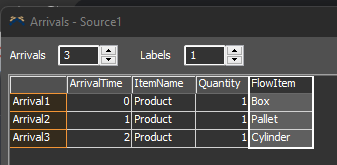
To switch object created - use the FlowItemClass property. Here's an example with a FlowItem Column in a schedule:

1660417414051.png

On reset:

Table schedule=current.attrs.variables.subnodes["schedule"];
string nextFlowItemClass=schedule[1]["FlowItem"];
current.setProperty("FlowItemClass",nextFlowItemClass);

Then on creation:

Table schedule=current.attrs.variables.subnodes["schedule"]; 
int repeatSchedule=current.attrs.variables.subnodes["repeat"].value;
if (rownumber<schedule.numRows || repeatSchedule) {
    if (rownumber==schedule.numRows)
        rownumber=0;
    string nextFlowItemClass=schedule[rownumber+1]["FlowItem"];
    current.setProperty("FlowItemClass",nextFlowItemClass);
}

Message 5 of 5

Jeanette_Fullmer
Community Manager
Community Manager

Hi @Josymar_alejandro Tr, was one of Jason Lightfoot's or Patricia_brenny R's or Kavika F's answers helpful? If so, please click the "Accept" button at the bottom of the one that best answers your question. Or if you still have questions, add a comment and we'll continue the conversation.

If we haven't heard back from you within 3 business days we'll auto-accept an answer, but you can always unaccept and comment back to reopen your question.

0 Likes