Operator Positioning at Processor

Operator Positioning at Processor

marco_n2
Not applicable
255 Views
4 Replies
Message 1 of 5

Operator Positioning at Processor

marco_n2
Not applicable

[ FlexSim 19.0.2 ]

Hi all,

I like to know how I can position an operator at a processor to assist the work being made at the processor.

The 'Carrier' operator shall first carry the part to the processor, then the 'ProcEng' shall will step in front of it and perform the work and finally 'Carrier' operator will pickup the part and carry to the end buffer.

Can this being done without any coding (e.g. ProcessFlow) ?

Ideally I like to assign a task 'CarryParts' to the carrier operator and a task 'Process' to the ProcEng operator. We can classify this as skills.

This is what happens in our real machine testroom, some people are installing tools, other run the machine process.

Regards

operatoratprocessor001.fsm

with dispatcher

operatoratprocessor001b.fsm

0 Likes
Accepted solutions (1)
256 Views
4 Replies
Replies (4)
Message 2 of 5

zac_h_adsk
Autodesk
Autodesk
Accepted solution

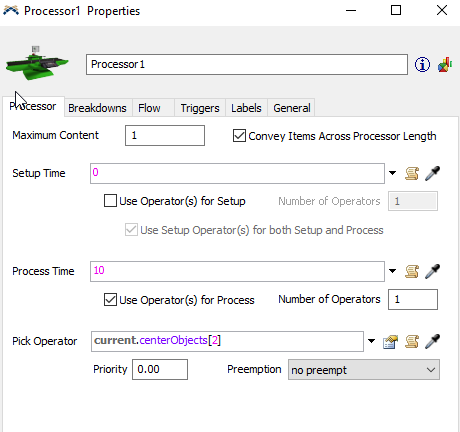
@Marco Ney You can edit the Processor properties by double clicking on the processor. Then under the Processor tab, under Process Time there is a check box for "Use Operator(s) for Process" by checking that and then under to the right of Pick Operator click on the edit button and select the correct port, in your case port 2 is for the ProcEng. This will make the process engineer work on the item and then when it is done have the Carrier take the item to Queue2.

2019-05-14-09-30-52-processor1-properties.png

operatoratprocessor001b.fsm

0 Likes
Message 3 of 5

marco_n2
Not applicable

OK, is clear how to assign the process operator.

How can I define the position of the process operator in front of the processor. I like him to be in front of the panels with the buttons.

I have created a model with 2 lines to have the operator move around.

You can notice that the parts move over belt before the process operator is there. After being deposed the part moves to the end of the belt and return to the front when the process operator arrives at the workplace.

operatoratprocessor002.fsm

0 Likes
Message 4 of 5

joseph_g3
Not applicable
@Marco Ney

One way to make the operator stand in front of the processor without using process flow is to use network nodes.

If you are unfamiliar with them, here are some good intros:

KEY CONCEPTS ABOUT TRAVEL

WORKING WITH TRAVEL NETWORKS

Here I edited your model using network nodes to get the process operator to stand in front of both processors: operatoratprocessoranswer.fsm

0 Likes
Message 5 of 5

joseph_g3
Not applicable

Also note that if you right-click on any of the network nodes and go to "Network View Mode" you can make the network nodes and edges invisible.

0 Likes