Hi @tomonori S,
Picking Based on Distance
The key to ordering the orders by distance is to write custom code. From the attached model, in the Create Orders box, select the Create Object, add a label to the created items called "Rack" with a value of "Table("ItemLocation").executeCell(token.TaskRank, "Rack")". This will store the rack into the order.
In the Pickers Pull Orders and Items box, add an Assign Labels activity after the first Pull from List. The purpose of this activity is to re-order all of the pulled orders based on distance. Notice that this will only order the pulled orders.
Open up the Assign Labels activity. Add a label called "OrderedOrders". Select the arrow underneath "Value". Hover over "Array" and click "Create an Array of Values". Then click on the custom code icon. Delete the text of the custom code and past the following:
/**Custom Code*/
Object current = param(1);
treenode activity = param(2);
Token token = param(3);
Variant assignTo = param(4);
string labelName = param(5);
treenode processFlow = ownerobject(activity);
int orderArraySize = token.Orders.length;
Array orderedOrders = Array(0);
Array Orders = token.Orders;
Object aquiredOperator = token.Picker.as(Object);
double shortestDistance = 0.0;
int shortestIndex = 0;
for (int i = 1; i <= Orders.length; i++)
{
	double tempDistance = 0.0;
	Object object1 = aquiredOperator;
	Object object2 = Orders.Rack;
	double x1 = vectorprojectx(object1, 0.5 * xsize(object1), -0.5 * ysize(object1), 0, model());
	double y1 = vectorprojecty(object1, 0.5 * xsize(object1), -0.5 * ysize(object1), 0, model());
	double z1 = vectorprojectz(object1, 0.5 * xsize(object1), -0.5 * ysize(object1), 0, model());
	double x2 = vectorprojectx(object2, 0.5 * xsize(object2), -0.5 * ysize(object2), 0, model());
	double y2 = vectorprojecty(object2, 0.5 * xsize(object2), -0.5 * ysize(object2), 0, model());
	double z2 = vectorprojectz(object2, 0.5 * xsize(object2), -0.5 * ysize(object2), 0, model());
	tempDistance = sqrt(sqr(x1 - x2) + sqr(y1 - y2) + sqr(z1 - z2));
	if ((i == 1) || (tempDistance < shortestDistance))
	{
		shortestDistance = tempDistance;
		shortestIndex = i;
	}
	if (i == Orders.length)
	{
		orderedOrders.push(Orders[shortestIndex]);
		Orders.splice(shortestIndex,1);
	}
}
for (int i = 1; i <= orderedOrders.length; i++)
{
	double tempDistance = 0.0;
	Object object1 = orderedOrders.Rack;
	for (int j = 1; j <= Orders.length; j++)
	{
		Object object2 = Orders.Rack;
		double x1 = vectorprojectx(object1, 0.5 * xsize(object1), -0.5 * ysize(object1), 0, model());
		double y1 = vectorprojecty(object1, 0.5 * xsize(object1), -0.5 * ysize(object1), 0, model());
		double z1 = vectorprojectz(object1, 0.5 * xsize(object1), -0.5 * ysize(object1), 0, model());
		double x2 = vectorprojectx(object2, 0.5 * xsize(object2), -0.5 * ysize(object2), 0, model());
		double y2 = vectorprojecty(object2, 0.5 * xsize(object2), -0.5 * ysize(object2), 0, model());
		double z2 = vectorprojectz(object2, 0.5 * xsize(object2), -0.5 * ysize(object2), 0, model());
		tempDistance = sqrt(sqr(x1 - x2) + sqr(y1 - y2) + sqr(z1 - z2));
		if ((j == 1) || (tempDistance < shortestDistance))
		{
			shortestDistance = tempDistance;
			shortestIndex = j;
		}
		if (j == Orders.length)
		{
			orderedOrders.push(Orders[shortestIndex]);
			Orders.splice(shortestIndex,1);
		}
	}
}
Note that the above code will order the orders by looking first at the closest item to the operator, then the next closest item, then the next closest item. If you are looking for the shortest possible path, you will need to completely rebuild the model and design it for the optimizer.
Next, open up the Assign Labels in the first sub-flow underneath Pickers Pull Orders and Items. Underneath the label called "PullLable", edit the value to say, "token.parent.OrderedOrders[token.Rank].Label". Underneath the label "PullQuantity" edit the value to say, "token.parent.OrderedOrders[token.Rank].Quantity.
This will give you a better travel path than before.
Creating Different Number of Items
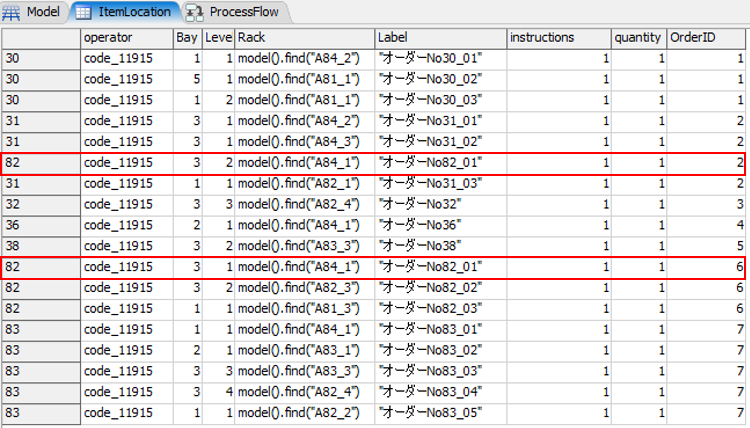
To reduce the number of items created within each rack, simply edit the "instructions" column within the table ItemLocation. Make sure that the value of this column is equal to or exceeds that of the "quantity" column or else the model will break.

global-table-in-picking-model-with-row-batching-an.fsm