How can I use the concat command to create a global variable name?

How can I use the concat command to create a global variable name?

tee_hiett
Not applicable
354 Views
9 Replies
Message 1 of 10

How can I use the concat command to create a global variable name?

tee_hiett
Not applicable

[ FlexSim HC 5.1.0 ]

4175-puiar.png

In the code listed above, I would like to use name created in line 15 as the name of the global variable to receive the time value instead of using the switch command in line 20.Since the integer variable Counter contains the numeral which is in the middle of the name of the global variable I thought I could use the concat command to create the name and use that in lieu of the switch command but I couldn’t get that approach to work. Of course, it doesn’t make any difference in the simple model but some of our clinics have 30-40 providers and creating the name of the global variable would be helpful. Besides, I would just like to know.

Any suggestions?

Tee

PS: I used the FlexSim Answers to find the concat command. I couldn’t find it in FlexSim Users Help.

0 Likes
Accepted solutions (1)
355 Views
9 Replies
Replies (9)
Message 2 of 10

Matthew_Gillespie
Autodesk
Autodesk

There's not really an easy way to do this with the way global variables are set up. The main issue is that the variable's value is stored in memory and the only way to set it is using the LastPCITimeNum = value method.

You can use the name to find the node in the tree where the initial value is stored and update its initial value by setting the value on that node. Then you would have to call the refreshglobalvariables command which resets the global variable's value in memory to its initial value. You would also want to reset this value to the original value and call refreshglobalvariables on reset, otherwise your variable would never be reset to its initial value.

As you can see this would require a fair bit of code to navigate the tree and "hack" the global variable system. I personally wouldn't recommend doing that though.

The concat command is in the User Manual. If you open Help > Commands you'll see an alphabetical list of commands. You can also switch to a list grouped by category, an alphabetical index, or a category index in Quick Properties.


Matthew Gillespie
FlexSim Software Developer

Message 3 of 10

SCHamoen
Advisor
Advisor

@Tee Hiett isn't it possible to just use a global variable array? That way you don't have to mess around with the name but just access the value directly with "Counter"

Message 4 of 10

joerg_vogel_HsH
Mentor
Mentor

You can use the classic technics of tables, labels or nodes to store or receive data. You build your own user command which contain a string to identify the storage place to get the value and optional a value to write new values. In the logic of your user command you translate the string and use an easier name structure for Flexsim.

0 Likes
Message 5 of 10

tee_hiett
Not applicable

Steven, I am not familiar with the global variable array feature. Do you happen to have an example of how it is used? Maybe Mathew will let us know if he thinks it would work in this case. Thanks for your help. Tee

0 Likes
Message 6 of 10

tee_hiett
Not applicable

Thanks, for the explanation, Matthew.

I know that the comcat command is in the list of commands. My problem was that nowhere in the usual manual is the word concatenate identified with the command comcat. Who would think to search for the word comcat? I have searched through the list of commands several times but somehow I never found comcat.

Anyway, I know about that now :-).

Tee

0 Likes
Message 7 of 10

philboboADSK
Autodesk
Autodesk
Accepted solution

You can use the executestring() command to execute a string that you concatenate together:

executestring(concat("LastPCI",numtostring(Counter),"TimeNum = getsimtime();"));


Phil BoBo
Sr. Manager, Software Development
Message 8 of 10

philboboADSK
Autodesk
Autodesk

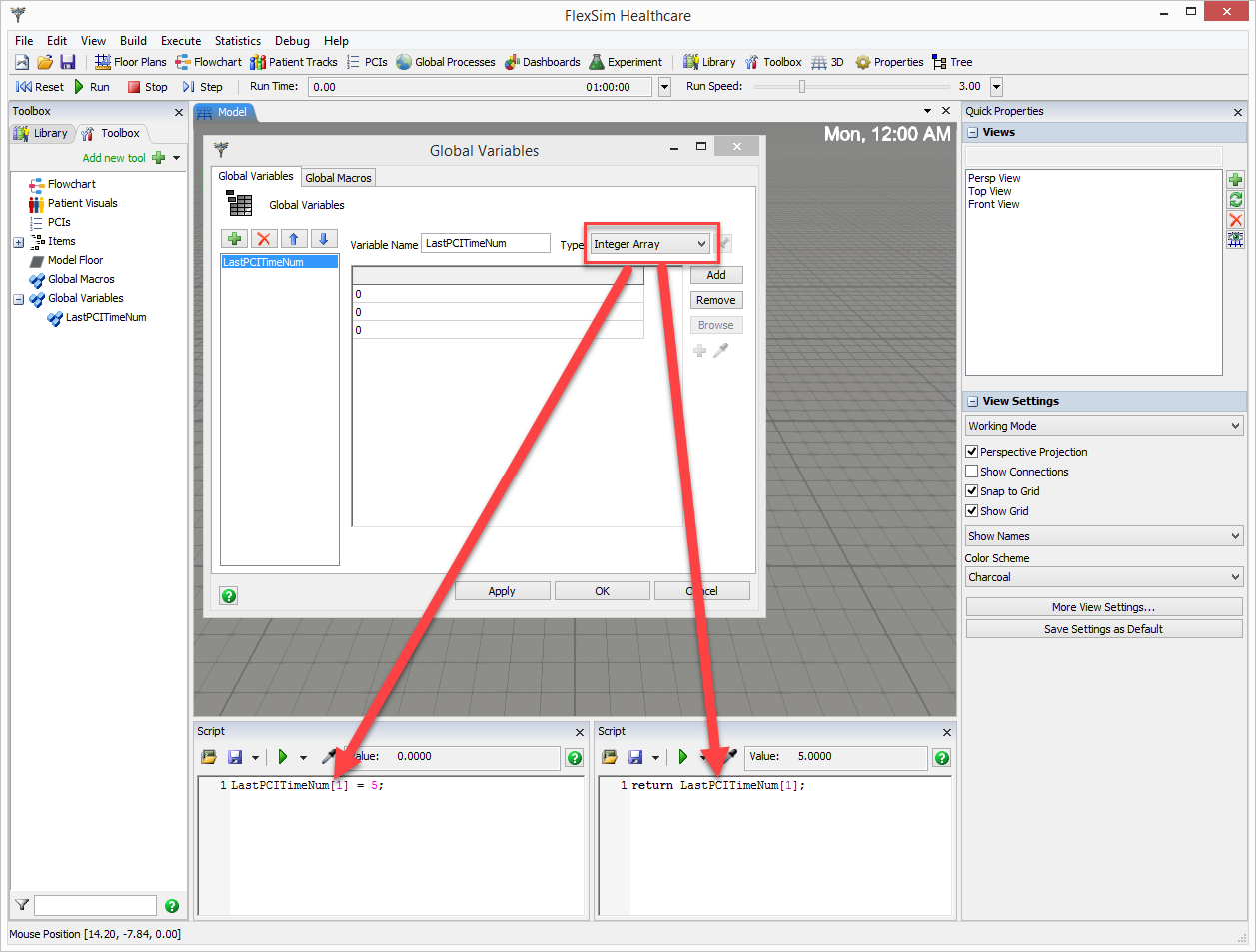
You select an Array type from the Type dropdown on the Global Variables window.

Then you can access each element in the array using variableName[IndexNumber] syntax, such as:

LastPCITimeNum[Counter] = getsimtime();

4183-global-variable-array.png


Phil BoBo
Sr. Manager, Software Development
0 Likes
Message 9 of 10

tee_hiett
Not applicable

This method works perfectly. Also the graphic clearly explained the process as well as demonstrating the use of script. Thanks for joining in.

Tee

0 Likes
Message 10 of 10

tee_hiett
Not applicable

This method works perfectly. Thanks for joining in.

Tee

0 Likes