Creating a module in FlexSim

Creating a module in FlexSim

CarlosReyes
Not applicable
618 Views
2 Replies
Message 1 of 3

Creating a module in FlexSim

CarlosReyes
Not applicable

[ FlexSim 23.0.1 ]

Hi everyone!

Hope you are doing great!

I'm following the user manual to create a module, but when I create a module node and the subnode within it and save the defaults with the button I created in the menu toolbar to apply: applicationcommand("savedefaultviewproject") it doesn´t create me the files testmodule.fsx and a testmodule.t in the folder "testmodule", so when I close FlexSim and open it again it's like the changes were unsaved. Do you know what am I doing wrong?


I attach some evidence of my process:

1673547195888.png

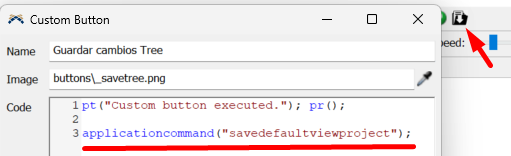
My custom button to save defaults:

1673547232360.png

FlexSim\modules directory :

1673547303579.png

Save Default Project/View:

1673547417683.png


Thanks for your answers!


Accepted solutions (1)
619 Views
2 Replies
Replies (2)
Message 2 of 3

JordanLJohnson
Autodesk
Autodesk
Accepted solution

It sounds like testmodule/testmodule.fsx (or .t) isn't saving. If you run FlexSim as an administrator and then repeat your steps, do the steps work? If so, then you probably don't have permission to save in that directory.

To avoid needing to run as an administrator, then follow the steps in the quick start to create a development version of FlexSim, in a location where you have permission to modify files:
https://docs.flexsim.com/en/23.0/Reference/DeveloperAdvancedUser/ModuleSDK/QuickStart/QuickStart.htm...

.


Jordan Johnson
Principal Software Engineer
>

0 Likes
Message 3 of 3

CarlosReyes
Not applicable

Thanks @Jordan Johnson !

It works if I run FlexSim as an administrator and I also put a development version of FlexSim as you said and now I don´t need to run as administrator FlexSim to save the changes.


regards!

0 Likes