create a Global Table in flexscript

create a Global Table in flexscript

enrique.elizaga
Advocate Advocate
1,372 Views
9 Replies
Message 1 of 10

create a Global Table in flexscript

enrique.elizaga
Advocate
Advocate

[ FlexSim 18.2.2 ]

Is it possible to create new tables inside part of a code. Then to destroy in another code. The number of tables created will depend on an integer in a label called "DAYS TO RUN". I want to have data per day on each table. I tried insertcopy but didn't work.

0 Likes
Accepted solutions (1)
1,373 Views
9 Replies
Replies (9)
Message 2 of 10

joerg_vogel_HsH
Mentor
Mentor

Try this

treenode globalTablesNode = model().find("Tools/GlobalTables");
treenode newTable = createcopy(globalTablesNode.first,globalTablesNode,0);
newTable.name = "myNewTable";

It copies the first global table of the global tables.

If you know the name of the table for example "MyKnownTableName"

globalTablesNode.subnodes["MyKnownTableName"] 

is the reference to this table object.

Message 3 of 10

SCHamoen
Advisor
Advisor
Accepted solution

@Enrique Elizaga If I want to do something like this I look through the tree to find how FlexSim did it. In this case there is actually an application command for it:

treenode table = applicationcommand("addglobaltable");
Message 4 of 10

enrique.elizaga
Advocate
Advocate

Great @steven.hamoen, it worked! Can you give me more detail on "looking through the tree". This will give me lots of options. For example, when the table is created it opens it up on a new window. How can i close that window through flexscript...

0 Likes
Message 5 of 10

SCHamoen
Advisor
Advisor

@Enrique Elizaga

If you open the view tree you can search through the tree in the search box in the quick properties. So I looked for Toolbox and drilled down till I found the table add option

Message 6 of 10

alfredo_df2
Not applicable

After entering the table, how do I assign the dimensions by flexscript?

0 Likes
Message 7 of 10

enrique.elizaga
Advocate
Advocate

Hi, do you mean the table size? Doing this.

MyKnownTableName.setSize(5,5);

Or whatever size you want.

0 Likes
Message 8 of 10

alfredo_df2
Not applicable

capture.png

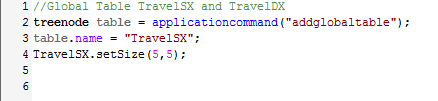
I cannot do it. This is my script, I want to inser by flexscript a table 38x6, but the software don't read the comand.

0 Likes
Message 9 of 10

enrique.elizaga
Advocate
Advocate

@Alfredo DF2 try this instead:

treenode TABLE = applicationcommand("addglobaltable");
TABLE.name = "TravelSX";
Table("TravelSX").setSize(5,5);

Message 10 of 10

manuel_s4
Not applicable

Hi @steven.hamoen,

I searched in the same way as you suggested through the view tree, but I was not able to find which the command closes the window of the new table, can you add it, please?

Thanks.

Manuel.

0 Likes