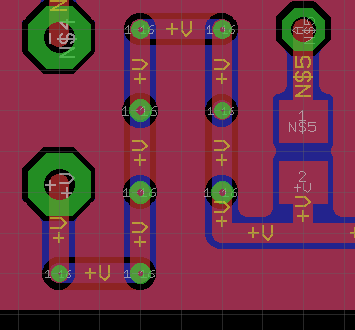
Octagonal (not round) clearance around vias.

Octagonal (not round) clearance around vias.

odinrizhanin
Advocate Advocate
6,388 Views
21 Replies
Message 1 of 22

Octagonal (not round) clearance around vias.

odinrizhanin
Advocate
Advocate

Hi,
Is it possible somehow to make copper shape around vias not octagonal but round (or have more sides)?.

Explanatory image in attachment.

Reply
Reply
Accepted solutions (1)
6,389 Views
21 Replies
Replies (21)
Message 2 of 22

Yura.Ivanov.VLuki
Collaborator
Collaborator

Hi,

octagonal copper shape around vias at you in settings.

Remember that you changed at yourself in settings.

PCB.png


Reply
Reply
0 Likes
Message 3 of 22

odinrizhanin
Advocate
Advocate

Юрий, добрый день!
Thank you for response, I have found only how to change the shape of PAD, not of the copper around it.

I believe, if you reduce via drill to 0.2mm, you will have the same issue as me - the copper around round via will be in shape of octagon.


So, the problem is still not solved.

Reply
Reply
0 Likes
Message 4 of 22

Yura.Ivanov.VLuki
Collaborator
Collaborator

@odinrizhanin wrote:

I believe, if you reduce via drill to 0.2mm, you will have the same issue as me - the copper around round via will be in shape of octagon.


no problem2019-02-21_174850.png

Reply
Reply
Message 5 of 22

Yura.Ivanov.VLuki
Collaborator
Collaborator

Attachments

Reply
Reply
0 Likes
Message 6 of 22

odinrizhanin
Advocate
Advocate

Thank you for board file! 🙂
This helped to understand, that issue is somewhere in Eagle's global settings or DRC file (not VIAs settings), because when I open your board file on my PC, everything looks like it should - copper layer around 0.2mm round via is round too...

When I go back to my design, with same VIA settings, problem exists.

via_strange.png

Going to search this settings

Reply
Reply
0 Likes
Message 7 of 22

one-of-the-robs
Advisor
Advisor

I'm not at a machine with Eagle to check this but I think the clearance round a circular via is drawn as a series of straight lines approximating a circle, and that the length of those lines depends on the "width" parameter of the polygon. If you want near-circular rings round very small vias, you need to use a "narrow" polygon.

Reply
Reply
Message 8 of 22

Yura.Ivanov.VLuki
Collaborator
Collaborator

No.

With settings of a polygon, I cannot receive octagonal openings.

Попробуйте загрузить DRC (default), and (or) NET Class (default).

Remember (where was and with whom). 😉

Good luck.

Reply
Reply
0 Likes
Message 9 of 22

Yura.Ivanov.VLuki
Collaborator
Collaborator

IMHO, look at settings

11.png

Reply
Reply
0 Likes
Message 10 of 22

iquacker
Advocate
Advocate

The answer is how thick the lines are that form the polygon. On the left, the polygon line width is 0.2mm, on the right it is 0.1mm. The second picture shows the same thing but with the layer specified as a hatch rather than a solid. This makes the effect a bit easier to see. I have not done any work to see if these widths hold true globally or if they are related to the pad size of the via - which in this case is .7mm


Regards -


.1mm vs .2mm with layer solid filled.png.1mm vs .2mm with layer hatch filled.png

Reply
Reply
Message 11 of 22

Yura.Ivanov.VLuki
Collaborator
Collaborator

Hi from Russia!

And maybe, that you had oktogonalny transitional openings earlier?
Did you set them?
Try to delete a polygon and to make rollback.
Good luck!

Reply
Reply
0 Likes
Message 12 of 22

Yura.Ivanov.VLuki
Collaborator
Collaborator

1. We put Vias, we draw a Poligon.

2. We change a form of Vias.

3. We delete a polygon and we do rollback, (Ctrl+Z).

via_clearance_01.pngvia_clearance_02.pngvia_clearance_03.png

Reply
Reply
0 Likes
Message 13 of 22

odinrizhanin
Advocate
Advocate

Hi guys!

Привет из Риги 🙂
@Yura.Ivanov.VLuki  , @iquacker  thank you for attempts to recreate a problem.
In my case I tried all following:

1) changed width of polygon down to ZERO mil. (every time pressing command "RATSNEST" to recalculate polygon)

2) tried to assign different NET classes to signal of polygo

3) Change "Shapes" tab in DRC (I believe, it's only for PADs, not VIAs)


all points didn't help 😞  @one-of-the-robs  could this be officially considered as bug?? - image attached + board file attached.still_via_fail.png

Reply
Reply
0 Likes
Message 14 of 22

hudriwudri
Advocate
Advocate

I just experimented a bit with your brd file, and I think it's a bug, but a very concealed one. And an old one too, Eagle 7.7 behaves the same. The issue arises when width and isolate are both very small. If you make one of them sufficiently large, you get a (nearly) round cutout.

For example with your brd file, the issue is still there when width=14mil and vanishes when width=15mil (and the resulting isolate value from DRC/netclass = 5mil).


poly14.pngpoly15.png


So I suspect the problem is a rounding error in an intermediate calculation result in the program. Increasing the precision (float to double) or changing the sequence of math operations (multiplication before division) might already cure it.

Reply
Reply
Message 15 of 22

Yura.Ivanov.VLuki
Collaborator
Collaborator

Yes, at values less than 9 mil, all octagonal becomestill_via_fail_break_02.pngstill_via_fail_break_03.png

Reply
Reply
Message 16 of 22

iquacker
Advocate
Advocate

Meanwhile...


I do lots of very tight 4 layer boards with 4/4 and even 3/3 copper and have never found octagonal setbacks to be a problem, so I never tried to fix it until last night, just to see if I could.


Regards - 

Reply
Reply
0 Likes
Message 17 of 22

iquacker
Advocate
Advocate

Making the line width bigger, makes the setback go round.

Reply
Reply
Message 18 of 22

Yura.Ivanov.VLuki
Collaborator
Collaborator

The nature does not suffer direct lines, the computer cannot take ripples in the water.
Draw hands!

Good luck!

Reply
Reply
0 Likes
Message 19 of 22

odinrizhanin
Advocate
Advocate

@one-of-the-robs , could be this fixed in next version of Eagle? - it's quite unpleasant, that I can't set width and clearance of polygon I want without getting a bug mentioned in the topic.

Reply
Reply
Message 20 of 22

one-of-the-robs
Advisor
Advisor

@odinrizhanin wrote:

@one-of-the-robs , could be this fixed in next version of Eagle? - it's quite unpleasant, that I can't set width and clearance of polygon I want without getting a bug mentioned in the topic.


I fear you have completely misidentified me. I am not an employee of Autodesk, nor in any other way an official representative. I am merely a user, like yourself, albeit with a good few years' experience and a tendency to post too much on forums.

Reply
Reply