Move pin name text in symbol editor

Move pin name text in symbol editor

cdenneyB9ZMH
Enthusiast Enthusiast
26,077 Views
35 Replies
Message 1 of 36

Move pin name text in symbol editor

cdenneyB9ZMH
Enthusiast
Enthusiast

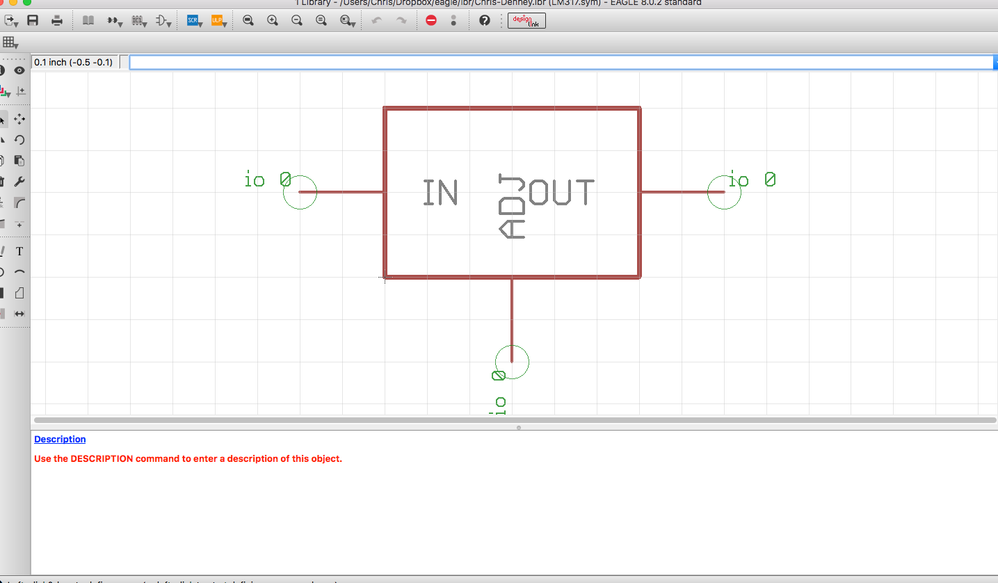
Is it possible to move a pin's name in the symbol editor. For instance, if you were drawing an LM317 symbol and wanted the In, Out, and Adj to appear outside of the body of the symbol rather than inside of it, could you do this without simply creating separate text files? Is there a way to reposition these? If not, then I know I can just use the text tool. Just curious about that.


I'm also curious if it's possible to give the pins a different name/number. For example if you were using an LM317 in an SO8 package, the In would be Pin 1, the Out would be Pin 2, and the Adj would be Pin 4. I know you can assign this in the Device rather than the symbol but I do like it when my Symbols match my Packages pin numbering-wise.


Thanks in advance
 

Screen Shot 2017-03-14 at 1.59.18 PM.png

Reply
Reply
Accepted solutions (2)
26,078 Views
35 Replies
Replies (35)
Message 2 of 36

jorge_garcia
Autodesk
Autodesk
Accepted solution

Hi @cdenneyB9ZMH,


Thanks for your participation. The pin text is not moveable, so as you have already mentioned what you have to do make the pin text invisible using the properties and then using the TEXT command add in your own text.


In the symbol the pins will only show the pin name, once you go into the device EAGLE will reflect the pad numbers on the symbol automatically, again the pad text are not user modifiable. Depending on the package variant in the device the Pad numbers will update automatically so for different packages you'll get different pad numbers on the symbol.


Please accept as solution if my post fully resolves or you issue, or reply with additional details if the problem persists.


Let me know if there's anything else I can do for you.


Best Regards,


Jorge Garcia
​Product Support Specialist for Fusion 360 and EAGLE

Kudos are much appreciated if the information I have shared is helpful to you and/or others.

Did this resolve your issue? Please accept it "As a Solution" so others may benefit from it.
Reply
Reply
Message 3 of 36

cdenneyB9ZMH
Enthusiast
Enthusiast

I suppose I'm making a futile effort to use Eagle the way I used CircuitMaker/Altium of which I'm far more familiar with. To me, the way that Altium handles this situation seems to be the more appropriate way but I could definitely see somebody disagreeing with me on this point and suggesting the way EAGLE handles it is the more appropriate way.


Either way, it will get done and I'll have a working circuit. Thank you for your help.

Reply
Reply
Message 4 of 36

C.Nicks
Advisor
Advisor

SUGGESTION:

Make the pins smash-able from the symbol editor only. Being able to change the size and location would go a long way to prettier schematics.

Best Regards,
Cameron

Eagle Library Resources


Kudos are much appreciated if the information I have shared is helpful to you and/or others.
Did this resolve your issue? Please accept it "As a Solution" so others may benefit from it.

Reply
Reply
Message 5 of 36

cdenneyB9ZMH
Enthusiast
Enthusiast

C.Nicks - It's funny because this is exactly what I had been trying to do. I kept typing "smash" in the command line but it would just tell me it can only be used in a schematic or board editor.


I completely agree with C.Nicks on this one. Making the symbol 'smashable' would go a long way in making things neat and tidy. One of the risks with the current method is that you need to be very careful when you are labeling the pins, otherwise you could completely screw up your schematic.


For example, in the example above with the LM317, what if when I went to add text to the symbol, I accidentally put the "In" text on the Out pin and put the "Out" text on the In pin. Then when I did my layout I wired it up according to what I labeled everything, I'd have a bad circuit and would be struggling to troubleshoot it. If we could Smash the symbol instead, then the risk of labeling the pins wrong would be virtually eliminated.

Reply
Reply
Message 6 of 36

matt.berggren
Alumni
Alumni

Totally agree.  You get an Upvote from the dev team.  🙂  We'll get this on the list of stuff for us to implement.  We are doing a lot of work on libraries at the moment but of course this takes some serious care to not screw up people's existing content.  We'll look to get this capability scheduled and try and implement this in a future release.  No promises yet on when we do it, but it's something we need to do anyway to support importing libraries from other systems, so we'll have a look at it.  


Thanks for the suggestion!


Best regards,


Matt.

Reply
Reply
Message 7 of 36

C.Nicks
Advisor
Advisor
Accepted solution

I found and modified a useful ULP last night that essentially mimicks smashing the symbol pins. It only works on the pin name and not the pad, but it may be useful to someone.

You can easily change the text size/ratio, location, and pin visibility by editing the file.


Current defaults:

Layer: 97 info

Size: 0.06
Ratio: 8

Offset: 0.15 (good for middle length)
Visibility: Pad numbers along with generated smashed texts.

 
To change visibility of pin, change pad on line 72 to "off, both, pin, or pad"


Original is located here

Best Regards,
Cameron

Eagle Library Resources


Kudos are much appreciated if the information I have shared is helpful to you and/or others.
Did this resolve your issue? Please accept it "As a Solution" so others may benefit from it.

Reply
Reply
0 Likes
Message 8 of 36

cdenneyB9ZMH
Enthusiast
Enthusiast

That's really neat C.Nicks. I'll have to give that a shot.

Reply
Reply
0 Likes
Message 9 of 36

owendelong
Contributor
Contributor

So, uh, here we are two years later and this still doesn't seem to be present in 9.4.2.


Any forecast as to when it will be available? Could really use it in several parts I'm creating right now.


Reply
Reply
Message 10 of 36

jorge_garcia
Autodesk
Autodesk
Hi @owendelong,

I hope you're doing well. It's on the wishlist but it's currently considered a low priority item and hence doesn't have an ETA. Feel free to followup whenever you wish since these bumps do help. In the meantime continue to use the work around indicated above.

Best Regards,


Jorge Garcia
​Product Support Specialist for Fusion 360 and EAGLE

Kudos are much appreciated if the information I have shared is helpful to you and/or others.

Did this resolve your issue? Please accept it "As a Solution" so others may benefit from it.
Reply
Reply
0 Likes
Message 11 of 36

Steve.Drummond8Y3YW
Participant
Participant

Hi

Just to add my frustration at not being able to do this. I've used several schematic packages (Mentor Design Architect, Cadence Capture, Proteus) over the years and Eagle is the only one that makes this simple task so difficult. It was excusable when Eagle was  £70 for a perpetual license, but we are now paying £500 per year per seat for a Premium licence (which is only slightly less than Cadence).  Would be nice if this could be bumped up the priority list. 

Reply
Reply
Message 12 of 36

kb9ydn
Advisor
Advisor

Another bump for this one.  I'm finding pin labeling to be quite annoying at the moment.


C|

Reply
Reply
Message 13 of 36

Anonymous
Not applicable
Another upvote. This would make schematics a lot prettier!
Reply
Reply
0 Likes
Message 14 of 36

wwfeldman
Advocate
Advocate

agreed

the original post is dated march 14 2017 it is now march 5 2020

and eagle is being pushed into fusion (a square peg in a round hole?)


what's the plan now?

Reply
Reply
Message 15 of 36

h_a_van_doorn
Explorer
Explorer

Capture.PNG


Im using Eagle now for only 3 weeks and this is what a component i designed looks like.

Horible in my opinion.

Please do something about it.


Harry

Reply
Reply
Message 16 of 36

Anonymous
Not applicable

Please make it happen, the current way is not fit for a tool like EAGLE

Reply
Reply
0 Likes
Message 17 of 36

Anonymous
Not applicable

Same here. I'm just starting to us Fusion 360 Electronic Designer. I come from the land of Altium and DipTrace. Not being able to move the name really makes for a lousy experience. Hiding and adding text is way more likely to result in me naming something improperly and ending up with a bad design. Please fix this.

Reply
Reply
Message 18 of 36

ikislol
Explorer
Explorer

Here another Upvote? Is there a voting list for this feature?

Reply
Reply
0 Likes
Message 19 of 36

cdenneyB9ZMH
Enthusiast
Enthusiast

Just wanted to post a quick update. I have reached out directly to a member of Autodesk's support staff. They are aware of this feature request and are going to do what they can to encourage the development team to consider adding it sooner rather than later. However, if more folks continue to make noise about it, it's more likely that this feature could possibly get implemented.


For now @C.Nicks definitely seems to have the best work around solution. But I definitely agree with everybody else here. This should be a feature built into Eagle.

Reply
Reply
Message 20 of 36

grahamUTKMN
Advocate
Advocate

Another vote from me then!

Reply
Reply