

Message 1 of 1
Manufacturing preview does not show board image

- Mark as New
- Bookmark
- Subscribe
- Mute
- Subscribe to RSS Feed
- Permalink
- Report
Hello,
I have updated to autodesk Eagle 9.3, worked still my old version 7, using Mac OS.
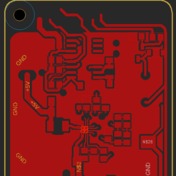
I have completed a board and success fully pushed it to fusion 360, build some 3D parts in fusion, now there is no copper trace layout on the BCB plane in fusion imported??, i checked the canvas tabs in the menu an they are there, but have prohibited signs on it means there is no data inside the tab folder..
I want to view my board in preview option in the PCB work sheet using the MANUFACTURING tab, all the data is in there parts, true holes, and will highlighted when using the view button, trace information is there but cannot get the image produced in the screen how the board is look like..
Anyone a idea how to make this work??.
Greets Willem.
Reply
Reply


