Eagle 9.2 - Error when running on Debian Buster (Linux x64)

Eagle 9.2 - Error when running on Debian Buster (Linux x64)

kaktus
Enthusiast Enthusiast
6,772 Views
7 Replies
Message 1 of 8

Eagle 9.2 - Error when running on Debian Buster (Linux x64)

kaktus
Enthusiast
Enthusiast

Hello. Smiley Wink


I am passionate about electronics and have been using the Eagle editor for almost 20 years.
Of which a very long time on the Linux platform.

For obvious reasons I use the free license. Smiley Very Happy


Recently I wanted to get acquainted with novelties that have been added to the latest version of Eagle. That's why I started to run it.

I encountered the following error:

08:23 kaktus@donica:/opt/eagle-9.2.0$ ./eagle
terminate called after throwing an instance of 'std::runtime_error'
  what():  locale::facet::_S_create_c_locale name not valid
Przerwane
08:23 kaktus@donica:/opt/eagle-9.2.0$

which I handled as follows:

08:33 donica:/opt/eagle-9.2.0# echo "en_US.UTF-8 UTF-8" > /etc/locale.gen
08:33 donica:/opt/eagle-9.2.0# locale-gen
Generating locales (this might take a while)...
  en_US.UTF-8... done
Generation complete.
08:33 donica:/opt/eagle-9.2.0# ./eagle
QStandardPaths: wrong ownership on runtime directory /run/user/504, 504 instead of 0
Sandboxing disabled by user.
inotify_add_watch("/root/.local/share/Eagle/cloud-processing/3d-models-jobs-EF5KMX5AGCHA.json") failed: "No such file or directory"

You can see some warnings, but this allows to run the program.
The problem is that the changed configuration causes clutter in my environment. The language settings are confused, which is not good. Smiley Frustrated

My system has a Polish interface.


Is this situation known to somebody?
Maybe there is a better solution that I don't know?

Reply
Reply
0 Likes
Accepted solutions (1)
6,773 Views
7 Replies
Replies (7)
Message 2 of 8

kaktus
Enthusiast
Enthusiast

Hello. Smiley Very Happy


A newer version of the software marked 9.2.1 has the same problem ...

Reply
Reply
0 Likes
Message 3 of 8

one-of-the-robs
Advisor
Advisor

Instead of completely replacing your locales list, it should be acceptable to have both Polish and US enabled. The error you got looks like Eagle wants to use the minimal "C" locale, which should ALWAYS be present on a properly installed Linux system.

Reply
Reply
0 Likes
Message 4 of 8

kaktus
Enthusiast
Enthusiast
Accepted solution

Hello my mate. Smiley Wink

Especially for you I have found a solution.
There is nothing better than working alone.

This problem is well known (perhaps only in my country). And it has nothing to do with correct or incorrect installation and configuration of the system. But so far no one has indicated the correct and complete solution.
So I do it first, Smiley Very Happy on your forum.

The configuration required by Eagle is problematic. Only for the fact that it requires foreign-language locales. Without this the program does not start.

To solve the problem is necessary:
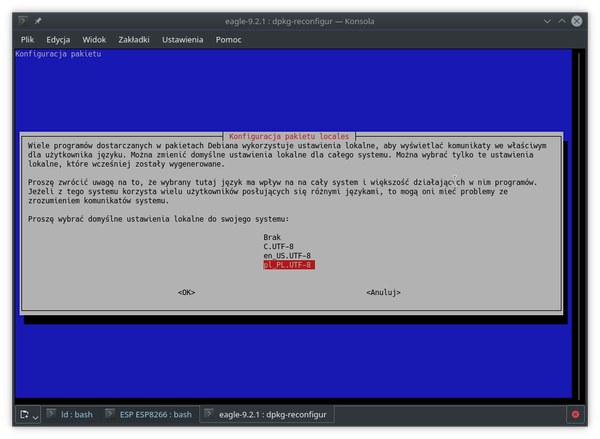
restart the configuration of the locales with the command

dpkg-reconfigure locales


select additional settings for the English language

en_US.UTF-8

Screenshot_20181024_235159.png
validate the choice.
Screenshot_20181024_235234.png
The shares will be confirmed by

root@programator:/opt/eagle-9.2.1# dpkg-reconfigure locales
Generating locales (this might take a while)...
  pl_PL.UTF-8... done
  en_US.UTF-8... done
Generation complete.

From now on, the Eagle will run correctly and without errors.

Thank you for your contribution and willingness to help. Smiley Happy

I greet you cordially!
I consider the subject to be closed.

Reply
Reply
Message 5 of 8

Anonymous
Not applicable

Thank you so much! Respect from Turkey ❤️

Reply
Reply
Message 6 of 8

kaktus
Enthusiast
Enthusiast

Smiley Happy

Thank you, that's nice of you to say.

Reply
Reply
0 Likes
Message 7 of 8

greeshsah
Participant
Participant

I am using eagle 9.4.2, i followed yours instruction but it still throwing error

Reply
Reply
0 Likes
Message 8 of 8

one-of-the-robs
Advisor
Advisor

OK, that no longer looks like a locale error but rather a MESA/DRI error. You probably need an LD_PRELOAD - sorry, I don't have time to search for that thread right now but it got bumped not that long ago.

Reply
Reply