Announcements

Announcement: We’re aware of an issue affecting starting a new topic from category pages and creating new blog posts. New topics can still be started directly from the relevant board. Learn more here.

Convert a .dwg to an older version

Convert a .dwg to an older version

Anonymous
Not applicable
14,617 Views
6 Replies
Message 1 of 7

Convert a .dwg to an older version

Anonymous
Not applicable
The DWG TrueView main page on autodesk.com says that it now contains the features of DWG TrueConvert. When I use TrueView and open a .dwg file, there are no options anywhere to convert to an older version of AutoCad.

"Incorporates all the TrueConvert functionality to convert sets of drawings from new versions of AutoCAD to older versions and vice versa"

Can anyone tell me how to convert a file ?
0 Likes
Accepted solutions (1)
14,618 Views
6 Replies
Replies (6)
Message 2 of 7

Anonymous
Not applicable
I am with you all the way in what you say. I did the same thing yesterday and I thought there might be a conflict with the new one so I removed the old TrueConvert before this up load, so I am really in a pickle.
I tried Help with all the topic names I could think of such as: Migration, translation, migrate, translate, convert, auto convert, autoconvert, DwgCvt (the name of the old program exe file), dwg convert, trueconvert, true convert, copy and I think a few others and no hits. Whats up? even when you go to the DWG TrueConvert page it takes you to the TrueView down load page. ARRRG!
0 Likes
Message 3 of 7

Anonymous
Not applicable
toolpro said the following On 3/21/2007 10:07 AM:
> so I removed the old TrueConvert before this up load, so I am really in a pickle.

The "old" DWGTrueConvert is still there...
http://download.autodesk.com/global/DWGTrueConvert/DWGTrueConvert.exe

If they pull that plug, try here:
http://www.amicrocad.com.br/a_downloads.htm


--
R.K. McSwain
http://rkmcswain.blogspot.com
0 Likes
Message 4 of 7

Anonymous
Not applicable
THANKS GREATLY, that first link still works and that at least gets me out of the Pickle. I tried quite extensively to find this link, how did you find it?

It still does not answer the original question of why TrueView does not do as they say, so if anyone has the answer to that I am still curious to know as I am sure others are.
0 Likes
Message 5 of 7

Anonymous
Not applicable
toolpro said the following On 3/21/2007 12:06 PM:
> THANKS GREATLY, that first link still works and that at least gets me out of the Pickle. I tried quite extensively to find this link, how did you find it?

No problem. Used Google.

>
> It still does not answer the original question of why TrueView does not do as they say, so if anyone has the answer to that I am still curious to know as I am sure others are.

Maybe the web team got ahead of the development team...


--
R.K. McSwain
http://rkmcswain.blogspot.com
0 Likes
Message 6 of 7

Anonymous
Not applicable
i have the same problem
0 Likes
Message 7 of 7

ukdxb012
Advisor
Advisor
Accepted solution

Open Trueview 2015 and select the 3rd icon from the top left (next to open after the application button). If you hover over the icon it will say DWG Convert. Dont open the drawing first, go through DWG Convert.


DWG Convert.bmp


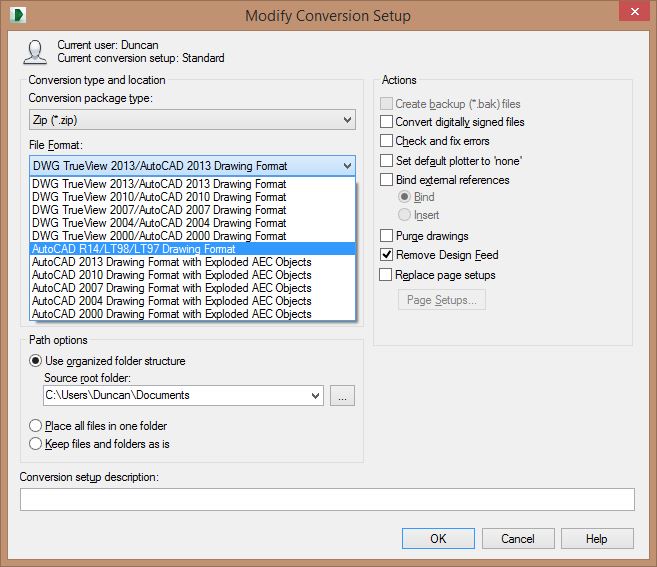
Select that and you will get a dialog (Above) where you can load the DWG you want to convert and apply a conversion to it. Alternatively you can setup your own conversion.


Convert.jpg


Regards,


Duncan


Duncan Brannan
UK/EMEIA CAD Operations Manager
Twitter | LinkedIn

0 Likes