Right Click problem.

- Mark as New
- Bookmark
- Subscribe
- Mute
- Subscribe to RSS Feed
- Permalink
- Report
Hi all,
I am using Civil 3D 2018 and I think there might be an update recently (the last month or so maybe). Not sure if that's the cause of the problem, but several of my coworkers and I have recently experienced some weird behaviors with our right-click function. The first attached image showed my right click settings, which has been the same all along.
So randomly, when I select some civil 3D pipes (This happens to other none Civil 3D objects too), then right-click, say I want to go to "Object Viewer". As soon as I right click, my previously selected pipes become dis-selected. I tried to wait a few seconds after I selected the pipes and then right-click, and most of the time it worked (remains selected when I right-click) but occasionally still dis-select.
Another behavior with right-click is that it actually moves the selected object (In this case, an x-reference file). So I first select the xref, then move my cursor away and right-click to change the display order to back, but it dis-select again, and the x-reference file is moved to where my cursor is.
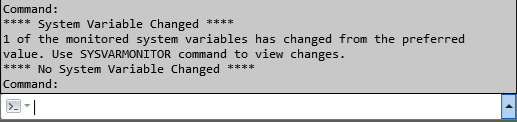
Along with both of the above behaviors, in the command prompt, I get a notification saying that a system variable is changed, but then immediately a second line saying that "No system variable is Changed". I go to the sysvarmonitor and load all of the available variables (left) to the monitored window (right), and none of them were changed (Not exclamation mark).
Thanks for any help.
Ben