Issue with copy/paste

Issue with copy/paste

dzukowski4Z8L3
Contributor Contributor
1,389 Views
4 Replies
Message 1 of 5

Issue with copy/paste

dzukowski4Z8L3
Contributor
Contributor

Civil 3D 2022

I'm in a drawing, I select some simple entities, then select Clipboard/Copy with Base Point. I go to another drawing, select Clipboard/ Paste to Original Coordinates. When the entities come in (pasted)they are off in space somewhere,

usually scaled up twelve times both in size and distance from zero.  Drawing Units are set to Unitless.

BASE and INSBASE are set to 0,0,0.


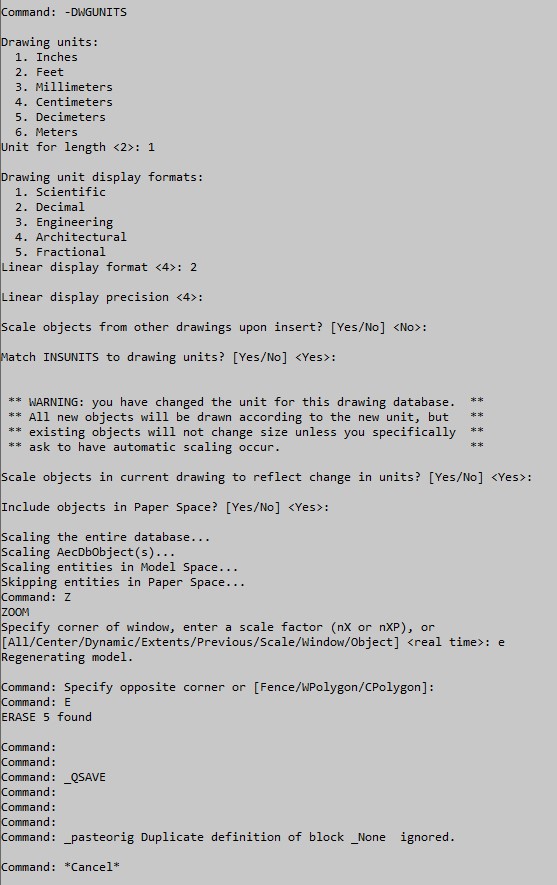
Found DWGUNITS. Changing the drawing units did nothing, changing the Drawing unit display formats fixed it.


This command overrode the Drawing Units dialog box settings.

Now the questions: is this an old old command?

If we have dialog box driven commands now, why does this still work?



0 Likes
1,390 Views
4 Replies
Replies (4)
Message 2 of 5

cneely
Collaborator
Collaborator

Are both drawings on the same coordinate system/World UCS?

AEC Collection 2022
WIN 10 PRO
Dell 3650, Intel i9-11900k @ 3.50GHz, 64 GB
NVIDIA QUADRO RTX 4000
http://www.cobbfendley.com
0 Likes
Message 3 of 5

AllenJessup
Mentor
Mentor

@dzukowski4Z8L3 wrote:


then select Clipboard/Copy with Base Point. I go to another drawing, select Clipboard/ Paste to Original Coordinates.


If both drawing are in the same coordinate system. Don't use Copy with Base Point. Simply use Copy.


If the drawings aren't in the same coordinate system. Then you'll need an identical point in both drawing to pick as the Base Point and destination. Since you fixed it. It looks like your drawings are in the same coordinate system.

In your case it looks like one of the drawings was set to Architectural units.


Civil 3D is built on AutoCAD.  I've often suggested at the UNITS and -dwgunits command be disabled in Civil 3D. They lead to trouble. Use the ToolPalette or AECDWGUNITSSETUP.


Also. All AutoCAD and a good number of Civil 3D commands are still accessible from the command line. I'm an old timer who likes that. Plus it's necessary to allow macros and Lisp routines to be run silently without involving user input from dialog boxes or command line.

Allen Jessup
CAD Manager - Designer
Did you find this post helpful? Feel free to Like this post.
Did your question get successfully answered? Then click on the ACCEPT SOLUTION button.

EESignature

0 Likes
Message 4 of 5

dzukowski4Z8L3
Contributor
Contributor

Thanks for the reply. Just to be clear, both drawings were created as decimal, not architectural. I do like the idea you proposed of disabling -dwgunits since this command seemed to be the culprit.

0 Likes
Message 5 of 5

Asmir
Advocate
Advocate

The problem is in units. Check units in both dwgs. Like one is in meters and second one is feet. Set them to units you use

0 Likes