Generic subassembly links not changing code with C3DStockSubassemblyScripts.codes

Generic subassembly links not changing code with C3DStockSubassemblyScripts.codes

cyberflow
Advisor Advisor
1,219 Views
10 Replies
Message 1 of 11

Generic subassembly links not changing code with C3DStockSubassemblyScripts.codes

cyberflow
Advisor
Advisor

So we've got a linking file in C3D that maps all the ADSK Codes (Links, shape, point) with our inhouse codes.

It works PERFECTLY, but almost !

One thing we've noticed is that generic links with the same ADSK codes sometimes dont update.

So lets say after we fetch those translated codes for a surface definition but then it doesnt show that link correctly and is not caught in the mapping/translation.

Anyone knows what's up with that ?
We've got the impression it's a we're using Civil 3D french installation version (NOT THE COUNTRY KIT).

The Civil 3D Enu version works fine and that defect doesnt occur

Frank Freitas

CAE/CAD/BIM Coordinator & Support Specialist

LinkedIn
1,220 Views
10 Replies
Replies (10)
Message 2 of 11

cyberflow
Advisor
Advisor

I guess this one is more of a "Hey ADSK, there's a bug that needs to be fixed"

Frank Freitas

CAE/CAD/BIM Coordinator & Support Specialist

LinkedIn
Message 3 of 11

ecfernandez
Mentor
Mentor

Hi @cyberflow, I read your post, and I wanted to answer something, but unfortunately, the situation you talked about is unknown to me since I do not use country kits. I hope you can find a solution to that problem.

Best regards! 

Camilo Fernández

Civil engineer | Specialist in design, construction, and maintenance of roadways

EESignature

LinkedIn
0 Likes
Message 4 of 11

cyberflow
Advisor
Advisor

Hi @ecfernandez 

I dont use the country kit, we're a french province in Quebec but the french country kit is more oriented to the France french market.

That's why i'm saying in my primary post that I'm using Civil 3D french installation. Without the country kit.

We use the "C3DStockSubassemblyScripts.codes" to change the in the box codes (for links, points and shapes) so we can adjust the Corridor codes to our local codes.

And with the generic links, sometimes the "C3DStockSubassemblyScripts.codes" doesnt work !

Maybe because in the generic links we can put our custom codes in the input parameters ?

Trying to figure this one out and tackle it down

Frank Freitas

CAE/CAD/BIM Coordinator & Support Specialist

LinkedIn
Message 5 of 11

ecfernandez
Mentor
Mentor

Hi @cyberflow, I'm sorry I understood something differently. I'm also in Canada, but I keep using the English version. Anyway, this should be something for Autodesk Support to revise. Thanks for the clarification, and I hope you can find a solution.

Best regards!

Camilo Fernández

Civil engineer | Specialist in design, construction, and maintenance of roadways

EESignature

LinkedIn
0 Likes
Message 6 of 11

cyberflow
Advisor
Advisor

Thanx @ecfernandez for the message !
Appreciate the concern 🙂

If there's a solution I'll come and post it here so someone can see it in the future.

Do you know how we can submit to Autodesk Support this problem ?

Frank Freitas

CAE/CAD/BIM Coordinator & Support Specialist

LinkedIn
Message 7 of 11

paulo_santoso
Advocate
Advocate

I'm sorry for also being unfamiliar with this Country Kit. Perhaps you can report this bug in the Civil 3D Customization Forum through this link: Civil 3D Customization Forum - Autodesk Community

Paulo Santos | BIM Expert | LinkedIn | Contatos |
Message 8 of 11

cyberflow
Advisor
Advisor

@paulo_santoso Will do Paulo !

Thanx for pointing me to the right direction !

Muinto obrigado Paulo !

Frank Freitas

CAE/CAD/BIM Coordinator & Support Specialist

LinkedIn
0 Likes
Message 9 of 11

ecfernandez
Mentor
Mentor

Hi guys maybe @lim.wendy 😃can provide help with this issue.


Best regards 

Camilo Fernández

Civil engineer | Specialist in design, construction, and maintenance of roadways

EESignature

LinkedIn
Message 10 of 11

cyberflow
Advisor
Advisor

@ecfernandez @paulo_santoso Let's wait and see ^_^

Frank Freitas

CAE/CAD/BIM Coordinator & Support Specialist

LinkedIn
Message 11 of 11

lim.wendy
Alumni
Alumni

Thanks for reaching out to me. I can imagine this must be a big inconvenience for you.

I've created a case for you, with the number 22423354. You'll receive an email with the case details.

Here are the steps to reach support should you need them in the future.


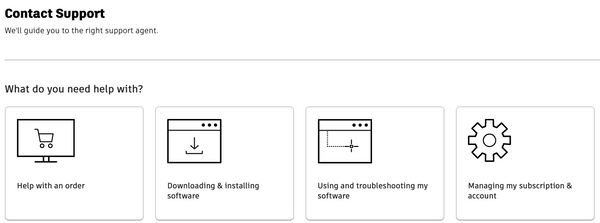
  1. Visit the 'Contact Support' page at https://www.autodesk.com/support/contact-support.
  2. Once there, please sign in to your account
  3. Select the 'Using and troubleshooting my software' option. 
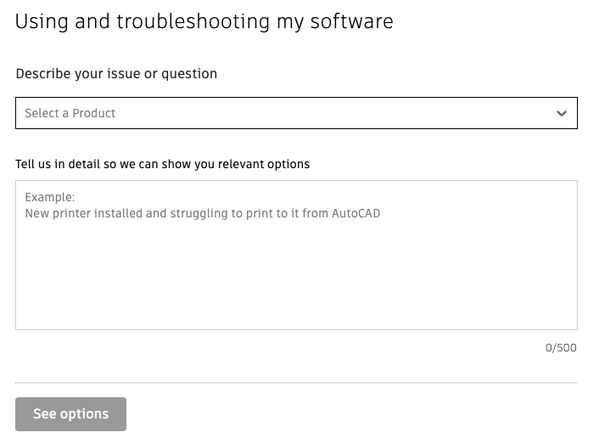
  4. Next, provide a detailed description of your issue or question. 
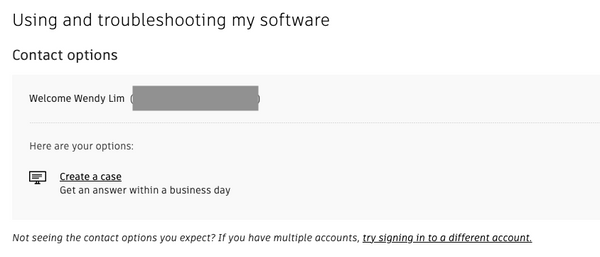
  5. Click on 'See options,' and you will be presented with your subscription contact choices. You can either click 'Live Chat' to chat with an Autodesk support specialist or click 'Create a case' to send your question via email.


Remember to mark your posts as having an "Accepted Solution" if a solution is found as it helps other forum users with the same issue – so don't be shy about marking it as a solution! Accepted solutions get viewed more and help more users find the answer to their problems. . You could unmark the post as an accepted solution if the solution did not work. Click the ellipsis menu  > Not the Solution to cancel an accepted answer. 


Wendy Lim

Data Nerd | Community Advocate | AEC Industry


facebook twitter twitter blogs pm


Join the new online Rail Community


Rails Summit