Dimension Extension Line Missing Node

Dimension Extension Line Missing Node

camden.n.dean
Advocate Advocate
1,244 Views
4 Replies
Message 1 of 5

Dimension Extension Line Missing Node

camden.n.dean
Advocate
Advocate

Hello,


I have a simple problem, but I can't figure out how to phrase my question to find the solution.


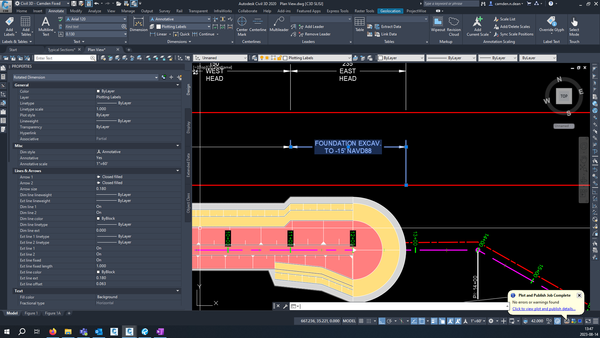
I have a dimension that I made using the DIMCONTINUE command. The extension line on the right is correct, but the extension line on the left is not extending to the red construction line. Normally I just use the grip that controls where it is measuring from (at the bottom of the right extension line), but that grip does not exist on the left extension line so I am at a loss.
 

camdenndean_0-1692036188823.png


-Camden


P.S. attached is a copy of my .dwg, but i am not bothering to promote the data shortcuts since they are not relevant to this problem.


0 Likes
Accepted solutions (1)
1,245 Views
4 Replies
Replies (4)
Message 2 of 5

camden.n.dean
Advocate
Advocate

Alright, found out that I can just zoom in really tight and find the grip that I usually use, so I have a workaround for this problem. Leaving this thread unresolved for now though because I would love to know if there is a better solution where I don't have to grip edit each continue dimension that I draw.


-Camden

0 Likes
Message 3 of 5

ChicagoLooper
Mentor
Mentor
Accepted solution

It's not showing up?


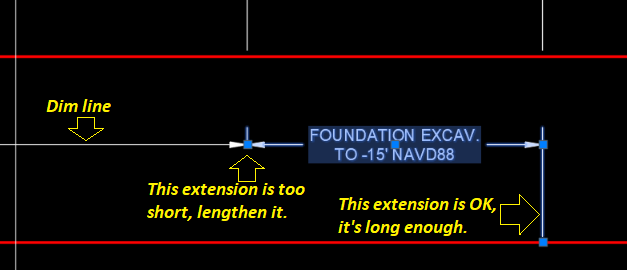
The Extensions are there, really, they are, but they're too short. The the Extension line is too close to the Dim line and that makes them too short. The Extension needs a reasonable length away from the Dim line. You can use 'Continue' but you still need to SNAP to a point ON the red line, not up in mid-air. 

101.png


Many users, at least savvy ones, turn on both Orthomode (F8) and Autosnap (F11) then use their mouse skills to create 'continue-type' dims.  


Chicagolooper

EESignature

Message 4 of 5

camden.n.dean
Advocate
Advocate

Oooooh, I see.


I knew that the properties were telling me that the extension line is on, and I could see the extension line ext above the arrow, but I didn't realize that I was just making the bottom part of the extension line very short based on where I was clicking when drawing the dimension.


For what it's worth, I was snapping to the intersection of the dimension line and some vertical construction lines that I had drawn at the stations of interest, not a totally random place in midair. Still, I now see how and why to deal with this in the future.


Thanks!

Message 5 of 5

serayozturk_SO
Explorer
Explorer

Hi @camden.n.dean,


There are two ways to do this; I personally prefer the first one.

  1. In the Properties of the selected dimension, under the Fit tab, choose “Move text, add leader.” Then move the text downward from its center without actually creating a leader. This will give you the desired result.

  2. You can also use DIMEDIT → Move text, add leader, but since I don’t like leaders, I prefer not to apply this setting globally to all dimension lines.


Cheers

0 Likes