Cut and fill in band of profile view

Cut and fill in band of profile view

Anonymous
Not applicable
4,670 Views
5 Replies
Message 1 of 6

Cut and fill in band of profile view

Anonymous
Not applicable

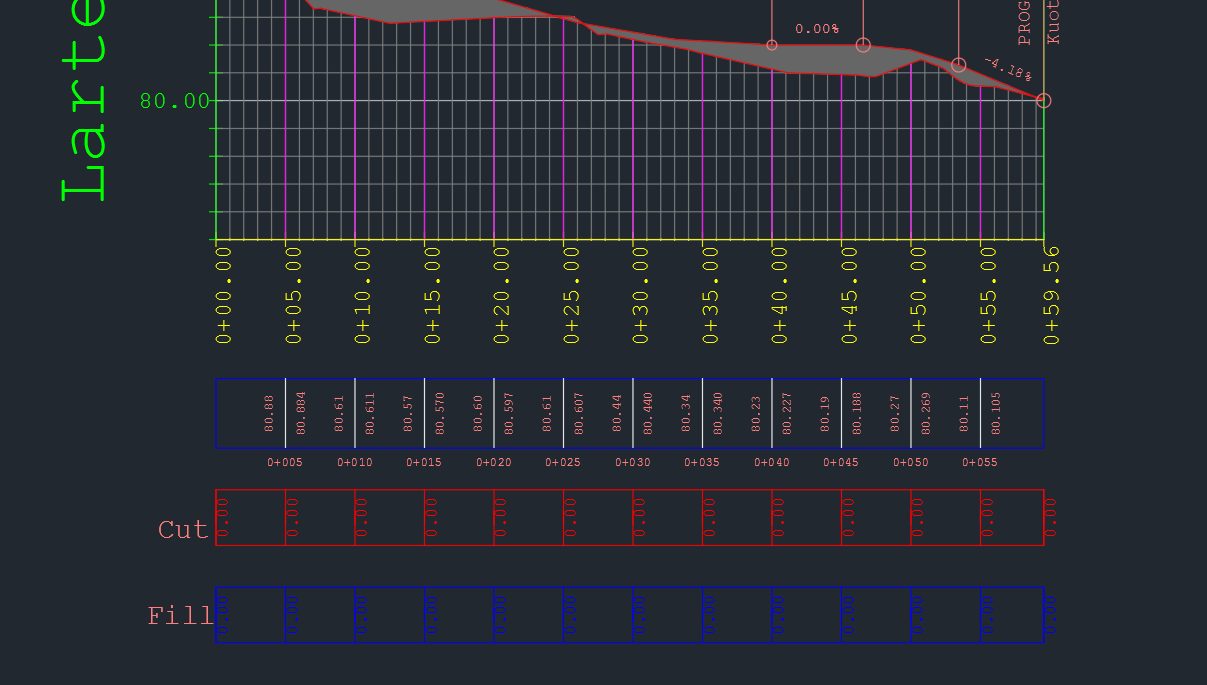
My profile view data band doesn't show the volumes of cut and fill. Values show 0.00 in all cut section , I am new to civil 3d. please help

4,671 Views
5 Replies
Replies (5)
Message 2 of 6

Jeew-m
Mentor
Mentor

Dear Friend,

Your existing ground surface is not sampled in to the profile view.

Go to create surface profile and add existing ground( Toka perfundimtare) as a surface profile. It will come as surface 5. Further set the weeding to 0.


Then set the profile view bands as in the image.


Untitled.png


Thanks


Jeewana Meegahage
Design Engineer
Autodesk Civil 3D Tutorials
Facebook | YouTube | LinkedIn


Message 3 of 6

m.ghofrani1986
Observer
Observer

thanks


Message 4 of 6

nkiakas
Advisor
Advisor

Hi @Anonymous


Go to profile view properties and put the profiles as per the attached snapshots

Your dwg file is also attached


Hope it helped

Message 5 of 6

choneq
Explorer
Explorer

Hi, thanks for sharing the doubt. The Fill and the Cut rows show though the differences in altitude, not partial volumes, doesn't it?

0 Likes
Message 6 of 6

teerawat.pSCHYQ
Advocate
Advocate

you need to select what is for Profile 1 and what is for Profile 2 in your profile view property in Data Band tab

0 Likes