Announcements

Announcement: We’re aware of an issue affecting starting a new topic from category pages and creating new blog posts. New topics can still be started directly from the relevant board. Learn more here.

0+00.00 to 0+000.00 help

0+00.00 to 0+000.00 help

Anonymous
Not applicable
4,049 Views
5 Replies
Message 1 of 6

0+00.00 to 0+000.00 help

Anonymous
Not applicable

Hey guys and gals,


Any idea how to switch from 0+00.00 to 0+000.00 stationing? When I switch it in the alignment controls, it automatically switches back...My units and everything is in metric. I feel like I am missing a parameter that switches to imperial...Anyways, thanks in advance for the help!


Tom

0 Likes
Accepted solutions (1)
4,050 Views
5 Replies
Replies (5)
Message 2 of 6

kcobabe
Collaborator
Collaborator
Accepted solution

Do it in the actual label style.  When you so it make sure you click the arrow to update the label style.


compose.jpg


R10 - 2020 ACAD
2008 - 2020 Civil 3D
2014 - 2020 Plant 3D
2014 - 2020 Revit
V8i - V8i SS4 Microstation
Infraworks
2018-2020 Inventor
2020 Navisworks
Message 3 of 6

e221018
Observer
Observer

Where is the text component editor though? 

0 Likes
Message 4 of 6

Jeff_M
Consultant
Consultant

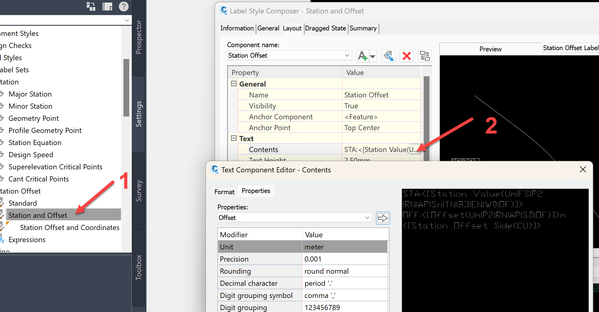
1: Find the label style you want to edit, rt. click, Select Edit

2: at the right side of the Contents line click the ... to open the Text Component editor.


2023-09-01_09-56-02.png2023-09-01_09-56-02.png

Jeff_M, also a frequent Swamper
EESignature
Message 5 of 6

e221018
Observer
Observer

Thank you for the help. 🙂

0 Likes
Message 6 of 6

lksuneth
Observer
Observer
  1. In toolspace ... go to setting...
  2. Right click drawing name and select "Edit drawing Settings".
  3. Select "Ambient Settings"
  4.  
  5.  
  6. Capture.JPGCapture.JPGIn "station" .... Change "Station Delimiter Position"..