Plant 3D Specs info plus conversion from CadWorx

Plant 3D Specs info plus conversion from CadWorx

PatrickByrne
Advocate Advocate
3,415 Views
14 Replies
Message 1 of 15

Plant 3D Specs info plus conversion from CadWorx

PatrickByrne
Advocate
Advocate

Hello,


I am using Plant 3D 2012. I am converting my CadWorx specs over to Plant 3D and have a few questions.


  1. After the spec is created the .pspx and .pspc files contain all the dimensional and description information is this correct. I could actually erase the catalogue and the spec would still work?
  2. Is there a more detailed explanation of what the .pspx and .pspc files contain?
  3. When I convert my CadWorx specs it does not create a catalog of the CadWorx library files, is this correct? We need these to be able to add more sizes later.
  4. Is there a way to convert the CadWorx library files across to a Plant 3D catalogue
0 Likes
Accepted solutions (1)
3,416 Views
14 Replies
Replies (14)
Message 2 of 15

dave.wolfe
Advisor
Advisor
Accepted solution

1.  Yes you could erase the catalog and the specs would still work for drawing items.

2.  How detailed do you want to get.  We do have some information in this article:

http://www.pdoteam.com/2012/02/setting-up-network-catalogs-for-autocad-plant-3d/

3. You are correct, the conversion process only creates specs.  We have been playing with the catalog builder, and it should be able to create a catalog from specs, but for a few bugs.  It looks like the intention is there to be able to do that.  It's new in 2013, so it doesn't know that we actually want to convert stuff like actuators (throws up errors when it comes across them), but it looks like that will be possible soon.

4. There is no conversion from the CADWorx libraries to a Plant 3D catalog currently.  As I said above, it looks like the workflow will be to convert the specs, export them to the catalog builder format, and then build a catalog from that using the catalog builder.

Dave Wolfe
Isaiah 57:15

EESignature

Plant 3D Wish list

Piping Labs

0 Likes
Message 3 of 15

PatrickByrne
Advocate
Advocate

Thanks

0 Likes
Message 4 of 15

PatrickByrne
Advocate
Advocate

Actually it is a pain, our spec did not convert across properly, missed a lot of sizes. Looks like we are going to have to recreate the catalog manually and then create a new spec.

0 Likes
Message 5 of 15

dave.wolfe
Advisor
Advisor

Did you add the appropriate mappings?  The default convert settings include about 1 conversion mapping per component.  Because most users have several of each component types, most people have to add copies of the mapping of commands.  For example, most users will have several elbows in their specs.  


CADWorx Mapping Settings

6-26-2012 8-28-02 AM.png


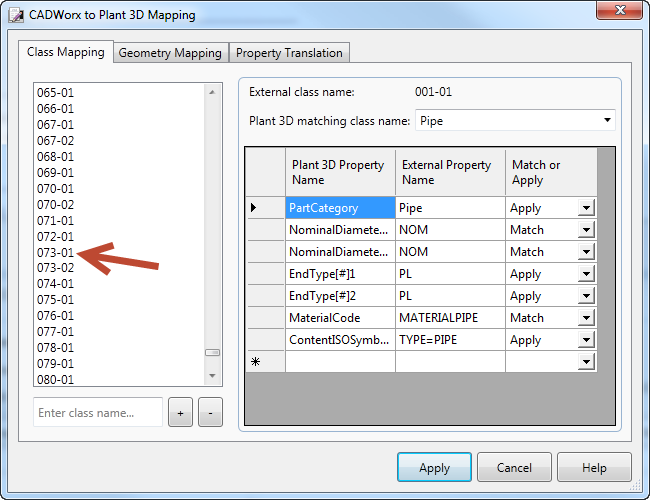
Mapping for component 73:

6-26-2012 8-28-45 AM.png


CADWorx's Prgm.tlb (System folder) indicating what 73 is:

6-26-2012 8-37-23 AM.png

Dave Wolfe
Isaiah 57:15

EESignature

Plant 3D Wish list

Piping Labs

0 Likes
Message 6 of 15

PatrickByrne
Advocate
Advocate

Missed that part of the instructions.


That is why not all the flanges came in as we have individual descriptions for each flange. Therefore if I copy more flanges in the mapping file I should get a better result. Would I have to make a copy in the Geometry Mapping as well as the Class mapping window?


In regards to recreating the catalogs I was thinking of creating a CSV file with the information from the CadWorx library files, do you think this could be an option. We don’t have the Export to Catalog Builder command in Plant 3D 2012 or if the Spec Editor from Plant 3D 2013 was used to convert the spec file to a catalog could this catalog then be converted back to use in Plant 3D 2012.


Thanks again for the excellent information.

0 Likes
Message 7 of 15

dave.wolfe
Advisor
Advisor

Yes, you'll have to duplicate the geometry mappings as well.


You could create the csv for library files, but that would be a ton of work.  In general catalogs and specs are not backwards compatible.  Are  you not planning on moving to 2013?

Dave Wolfe
Isaiah 57:15

EESignature

Plant 3D Wish list

Piping Labs

0 Likes
Message 8 of 15

PatrickByrne
Advocate
Advocate

Due to issues with other software and to keep the office on the same drawing version we won't be moving to 2013 yet.


At this stage there Plant 3D 2013 does not have that many improvements to warrant the move.


Thanks again

0 Likes
Message 9 of 15

raj.inugala
Autodesk
Autodesk

Hello,


I am not sure if you have a CADWorx spec file that contains all the parts in a Catalog. If you do, then it might be possible to directly create a Plant 3D Catalog from that Spec file.


Please let me know if you want to know how to do this.


Thanks,
Raj Inugala.

0 Likes
Message 10 of 15

dave.wolfe
Advisor
Advisor

No, no one I've ever heard of has put all of the parts from the CADWorx library into a spec.

Dave Wolfe
Isaiah 57:15

EESignature

Plant 3D Wish list

Piping Labs

0 Likes
Message 11 of 15

PatrickByrne
Advocate
Advocate

I will take anything I can get. It would at least be a start.


I am using Plant 3D 2012 what do I need to do?

0 Likes
Message 12 of 15

PatrickByrne
Advocate
Advocate

One more thing I have got to the stage of converting the CadWorx spec to a Plant 3D spec. This would be okay but there is a lot of information in there that can't be changed.

0 Likes
Message 13 of 15

PatrickByrne
Advocate
Advocate

Thanks for everyone help. We could create a Spec but there were a lot of things we could not alter. We really needed to get back to recreating the catalog.


Since we are using Plant 3D 2012 we could not create a catalog from the spec, in Plant 3D 2013 I believe you can export to Catalog Builder. What we did was get the older convertor tool for Plant 3D 2011, with this we could create the CSV files and then convert them into the Catalogs.


While not everything came across we got a lot of information. One of the good things about Plant 3D is all the different geometry therefore in some situations we found a more suitable shape and added the dimensions from scratch.

0 Likes
Message 14 of 15

Anonymous
Not applicable

can i convert plant 3d spec to cadworx 2013

0 Likes
Message 15 of 15

PatrickByrne
Advocate
Advocate

I am not sure if you can convert from Plant 3D to CadWorx but I was interested in why you are moving from Plant 3D to CadWorx. As you may have gathered we are looking a going the other way.

0 Likes