- Mark as New
- Bookmark
- Subscribe
- Mute
- Subscribe to RSS Feed
- Permalink
- Report
ok, I'm a bit stuck, could use a hint
I work in the electrical workspace. In the annotate menu there are a bunch of ribbon panels including "scheduling"
That panel includes "tag", "schedules", and "panel schedules". Each of those contains drop downs that access stock MEP items in those categories.
(see screen shot)
This is not at all useful to me, because like most of you I've tossed out all the out of the box elements and replaced them with ones that are functional and look decent when plotted.
Can anyone tell me how to make this panel point to my stuff, instead of out of the box stuff. Or, if necessary, how to replace this panel with my own that in turn points to my stuff?
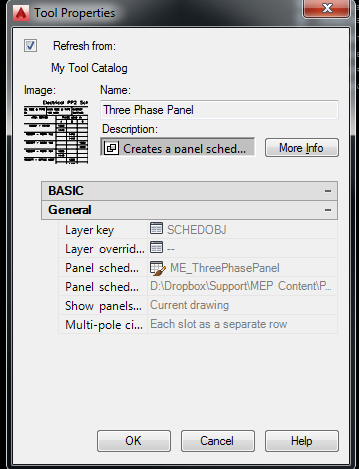
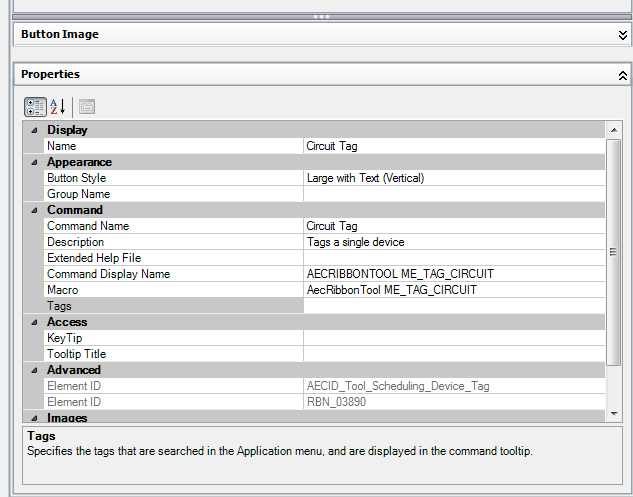
I've read up on partial customizaton files and it sounds like that is the best place to set this up but I don't understand how to attack the problem. I think maybe I need to create custom toobars, with one tool per item of interest, and then convert that toolbar to a ribbon panel? But if correct, I don't know how to create a tool that points to a tag or schedule.
I do know how to put all these items on a tool pallete, can I move them from there somehow to the ribbon?
thanks!
Solved! Go to Solution.