right click menu in AutoCad Map3D 2015

right click menu in AutoCad Map3D 2015

Anonymous
Not applicable
721 Views
4 Replies
Message 1 of 5

right click menu in AutoCad Map3D 2015

Anonymous
Not applicable

In the last 24 hours I have lost right-click menu options such as deselect all, Pline edit, move/copy/erase, node editing, insert vertex, convert to arc/line.  It also will not let me delete objects using the keyboard 'delete' button, and once selected I canot deselect objects. 

0 Likes
Accepted solutions (1)
722 Views
4 Replies
Replies (4)
Message 2 of 5

nwray
Advocate
Advocate
Accepted solution

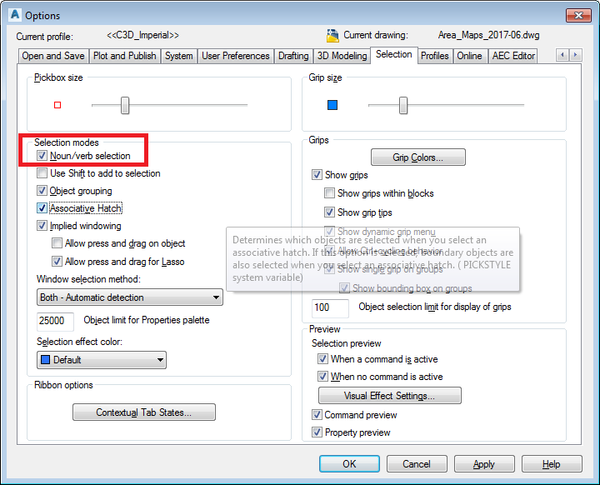
Not sure about all of the issues, but check your selection mode.  Under the OPTIONS menu, go to the "selection" tab, and make sure that the "noun/verb selection" box is checked.  This could help your issue with being able to delete items using the delete key.  I have seen this setting get changed at random sometimes.


For the other issues, I'm really not sure why the commands are disappearing from the right click menu.  Are you able to add them back in manually?


Norm


NounVerb.png

GIS Specialist

BOXX Technologies APEXX 2 2402 Workstation
Intel Core i7-6700K @ 4.4 GHz
32 GB RAM / 500 GB SSD
NVIDIA Quadro M2000 Graphics
Windows 7 Pro 64 bit C3D 2017
0 Likes
Message 3 of 5

Anonymous
Not applicable
Hi,
Thankyou! To be honest I tried to add items to the mpouse buttons earlier, and it all got too confusing, and I gave up, as I didn't want to make the matter worse! If you could give me a step-by-step that would be great. I'll try the noun setting thing for the keyboard issue. I'm now currently working in 2011 version with no problems, on the same machine, so it is definitely a problem with the 2015 installation only.
Regards,
Anne


0 Likes
Message 4 of 5

Anonymous
Not applicable

Hi,


I have successfully re-activated the noun selection option (it was un-ticked) this has also re-activated my right-click menu options, so they are all back and working!!  All I need to know now is what changed the setting in the first place!! or is it just AutoCad being AutoCad and random!?


Thank you,


Anne

0 Likes
Message 5 of 5

nwray
Advocate
Advocate

Hi Anne,


Glad it worked!  It is a system variable, and I have had issues with it sometimes changing on it's own.  This variable and FILEDIA seem to change by themselves from time to time; I've never had anyone explain exactly why.


Norm

GIS Specialist

BOXX Technologies APEXX 2 2402 Workstation
Intel Core i7-6700K @ 4.4 GHz
32 GB RAM / 500 GB SSD
NVIDIA Quadro M2000 Graphics
Windows 7 Pro 64 bit C3D 2017
0 Likes