Random block insertion into defined area

Random block insertion into defined area

Anonymous
Not applicable
1,022 Views
2 Replies
Message 1 of 3

Random block insertion into defined area

Anonymous
Not applicable

Hi!


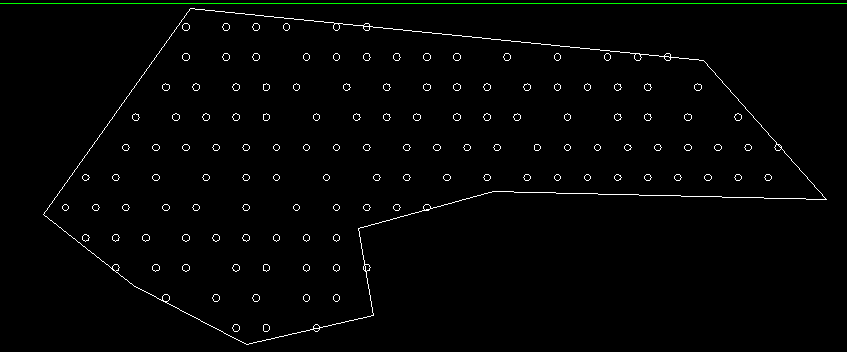
Is there a command or lisp to randomly insert certain blocks (eg. trees) into polyline defined area ? So I select some area defined with polyline and then I want to insert into that area randomly lots of tree blocks (or whatever blocks).


Tried to google but didn't find anything useful.


Any ideas ? Smiley Happy


M.

0 Likes
1,023 Views
2 Replies
Replies (2)
Message 2 of 3

Alfred.NESWADBA
Consultant
Consultant

Hi,


I did something like that with the following principle steps:

  • get bounding box of the polygon
  • for x = boundingbox.min.x to boundingbox.max.x by your x-stepsize
  •    for y = boundingbox.min.y to boundingbox.max.y by your y-stepsize
  •        here is a new xy-coordinate (like that of an array command)
  •        xnew = x + random value (within a tolerance to the left/right, positive or negative)
  •        ynew = y + random value (within a tolerance to the left/right, positive or negative)
  •        that coordinate xnew/ynew is now more randomized, depending on a higher or lower tolerance value it look more like an array or more randomized
  •        check if that new coordinate is inside the polygon
  •        if yes ==> that's a new point
  •    next y
  • next x


HTH, - alfred -

------------------------------------------------------------------------------------
Alfred NESWADBA
ISH-Solutions GmbH / Ingenieur Studio HOLLAUS
www.ish-solutions.at ... blog.ish-solutions.at ... LinkedIn ... CDay 2026
------------------------------------------------------------------------------------

(not an Autodesk consultant)
0 Likes
Message 3 of 3

Anonymous
Not applicable


1. Insert one block

2. Use array to multiply the entire area

Capture.PNG


3. Use MAPCLEAN.Select objects / Duplicates / Desired minimum distance

Capture.PNG

4. Use MAPTRIM. Select Boundary/Select Objects/Trim Outside Boundary

Capture.PNG


0 Likes