AutoCAD LT and Windows 11

AutoCAD LT and Windows 11

WillieLiebrand8356
Explorer Explorer
8,487 Views
4 Replies
Message 1 of 5

AutoCAD LT and Windows 11

WillieLiebrand8356
Explorer
Explorer

It might be coincidental, but since installing Windows 11 my AutoCAD LT performance has degraded to almost unusable.

This is my computer.

Surface Book 2 Pro
Processor Intel(R) Core(TM) i7-8650U CPU @ 1.90GHz 2.11 GHz
Installed RAM 16.0 GB
System type 64-bit operating system, x64-based processor


There appears to be a long delay in refresh. If say I want to edit text, I click on it. The 'Properties' dialogue box goes blank for say, 20 seconds. Only when the dialogue box refreshes am I able to perform the edit. I have read comments about the graphics driver / settings could potentially be cause. Any advice / suggested action would be appreciated.

0 Likes
Accepted solutions (2)
8,488 Views
4 Replies
Replies (4)
Message 2 of 5

Anonymous
Not applicable

search this forum 

lots of threads on windows 11 & autocad

rollback to windows 10 if everything was working fine

0 Likes
Message 3 of 5

pendean
Community Legend
Community Legend

Why did you do that on an old laptop? Bored? Nothing billable to work on?

What does ABOUT command show as your exact LT version? Yu forgot that important info for some reason too.


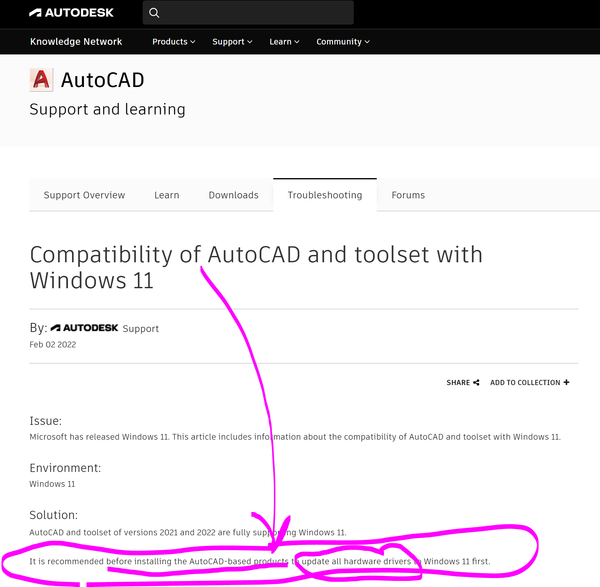
That's common for everyone that assumed Win11 is 100% perfect: no fix yet from Autodesk, although for an old computer like yours it appears you ignored this requirement (that also hints at a software reinstall)

pendean_0-1643899057135.png


Or roll back to Win10 and forget about it for now. Wait for LT2023 in the next month or two then leap with both feet on your old computer and pray 😉

0 Likes
Message 4 of 5

RSomppi
Mentor
Mentor
Accepted solution

There are certain thing you need to do when upgrading your OS. You need new drivers for your hardware and reinstalling your programs might also be beneficial.

0 Likes
Message 5 of 5

WillieLiebrand8356
Explorer
Explorer
Accepted solution

An uninstall and clean reinstall did the trick. Thank you for your help. 🙂

0 Likes