Issue with the properties pallete

Issue with the properties pallete

andres4T64A
Explorer Explorer
803 Views
9 Replies
Message 1 of 10

Issue with the properties pallete

andres4T64A
Explorer
Explorer

My properties pallette only shows "MISC" and only when i select a polyline will it give me further options. Before, without having a polyline highlighted it would give me information on lines and everything - what could this be?


Here its without selecting any line:

andres4T64A_0-1765889432551.png

This is after selecting a line:

andres4T64A_1-1765889449879.png


Help is much appreciated

0 Likes
Accepted solutions (1)
804 Views
9 Replies
Replies (9)
Message 2 of 10

imadHabash
Mentor
Mentor

Hi,

  • Does this behavior happen in a new CAD dwg file?
  • Try to close Layer Properties Manager then try to toggle on/off by Ctrl+1.
  • Make sure that you have the last CAD update.
  • Switch to a different workspace.
  • Try to reset AutoCAD to defaults. >> Click <<


Imad Habash

EESignature

0 Likes
Message 3 of 10

andres4T64A
Explorer
Explorer

Hi Imad, appreciate the response.
Unfortunately, i have tried everything and even asked ChatGPT.
I used to have it with live-information, without having anything selected.
Even when i pressed "line" it would automatically give me the information, but now, it seems to only give me that information once i click on the line i created.
I dont know if this makes sense, but it was easier before, according to ChatGPT, apparently this is normal from AutoCAD, but i dont know how it disappeared? it was easier before. 

0 Likes
Message 4 of 10

avishek.chakrabortyCSXPN
Autodesk
Autodesk

Hello @andres4T64A 

Thank you for bringing this question to the forum.


From your description, it appears that in AutoCAD, when you open an existing drawing or create a new one, the Properties palette shows only the Misc section when no object is selected. However, when you select an object such as a line or polyline, the remaining sections of the Properties palette reappear.


I have a few questions to better understand the issue:

Looking forward to your response so we can assist you further.


AVISHEK CHAKRABORTY
Senior Technical Support Specialist
0 Likes
Message 5 of 10

pendean
Community Legend
Community Legend

@andres4T64A Is this a sudden new problem?

Or a new software install?

Or did you install Windows11 on top of Win10 before this problem appeared?


Share with us a screenshot of your AutoCAD's ABOUT command pop-up please.

0 Likes
Message 6 of 10

andres4T64A
Explorer
Explorer

Hi Avishek.

Appreciate the response too. See my response in RED.


  • Could you please confirm the version of AutoCAD you are using? I AM USING THE 2026 LT VERSION
  • Do you have any third-party plugins or add-ins installed in AutoCAD? NONE, AND I HAVENT INSTALLED ANYTHING RECENTLY EITHER THAT SHOULD'VE CAUSED THIS
  • Have you had a chance to reset AutoCAD to its default settings and check if the issue still occurs? THIS IS MY LAST RESORT ATM. I DONT WANT TO RESET EVERYTHING SINCE I HAVE TAKEN TIME TO MAKE IT MY OWN
0 Likes
Message 7 of 10

andres4T64A
Explorer
Explorer

Hi Pendean.


Thanks for response. 


I am currently using Windows 11.


this is a new issue which i didn't have before, and when i say before, i mean it started 2 days ago (i havent downloaded or did anything out of the usual)


see below further screenshots:


FIRST IMAGE: THE PROPERTIES ONLY SHOW MISC. HOWEVER BEFORE I USED TO HAVE A REAL-TIME VIEW - I COULD CHOOSE TO CHANGE LINEWEIGHT, TRANSPARENCY, LAYER, COLOR ETC. BUT, AS YOU CAN SEE, I CANT DO THIS NOW.

andres4T64A_0-1765971130082.png


IMAGE TWO: WHEN I WRITE "L" - BEFORE IT WOULD NORMALLY HAVE THE REAL-TIME VIEW IN PROPERTIES - WHICH I CANT SEE ANYMORE.

andres4T64A_1-1765971271482.png


IMAGE THREE: STILL NO REAL-TIME VIEW ON THE PROPERTIES.
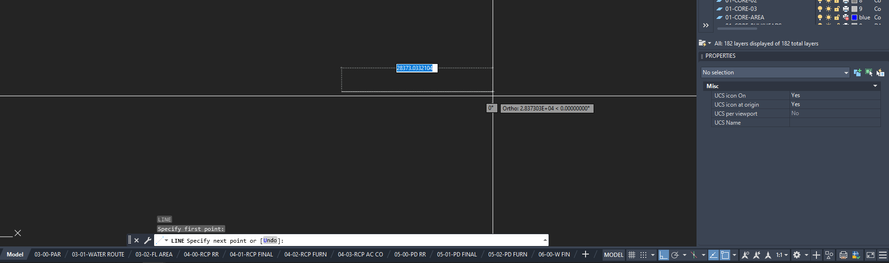
andres4T64A_2-1765971296112.png


IMAGE FOUR: ONLY WHEN I CLICK ON THE LINE THAT I FINISHED DRAWING - CAN I SEE THE 'LINE' PROPERTIES ON THE RIGHT SIDE TO CHANGE WHATEVER I NEED TO CHANGE.

I NEVER HAD THIS ISSUE BEFORE, IT WAS EASIER TO SEE THE REAL-TIME PROPOERTIES VIEW WHEN MOVING AROUND THE DRAWINGS ETC.

andres4T64A_3-1765971326822.png


Hope these screenshots help.


0 Likes
Message 8 of 10

pendean
Community Legend
Community Legend

@andres4T64A No one in our office with LT2026 and Win11 has the issue you do, neither do I. Is your LT2026 up to this version? it needs to be

pendean_1-1765978019523.png


Since this is a sudden new problem triggered by nothing to your knowledge (or your IT's knowledge), And assuming you've restart your PC already, then it's probably time to reset LT2026 back to defaults to start over. Backup your customizations first, and do not restore them until you confirmed the issue has disappeared.


pendean_0-1765977844853.png


OR... Here are the ways to open a support case with Autodesk if you are on subscription, schedule an appointment, have that Autodesk specialist enter your PC, poke around, and probably just reset your LT2026 for you if they cannot find a trigger unique to you in your Windows Registry:
https://www.autodesk.com/support/account/manage/use/support#:~:text=com/plans.-,Contact%20support,-S... 


0 Likes
Message 9 of 10

andres4T64A
Explorer
Explorer
Accepted solution

Thanks for all the help.


it suddenly seems to have resolved itself - I dont know how but i finally have that live-view of properties without having anything clicked.


I just turned off the PC and now its gone.


andres4T64A_0-1765978770032.png


appreciate the advise and to all aswell.


0 Likes
Message 10 of 10

pendean
Community Legend
Community Legend

@andres4T64A wrote:

...I just turned off the PC and now its gone....


Glad that's all it was. This should 100% always be the first ever thing you try before looking elsewhere for a fix.

0 Likes



